

Eugenia_Butko
Participating Frequently
Nov 22, 2021 3:56 AM UTC
Question

Discretionary hyphens turn into dashes

Illustrator turns discretionary hyphens into dashes. It happens not only in new files, but also in old files.
When I open old files, the texts become spoiled. All the discretionary hyphens turn into dashes in the middle of lines.
Example:
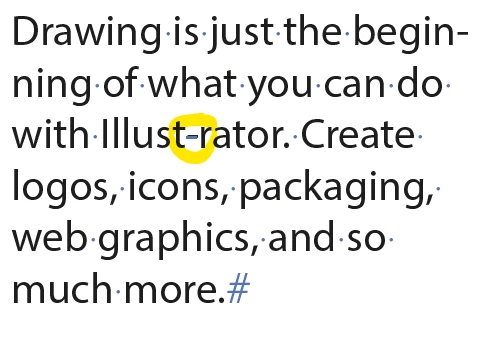
Illustrator 2022 the last version, Windows 10 Pro

(Sorry for my English))


This topic is closed to new replies. Start a new post to keep the conversation going.

16 replies

Eugenia_Butko
Participating Frequently
Nov 23, 2021 9:18 AM UTC

When you select this glyph, it is identified as U+00ad in the Table of glyphs, i.e. as discretionary hyphen. It is marked as discretionary hyphen with unprintable character (blue dash). It is copy+pasted into InDesign as invisible discretionary hyphen. So it does not change its type) Mystery)

Translate
Monika Gause
Community Expert
Community Expert
Nov 22, 2021 10:31 AM UTC

Currently using version 26.0.1 in English on an English system, I cannot reproduce that behaviour.


Could you perhaps share some more details of how to reproduce it?

Translate
Eugenia_Butko
Participating Frequently
Nov 22, 2021 10:48 AM UTC

Illustrator 26.0.1 (64-bit) Russian version, Russian system. 

It happens to all discr. hypens, when opening old documents and also when creating a text in new document and inserting discr. hypen. In texts in Russian and in English. 

Translate
Eugenia_Butko
Participating Frequently
Nov 22, 2021 10:52 AM UTC

hyphen )

Translate
Ton Frederiks
Community Expert
Community Expert
Nov 22, 2021 8:56 AM UTC

Looks like a bug, please report it here:

https://illustrator.uservoice.com

Translate
Eugenia_Butko
Participating Frequently
Nov 22, 2021 9:16 AM UTC
Ton Frederiks
Community Expert
Community Expert
Nov 22, 2021 10:12 AM UTC

And so did I.

Translate
Brad @ Roaring Mouse
Community Expert
Community Expert
Nov 22, 2021 4:17 AM UTC

Can confirm. Same issue on 26.0.1 on a Mac.

Translate