
New Participant
January 3, 2024
Question

Display errors in Indesign and Photoshop

  • January 3, 2024
  • 1 reply
  • 165 views

Hi,

since some weeks I've been noticing some display error in these two apps.

InDesign: there are some error in font display (some letters of some fonts are wrong, as in the photo, or some are thiner than other) and there are some horizontal lines in rectangles. When I export in PDF everything is ok.

In the photo below the "O" shouldn't have the straight lines
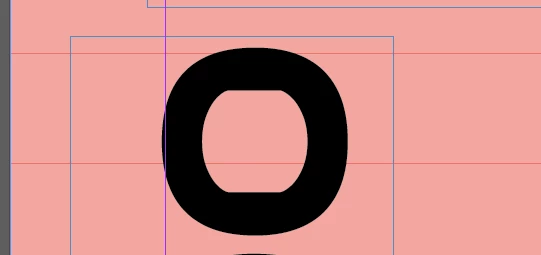
Photoshop: when I zoom out and and then in it appears a white rectangle and I have to restart the program to delete it. In this case, If I export in PNG/JPG it remains in the photo.


How can I solve it? Is it a problem of graphic card?

I'm using 2024 versions on Windows 11

Thanks

This topic has been closed for replies.

1 reply

Monika Gause
Community Expert
January 3, 2024

Is that happening when you import Illustrator artwork into those apps?

Because you posted in the Illustrator forum.

New Participant
January 3, 2024

Ops, I didn't noticed it!

I should move it to the right section or you do it?

Excuse me

Monika Gause
Community Expert
January 3, 2024

No problem. I can not move it since it covers 2 apps, it would be difficult anyway. So could you please post it to: 

https://community.adobe.com/t5/photoshop-ecosystem/ct-p/ct-photoshop?page=1&sort=latest_replies&lang=all&tabid=all

https://community.adobe.com/t5/indesign/ct-p/ct-indesign?page=1&sort=latest_replies&lang=all&tabid=all 


And can a moderator please lock this thread? thank you.