Known Participant
July 18, 2024
Answered

Display opened windows in a panel as a buttons

  • July 18, 2024
  • 1 reply
  • 2112 views

Hi, can anyone help with a script which can display these opened windows in illustrator in a panel with each document as a button.

It will help in doing back and forth with ease by clicking those buttons.


My working involves opening of lot of files and navigating them get difficult when I have lot of files opened.


This topic has been closed for replies.
Correct answer Sergey Osokin

I would generally use a resizable list box with a scroll. Because if there are more documents open than the height of the monitor, the interface with buttons will be cut off. Technical limitations of Illustrator.


On macOS with the "palette" type interface, Adobe has a bug that causes the script interface to move behind the Illustrator window on every click in the document.  This bug does not exist on PC. Mac users should run the script from the File > Scripts menu to avoid this bug.


/*
  DocumentSwitcher.jsx for Adobe Illustrator
  Description: Displays a list of currently open documents and allows you to activate any document with a single click.
  Discussion: https://community.adobe.com/t5/illustrator-discussions/display-opened-windows-in-a-panel-as-a-buttons/td-p/14745128
  Date: July, 2024
  Author: Sergey Osokin, https://github.com/creold

  FOR MAC OS: Run the script from File > Scripts. This avoids the z-ordering problem of the script window.
*/

#target illustrator
#targetengine docSwitcher

(function () {
  // Save the current order because after activating doc all array reordered
  var docs = getDocsInfo();

  var win = new Window("palette", "Document Switcher", undefined, {resizeable: true});
  win.preferredSize.width = 200;
  win.spacing = 20;
  win.alignChildren = ["fill", "fill"];

  var listbox = win.add("listbox", undefined, undefined,
    {
      numberOfColumns: 2,
      showHeaders: true,
      columnTitles: ["#", "Document Name"],
      multiselect: false
    });

  addList(docs);

  var btnClose = win.add("button", undefined, "Close");
  btnClose.alignment = ["center", "bottom"];

  listbox.onChange = function () {
    selectListItem(docs);
  }

  btnClose.onClick = function () {
    win.close();
  }

  win.onResizing = function () {
    this.layout.resize();
  }

  win.onActivate = function () {
    if (listbox.children.length !== app.documents.length) {
      sendDocumentList();
    }
  }

  // Add opened documents list
  function addList(arr) {
    listbox.removeAll();

    for (var i = 0; i < arr.length; i++) {
      var row = listbox.add("item", i + 1);
      row.subItems[0].text = arr[i].name;
    }
  }

  // Select list items and zoom to them contents
  function selectListItem(arr) {
    for (var i = 0; i < listbox.children.length; i++) {
      if (listbox.children[i].selected) {
        sendMessage(arr[i].path, arr[i].name);
      }
    }
  }

  function sendDocumentList() {
      var bt = new BridgeTalk();
      bt.target = BridgeTalk.appSpecifier;

      var msg = getDocsInfo + "\rgetDocsInfo().toSource()";
      bt.body = msg;

      bt.onResult = function(result) {
        docs = eval(result.body);
        addList(docs);
      };

      bt.send();
  }

  // Get documents info
  function getDocsInfo() {
    var arr = [];
    for (var i = 0; i < app.documents.length; i++) {
      arr.push({
        name: app.documents[i].name,
        path: app.documents[i].fullName
      });
    }
    return arr;
  }

  function sendMessage(docPath, docName) {
    var bt = new BridgeTalk();
    bt.target = BridgeTalk.appSpecifier;
    var msg = switchDoc + "\rswitchDoc(" + docPath.toSource() + "," + docName.toSource() + ");";
    bt.body = msg;
    bt.send();
  }

  function switchDoc(docPath, docName) {
    var f = new File(docPath);
    if (f.exists) {
      app.open(new File(docPath));
    } else {
      app.documents[docName].activate();
    }
  }

  win.center();
  win.show();
})();
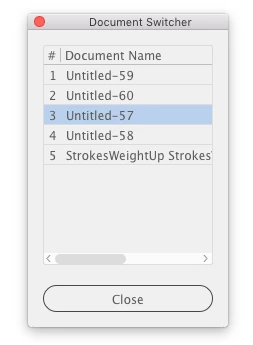
 

Upd 1: Dialog is now resizable. Fixed for PC

Upd 2: After opening or closing documents, the panel updates the list

 

1 reply

Sergey Osokin
Inspiring
July 19, 2024

Try this. After each document activation, Illustrator reorders the array of open documents so that all open documents are added to the array first. Long filenames shortened to 20 characters.

Warning: This version does not work on PCs. The problem is solved in the second version of the script


#target illustrator
#targetengine docSwitcher

// Save the current order because after activating doc all array reordered
var docs = get(app.documents);

function main () {
  var win = new Window("palette", "Document Switcher");
      win.preferredSize.width = 200;
      win.spacing = 20;
      win.alignChildren = "fill";

  var docsGrp = win.add("group");
      docsGrp.orientation = "column";
      docsGrp.alignChildren = "fill";

  for (var i = 0; i < docs.length; i++) {
    addButton(docsGrp, docs[i].name, i);
  }

  var btnClose = win.add("button", undefined, "Close");

  for (var j = 0; j < docsGrp.children.length; j++) {
    docsGrp.children[j].onClick = function () {
      sendMessage(this.properties.idx);
      this.active = true;
      this.active = false;
    }
  }

  btnClose.onClick = function () {
    win.close();
  }

  win.center();
  win.show();
}

// Convert collection into standard Array
function get(coll) {
  var out = [];
  for (var i = 0, len = coll.length; i < len; i++) {
    out.push(coll[i]);
  }
  return out;
}

// Generate buttons
function addButton(target, name, idx) {
  if (name.length > 20) name = name.slice(0, 20) + '...';
  var btn = target.add("button", undefined, name.slice(), { idx: idx });
  return btn;
}

function sendMessage(idx) {
  var bt = new BridgeTalk();
  bt.target = BridgeTalk.appSpecifier;
  var msg = switchDoc +  "\rswitchDoc(" + idx.toSource() + ");";
  bt.body = msg;
  bt.send();
}

function switchDoc(idx) {
  app.activeDocument = docs[idx];
}

// Run script
try {
  main();
} catch (e) {}


Sergey Osokin
Sergey OsokinCorrect answer
Inspiring
July 19, 2024

I would generally use a resizable list box with a scroll. Because if there are more documents open than the height of the monitor, the interface with buttons will be cut off. Technical limitations of Illustrator.


On macOS with the "palette" type interface, Adobe has a bug that causes the script interface to move behind the Illustrator window on every click in the document.  This bug does not exist on PC. Mac users should run the script from the File > Scripts menu to avoid this bug.


/*
  DocumentSwitcher.jsx for Adobe Illustrator
  Description: Displays a list of currently open documents and allows you to activate any document with a single click.
  Discussion: https://community.adobe.com/t5/illustrator-discussions/display-opened-windows-in-a-panel-as-a-buttons/td-p/14745128
  Date: July, 2024
  Author: Sergey Osokin, https://github.com/creold

  FOR MAC OS: Run the script from File > Scripts. This avoids the z-ordering problem of the script window.
*/

#target illustrator
#targetengine docSwitcher

(function () {
  // Save the current order because after activating doc all array reordered
  var docs = getDocsInfo();

  var win = new Window("palette", "Document Switcher", undefined, {resizeable: true});
  win.preferredSize.width = 200;
  win.spacing = 20;
  win.alignChildren = ["fill", "fill"];

  var listbox = win.add("listbox", undefined, undefined,
    {
      numberOfColumns: 2,
      showHeaders: true,
      columnTitles: ["#", "Document Name"],
      multiselect: false
    });

  addList(docs);

  var btnClose = win.add("button", undefined, "Close");
  btnClose.alignment = ["center", "bottom"];

  listbox.onChange = function () {
    selectListItem(docs);
  }

  btnClose.onClick = function () {
    win.close();
  }

  win.onResizing = function () {
    this.layout.resize();
  }

  win.onActivate = function () {
    if (listbox.children.length !== app.documents.length) {
      sendDocumentList();
    }
  }

  // Add opened documents list
  function addList(arr) {
    listbox.removeAll();

    for (var i = 0; i < arr.length; i++) {
      var row = listbox.add("item", i + 1);
      row.subItems[0].text = arr[i].name;
    }
  }

  // Select list items and zoom to them contents
  function selectListItem(arr) {
    for (var i = 0; i < listbox.children.length; i++) {
      if (listbox.children[i].selected) {
        sendMessage(arr[i].path, arr[i].name);
      }
    }
  }

  function sendDocumentList() {
      var bt = new BridgeTalk();
      bt.target = BridgeTalk.appSpecifier;

      var msg = getDocsInfo + "\rgetDocsInfo().toSource()";
      bt.body = msg;

      bt.onResult = function(result) {
        docs = eval(result.body);
        addList(docs);
      };

      bt.send();
  }

  // Get documents info
  function getDocsInfo() {
    var arr = [];
    for (var i = 0; i < app.documents.length; i++) {
      arr.push({
        name: app.documents[i].name,
        path: app.documents[i].fullName
      });
    }
    return arr;
  }

  function sendMessage(docPath, docName) {
    var bt = new BridgeTalk();
    bt.target = BridgeTalk.appSpecifier;
    var msg = switchDoc + "\rswitchDoc(" + docPath.toSource() + "," + docName.toSource() + ");";
    bt.body = msg;
    bt.send();
  }

  function switchDoc(docPath, docName) {
    var f = new File(docPath);
    if (f.exists) {
      app.open(new File(docPath));
    } else {
      app.documents[docName].activate();
    }
  }

  win.center();
  win.show();
})();


Upd 1: Dialog is now resizable. Fixed for PC

Upd 2: After opening or closing documents, the panel updates the list

 

StarAG​Author
Known Participant
July 19, 2024

Works fine.. thanks a lot.

Though resizing is bit laggy, but it can be managed. Thanks for quick resolution. 🙂


A small issue I am seeing is that, say if 10 documents are opened then the panel will display 10 in the list.

But when I open few more documents then the list do not updates, it still displays only 10 docs.


Also, is it possible to scroll and move the documents up and down in the panel resulting scrolling of opened files.