
Participant
August 25, 2017
Answered

Distorting text in diamond shape.

  • August 25, 2017
  • 4 replies
  • 11011 views

Hello,

I am trying to figure out how to distort a word, so that it takes a perfect diamond shape, as shown in the attached photo. I have tried envelope distort, envelope distort with mesh, perspective, free distort, warp, you name it.  Save for spending 2 hours and dragging each anchor into a perfect fashion to match the diamond, It seems to me that something like this wouldn't be as difficult to achieve in Illustrator as it is.

I've searched high and low, youtube, google, you name it!!  Does anyone have any insight as to doing this with Illustrator, or possibly a different program/technique was used.   As experienced as I think I am, leave it to something simple like this to completely baffle me. LOL!

Thanks in advance.
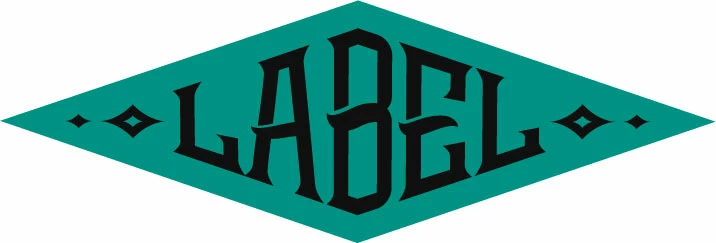

Using Illustrator 19.0.1, MAC OSX Yosemite (by choice, lol)

    This topic has been closed for replies.
    Correct answer JETalmage

    Guys, go back and look at the original.

    All of the attempts so far cause the horizontal strokes of the glyphs to taper. An envelope distortion algorithm does not know that the shapes are text glyphs and that the character strokes need to be angled, but maintain consistent "weight." Envelope distortions are just working on the outline paths. They know nothing about human perceptions like "stroke weight" of the glyphs. There is no shape recognition. There is nothing in an envelope distortion that knows "These paths are text objects that need to be bent to a particular surrounding shape, but still be recognized as individual text characters of equal importance throughout the word."

    There does not exist an instant-gratification command to automate every kind of thing you might imagine drawing. That's why an illustrator is necessary. The heart and soul of an illustration program is its primary path drawing tool. Such treatments as the original sample are commonplace since long before anyone every heard of drawing software, and are still drawn deliberately by hand and with human discernment.

    Sorry for the lack of mirth, but I assume you want a useful answer. Otherwise:

    An aspiring illustrator walked into a bar and asked, "Which button do I press to get a drawing of a...."

    That should be pretty funny, but it actually happens here all the time.

    JET

    4 replies

    Legend
    March 30, 2020

    Yes, there is not a command or a function that does it instantly or with ease.

    You need to elongate and shorten, vertically letter shapes, the tools that can achieve that are: the Shear tool, taht can be previewed and used parametrically and the Free Distort effect, though it has no direct preview on selected paths and uses no numbers.

    Text must be outlined and divided in a way part of the letterform ends distort upwards, others downwards at each half of the diamond shape behind it. Central parts must not be distorted or displaced, thus three horizontal division and one vertical (middle) division are required in  most situations.


    The Visionheir
    Participant
    March 30, 2020

    Hey man, I believe I might have the answer for you.

    I once asked myself that same question, why the hell is something so simple not working. So after countless hours of tidiously moving those anchor points around, I came to a realization... Maybe I got the original shape all wrong.

    I added guidelines to show exactly where we'll be creating an envelope to contain the desire typeface. For now let's ignore the diamond shapes that accompany the type. After what I'll teach you, you'll be able to add them in a jiff!


    Ok so now that we know where the type starts and ends we will copy and paste in front the green diamond. Using the Eyedropper tool we will change the color of the newly added diamond shape to whatever color you want it isnt neccesarry since this will ultimately become our envelope shape.


    Now here's the interesting part. Ever notice how everything we select on Illustrator is always within abounding box. It must mean that based on the algothryms illustrator is composed of, this bounding box it what helps determine it to keep things in proportion. The minute we try to envelope distort with top object on a shape that isn't based of rectangle, IT WILL DISTORT ON YOU.


    so this is what we do. We will create a shape that's a slightly taller than our inner diamond and reaching almost the end. Once we are satisfied with where our rectangle is, we'll select the back shape with the inner diamond. Using the shape builder tool by, we'll hold down the option key and click on the shapes that stick out.


    We should end up with that shape.


    Now what you have to do is send that shape to the front, find your desired typeface and hit envelope distort with Top Object

    and boom...


    Hope this answer's your question. 


    Legend
    March 30, 2020

    We will create a shape that's a slightly taller than our inner diamond and reaching almost the end. Once we are satisfied with where our rectangle is, we'll select the back shape with the inner diamond. Using the shape builder tool by, we'll hold down the option key and click on the shapes that stick out.

    Excuse but I cannot follow it, you have the original (green) diamond shape used as a background, then you have another smaller one and then draw a rectangle, slightly higher and shorter than this second diamond?

    You use the Shape builder on wich pair of objects? Original and rectangle, smaller diamond and rectangle? Delete the 4 corners of the protruding rectangle?

    Then, which shape is placed on top of the letters and used for top distortion?

    Mike_Gondek10189183
    Community Expert
    Community Expert
    August 25, 2017

    Outline your type, and split the word in half using pathfinder >> divide. The skew each half individually using the transform tool set to distort perspective.

    My B looks very wide in comparison to other letters. To make the effect better am thinking to for example set the "B" to 80% horizontal scale, and the "L"s to 120% horizontal scale.

    My diamond shape was created using offset path to give me my guide lines.

    Mike_Gondek10189183
    Community Expert
    Community Expert
    August 25, 2017

    Below are the results stretching the type using 80 to 120% horizontal scaling. Going in the correct direction,  but not even pre-distortion to the type.

    Maybe someone has an idea of how to do polar coordinates as in photoshop that does not involve bitmapping the type first.

    JETalmage
    JETalmageCorrect answer
    Inspiring
    August 26, 2017

    Guys, go back and look at the original.

    All of the attempts so far cause the horizontal strokes of the glyphs to taper. An envelope distortion algorithm does not know that the shapes are text glyphs and that the character strokes need to be angled, but maintain consistent "weight." Envelope distortions are just working on the outline paths. They know nothing about human perceptions like "stroke weight" of the glyphs. There is no shape recognition. There is nothing in an envelope distortion that knows "These paths are text objects that need to be bent to a particular surrounding shape, but still be recognized as individual text characters of equal importance throughout the word."

    There does not exist an instant-gratification command to automate every kind of thing you might imagine drawing. That's why an illustrator is necessary. The heart and soul of an illustration program is its primary path drawing tool. Such treatments as the original sample are commonplace since long before anyone every heard of drawing software, and are still drawn deliberately by hand and with human discernment.

    Sorry for the lack of mirth, but I assume you want a useful answer. Otherwise:

    An aspiring illustrator walked into a bar and asked, "Which button do I press to get a drawing of a...."

    That should be pretty funny, but it actually happens here all the time.

    JET

    Kurt Gold
    Community Expert
    Community Expert
    August 25, 2017

    As you have already stated: In Illustrator you have to do it manually if you are going to get exact and clean results. Most of the time it won't work well by using envelopes or effects.

    There may be some plugins that can probably do it better, but isn't it relieving that some things still require handcraft?

    Participant
    August 25, 2017

    Well, truthfully, I can appreciate your sentiment, but that's kind of like a building contractor being happy to use an old hammer in lieu of a nail gun.  But I guess If it can't be done, it can't be done.  Hah.

    Kurt Gold
    Community Expert
    Community Expert
    August 25, 2017

    No, it's not a sentiment. It's just a statement about what can or cannot be done convincingly in Illustrator at the moment. And currently there is no instant method (or "nail gun") to do it. That's all I'm saying. You may like it or not.