Participant
June 6, 2022
Answered

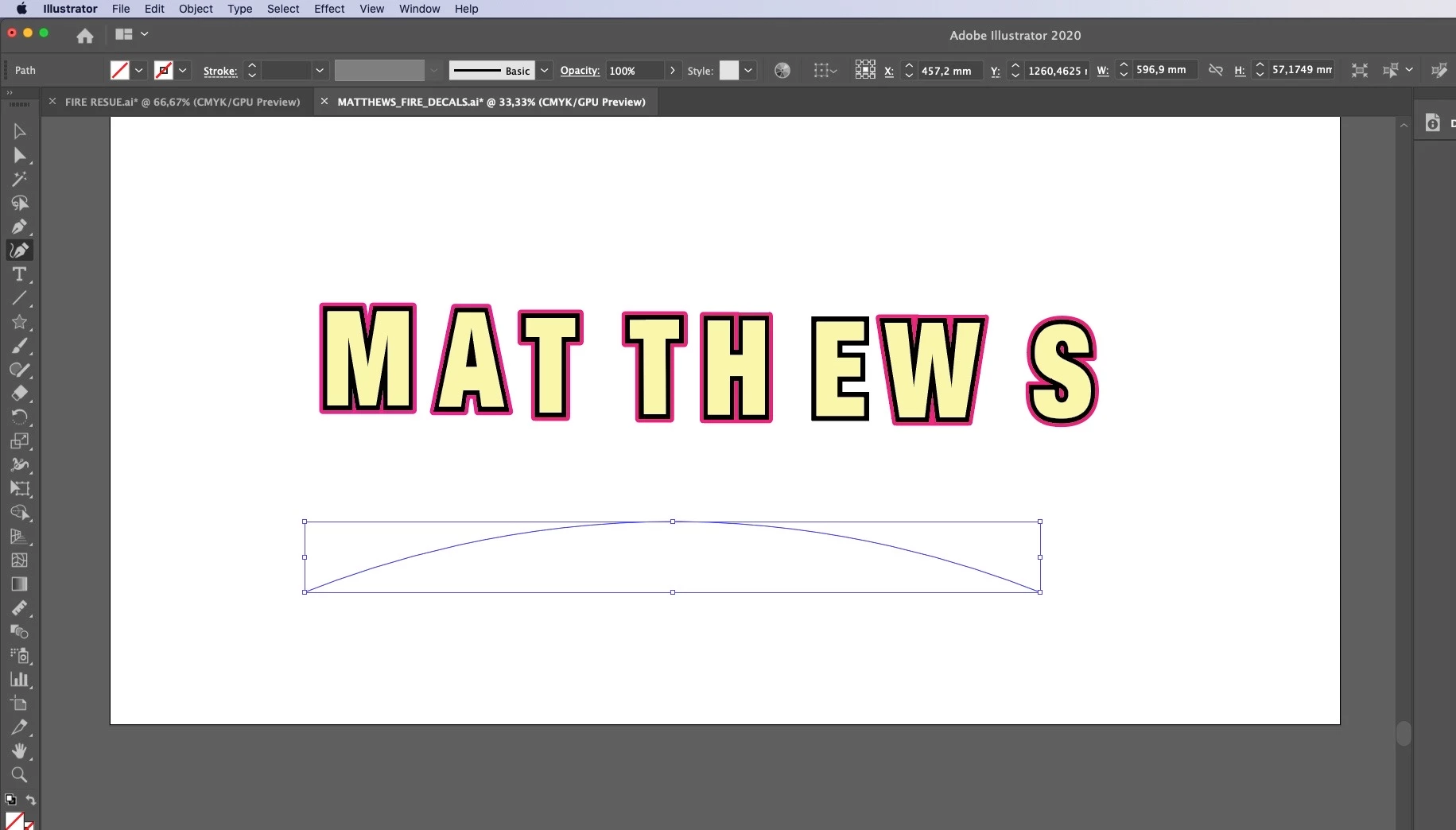
distribute Letters (they're paths) along curved path

  • June 6, 2022
  • 3 replies
  • 778 views

how do I distribute/align those letters along the curved path beneath them?
All the letters are paths. groups of paths. 
This topic has been closed for replies.
Correct answer Met1

Quick and dirty → type the word in the same font & size, distribute on curve to your liking, move your outlined letters on top of each distributed letter, rotate each as necessary. By the time you get to the eighth you'll be a pro...

Or use Arch, although there is some distortion...

3 replies

Met1
Met1Correct answer
Legend
June 9, 2022

Quick and dirty → type the word in the same font & size, distribute on curve to your liking, move your outlined letters on top of each distributed letter, rotate each as necessary. By the time you get to the eighth you'll be a pro...

Or use Arch, although there is some distortion...

kphotopage
Legend
June 7, 2022

Marcel, Hi.


I’m working with Live Type

With Text Tool, set your type. Now Fill it with color none.


Open up your Appearance Panel

Switch to the Selection Tool.

In the Appearance Panel, Fly out menu, Add Three new Fills

Yellow color on top, then Black, then red.

Give The black and red fills a slight offset. (Effects>Path>Offset )

Create a Graphic Style.


Draw your arc.

With Text tool, copy your text.

With Text on Path tool, paste your text on that arc.

With Selection Tool, apply your Graphic Style.


Since your text is still live, tweak your tracking and kerning as needed.


K

Participant
June 7, 2022

They type on path workaround wont do me any good.
My Letters are based on helvetcia, but I needed to modify their proprtions so I did "create outlines".
I working on some designs that are going to be plotted out of vinyl

Monika Gause
Community Expert
Community Expert
June 7, 2022

The type on a path would really be the best method. Editing the proportions would be possible in the character panel.


If you want to align the groups on the path: Some of the letters are difficult to space out (T or W)

So since you will need to manually adjust this anyway: Just drag the letters where you want them to be.


There is a script that aligns objects on a path, but it can only use the bounding box.

Jacob Bugge
Community Expert
Community Expert
June 7, 2022

Marcel,


Always keep a copy of the original artwork (both letters and path) as a backup.


Given what you have, you can use a really silly way, the 1 step blend fake, with full accuracy/no need to (re)position/other adjustments:


0) Make sure that the letters are abpve the path in the stacking order, as seen in the expanded Layer in the Layers panel;
1) Object>Blend>Blend Options with Spacing set to Specified Steps = 1 and Orientation set to Align to Path;
2) Object>Blend>Make;

3) ShiftClick the and Object>Blend>Replace Spine, this will give you some crippled intermediate letters, but only temporarily:
4) Object>Blend>Expand and Ungroup;
5) Delete all the crippled intermediate letters. you can do that in the L<ayers panel.


Participant
June 7, 2022

I think I understand what you want me to do and how this is supposed to work, but I cant manage to get it done right. 
I have sent you a PM with pictures on how it looks following your steps


Jacob Bugge
Community Expert
Community Expert
June 9, 2022

Marcel,


Blends, including 1 step fake blends, can be difficult, and sometimes they simply seem to move in mysterious ways as in your PM samples, so in some cases such as this it is better to look elsewhere.


Type on a path is an obvious solution, especially easy with unmodified letters, but I agree with you that you need the outlining to create the letters shown.


I believe the happiest way may be to create your own font, and then use Type on a path, even more if you wish to work more with modified letters.


You can use the extension Fontself Maker, which comes at a (moderate one time) price

https://www.fontself.com/


or make a search for (free) fonts,

https://duckduckgo.com/?q=font+creation+software&t=ffab&atb=v320-1&ia=web

https://duckduckgo.com/?q=free+font+creation+software&t=ffab&atb=v320-1&ia=web


There are also costlier options.
