
Eduard Buta
Inspiring
March 7, 2022
Answered

Does anyone have a script for adding an anchor point to the top-most point of a path?

  • March 7, 2022
  • 8 replies
  • 5154 views

Hi there!


I was wondering if any of you have got a script that would be able to add an anchor point to the top-most/bottom-most point of a selected path (ex: an arc)?


I know it's a long shot, and I'm not even sure if it's doable. But it's a problem I've run into quite often, so I was wondering if someone has been able to fix it in the past. Thank you!
This topic has been closed for replies.
Correct answer m1b

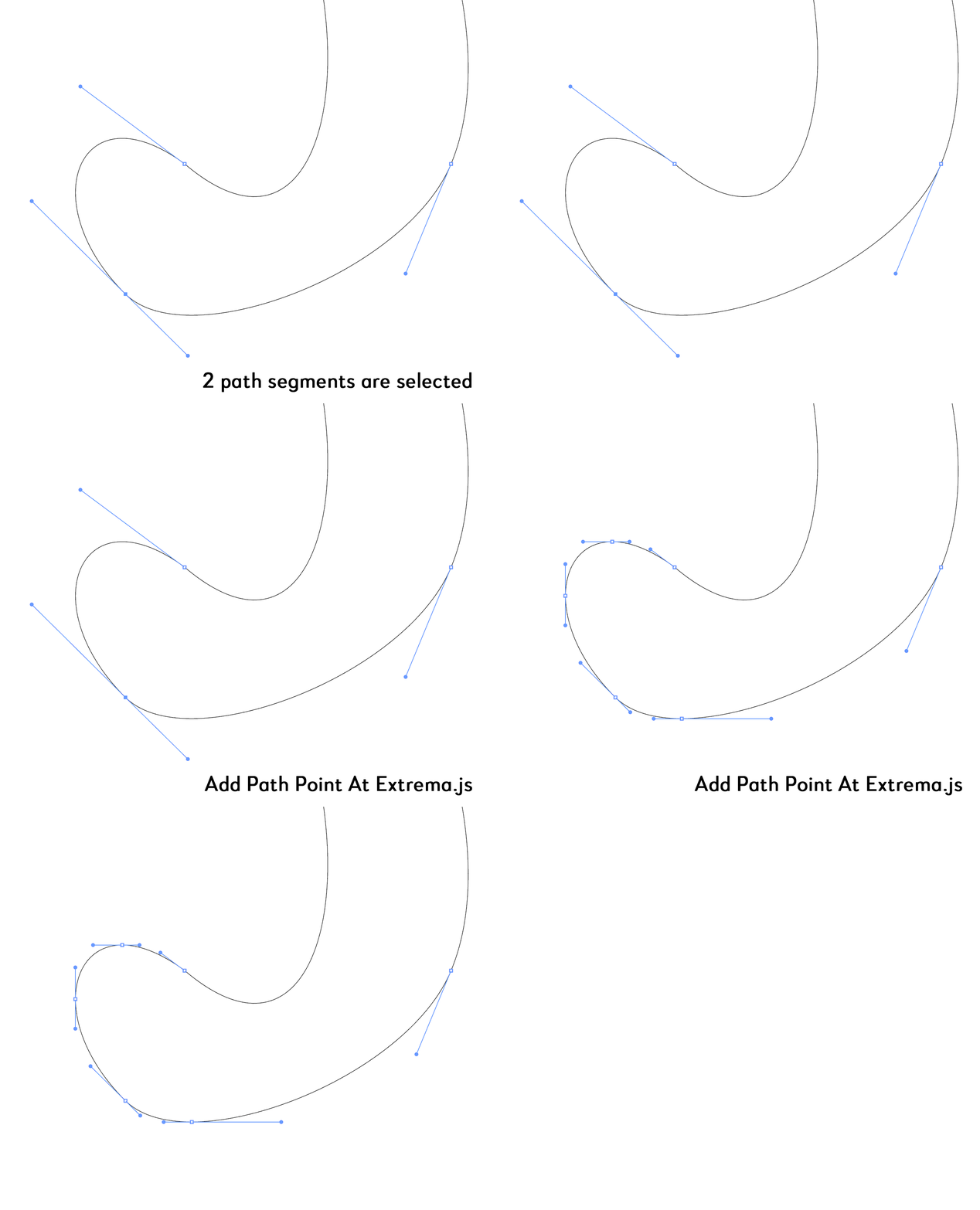
Hi @Eduard Buta, I've made a script that I think will do what you want. I've made a github page for it and you can download the latest release .zip file. The way you use it is to select *just the path segment(s) you want* and run the script "Add Path Point At Extrema.js". So if you just want a top anchor point, just select the topmost path segment (use direct selection tool and click on the path no on the anchor points) and then run script. If you select the whole path, it will add extreme points to every segment.

- Mark

8 replies

m1b
Community Expert
m1bCommunity ExpertCorrect answer
Community Expert
March 14, 2022

Hi @Eduard Buta, I've made a script that I think will do what you want. I've made a github page for it and you can download the latest release .zip file. The way you use it is to select *just the path segment(s) you want* and run the script "Add Path Point At Extrema.js". So if you just want a top anchor point, just select the topmost path segment (use direct selection tool and click on the path no on the anchor points) and then run script. If you select the whole path, it will add extreme points to every segment.

- Mark

Kurt Gold
Community Expert
Community Expert
March 14, 2022

That's a very good approach, Mark.


In particular I like that selecting the entire path will add extreme points to every segment, not only to the outermost regions of the whole path.


I have another action that can do that as well, but currently it only works with filled, but unstroked paths. Perhaps I will add it to Point Maker 4 as soon as I find a way that works with stroked paths as well.


Kurt Gold
Community Expert
Community Expert
March 12, 2022

An improved action set is availabe here:


Point Maker 3


It contains two additional actions that create points at all outer peaks of single or multiple selected curved paths.


point_maker_all_single_selection is supposed to work with single selected paths only.


point_maker_all_multiple_selection can handle multiple selected (ungrouped and non-overlapping) paths. It's a bit long-winded and it could be simplified. But this simplification would require some interaction by the user, so I didn't implement that option, accepting that it is just another bumpy ride.


m1b
Community Expert
Community Expert
March 14, 2022

Hi @Kurt Gold, I tried point_maker_3 and once again you have performed some incredible action wizardry! Do you record your actions in the normal way, or create/tweak them using the underlying action markup?

- Mark

Kurt Gold
Community Expert
Community Expert
March 14, 2022

Good Morning, Mark (late evening over here),


usually I try to go the normal (sometimes insane) way without any dirty tricks. Sometimes, however, I tweak them by editing the action code if it is required. Manipulating them this way unfortunately may be a bit risky and can destroy the entire action.


The Point Maker actions just use common commands. At least so far, but it may vary in case it is necessary.


femkeblanco
Legend
March 11, 2022

I won't be able to do anything over the weekend, so I thought I would post my progress.  Step one, finding the extrema of the segments, is done.  The math was not as hard as I thought.  (Step two would be redrawing the path with one or more of these points.) 

// select path
var doc = app.activeDocument;
var Ps = doc.selection[0].pathPoints;
// iterate segments
for (var i = 0; i < Ps.length - 1; i++) {
    var Px = [Ps[i].anchor[0], Ps[i].rightDirection[0], Ps[i + 1].leftDirection[0], Ps[i + 1].anchor[0]];
    var Py = [Ps[i].anchor[1], Ps[i].rightDirection[1], Ps[i + 1].leftDirection[1], Ps[i + 1].anchor[1]];
    getNDrawPoint();
}
function getNDrawPoint() {
    // get cubic Bezier curve extrema
    // for further info:  https://pomax.github.io/bezierinfo/#extremities
    var a = 3 * Py[3] - 9 * Py[2] + 9 * Py[1] - 3 * Py[0];
    var b = 6 * Py[0] - 12 * Py[1] + 6 * Py[2];
    var c = 3 * Py[1] - 3 * Py[0];
    var t1 = (- b + Math.sqrt(b * b - 4 * a * c)) / (2 * a);
    if (t1 > 0 && t1 < 1) var p1 = getPoint(Px, Py, t1);
    var t2 = (- b - Math.sqrt(b * b - 4 * a * c)) / (2 * a);
    if (t2 > 0 && t2 < 1) var p2 = getPoint(Px, Py, t2);
    // draw point(s)
    if(p1) drawPoint(p1[0], p1[1])
    if(p2) drawPoint(p2[0], p2[1])
}
function getPoint(Px, Py, t) {
    var x = Px[0] * (1 - t) * (1 - t) * (1 - t) + 3 * Px[1] * t * (1 - t) * (1 - t) + 3 * Px[2] * t * t * (1 - t) + Px[3] * t * t * t;
    var y = Py[0] * (1 - t) * (1 - t) * (1 - t) + 3 * Py[1] * t * (1 - t) * (1 - t) + 3 * Py[2] * t * t * (1 - t) + Py[3] * t * t * t;
    return [x, y];
}
function drawPoint(x, y) {
    var path1 = doc.pathItems.add();
    path1.setEntirePath([[x - 0.5, y + 0.5], [x + 0.5, y - 0.5]]);
    var path2 = doc.pathItems.add();
    path2.setEntirePath([[x + 0.5, y + 0.5], [x - 0.5, y - 0.5]]);
    path2.strokeWidth = path1.strokeWidth = 5;
    path2.strokeColor = path1.strokeColor = doc.swatches["CMYK red"].color;
    var group1 = doc.groupItems.add();
    path1.moveToEnd(group1);
    path2.moveToEnd(group1);
}


femkeblanco
Legend
March 15, 2022

I was naive in thinking that it's just a matter of redrawing the path with added anchor points.  In reality, all handles will need to be adjusted.  It's back to the drawing board.  (I'm hoping to solve this independently from @m1b's solution.)


Kurt Gold
Community Expert
Community Expert
March 10, 2022

Eduard,


if it is – for some reason – required to run the actions via scripts, you can download them here:


Point Maker Scripts


It contains four simple scripts that will run the actions in the Point Maker 2 action set.


Instruction:


- Download and unzip the file

- Important: In the Actions palette, first make sure that you've imported the action set point_maker_2.aia

- Select a curved path and run one of the scripts, for example point_maker_top.jsx


That should work pretty well.


m1b
Community Expert
Community Expert
March 11, 2022

@Kurt Gold, I'm going to have a try at this one too, purely with scripting solution (see my comment to @femkeblanco). This is just for fun, and not because you haven't already solved it.

- Mark

femkeblanco
Legend
March 8, 2022

I think this is an interesting problem, scripting wise. There are two steps. First, finding the maximum (or minimum) of the Bezier curve function of a segment. One may need to brush up their calculus. Two, since it's not possible to add a point to the middle of the segment, the whole segment will have to be redrawn with the added point. I'll think about it when I have the time.

Eduard Buta
Inspiring
March 9, 2022

Appreciate your willingness to look into it. Your idea sounds interesting, and could very well be a great starting point. Wish I had the knowledge to help out in these cases, but I really just depend here on the generosity and time of those that can write script code. I hope you'll give this some thought and that you'll come up with something!

CarlosCanto
Community Expert
Community Expert
March 9, 2022

What's the purpose of adding anchors? what do you do with it after it's added? just curious

Kurt Gold
Community Expert
Community Expert
March 8, 2022

You can download an action set file here:


Point Maker 2


It contains four actions that can make points at different positions on curved paths (topmost, bottommost, leftmost and rightmost).


Instruction:


- Download and unzip the file
- In the Actions palette import the action set file (point_maker_1.aia)
- Select an arc or any other curved path
- Run one of the actions
- Do some experiments


Note that the actions may fail in some cases, but they certainly work in many cases.


Eduard Buta
Inspiring
March 9, 2022

These certainly seem to work in some cases, so thank you. However, I'm really looking for scripts, since I'm using a script panel to create GUI button elements for all my scripts, extending the Illustrator capabilities through a new set of tools that way. Anyways, beggars can't be choosers, so I thank you for this solution. It'll definitely come in handy if I can't seem to find a script that does this.

Kurt Gold
Community Expert
Community Expert
March 9, 2022

By saying that the actions seem to work in some cases, does that mean that you carefully tested them and found out that they merely work sometimes and don't work more often than not?


I'm just asking because I checked them with some hundreds of different curved paths and as far as I can see they work reliably in almost all cases. Moreover, they can handle multiple selected (ungrouped and non-overlapping) paths as well as direct selected segments.


Sometimes (in rather rare cases) the actions may fail, but that has almost always to do with a general issue: Actions sometimes tend to stumble upon their own steps, especially if one runs them in accelerated mode.


Monika Gause
Community Expert
Community Expert
March 7, 2022

There is a plugin that can add points at these extreme positions (or move existing points there): VectorScribe


So if you need it often, that might be an option.

Eduard Buta
Inspiring
March 8, 2022

I will look into that. I appreciate the tip!


CarlosCanto
Community Expert
Community Expert
March 7, 2022

can you show a screen shot of a path showing what you need?

Eduard Buta
Inspiring
March 7, 2022

Absolutely. Here's the image in question, showcasing through the red circle the general area in which that point would be.


What I understand by the top-most point is the actual point that 'touches' (or represents, if you will) the top margin of a path's bounding box. In other words, the point with the highest coordinates on the vertical axis, or the 'peak' if we're thinking strictly of arches. I hope that's enough context to clear things up!

CarlosCanto
Community Expert
Community Expert
March 7, 2022

at first, I thought you needed to add an achor to the end of a path, that should be easy. 


After seeing your image, it's not impossible to write a script to do it but it's not as easy.


would a manual method work for you?