
Participant
May 28, 2024
Question

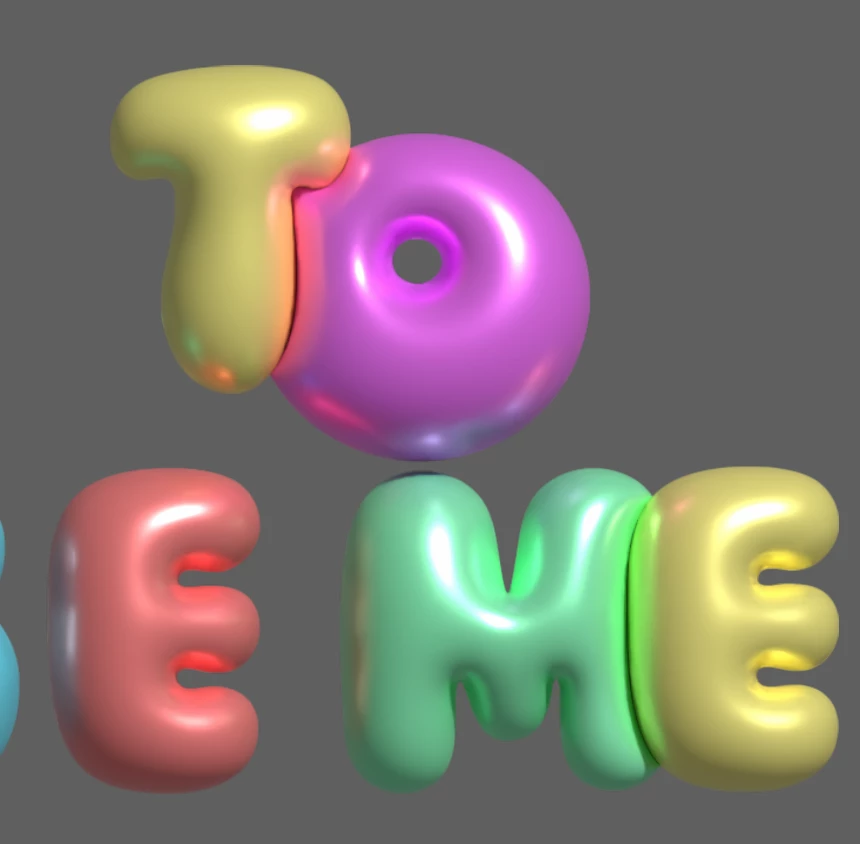
Does anyone know how to do this? related to 3d/inflate effect

  • May 28, 2024
  • 1 reply
  • 319 views

Hi,


Hoping someone can help me 🙂

I downloaded a text effect from Adobe stock which uses the 3D/inflated effect, however it also interacts with the letters/shapes next to it which i can't figure out how they have done it/not seen this before on illustrator. 

Could anyone advise how this has been done? pictures attached 
This topic has been closed for replies.

1 reply

Mike_Gondek10189183
Community Expert
Community Expert
May 28, 2024

Set each letter as separate individual text objects and color. Group and add the 3D effect. make metallic and turn on ray tracing.


If you like the lighting & other settings, you can make a graphic style from the art you downloaded, then apply that style to your new art group.


I later messed around and could not get the center of the O to fill with light.