
Participant
December 6, 2016
Answered

double dotted line box elimination and access denied
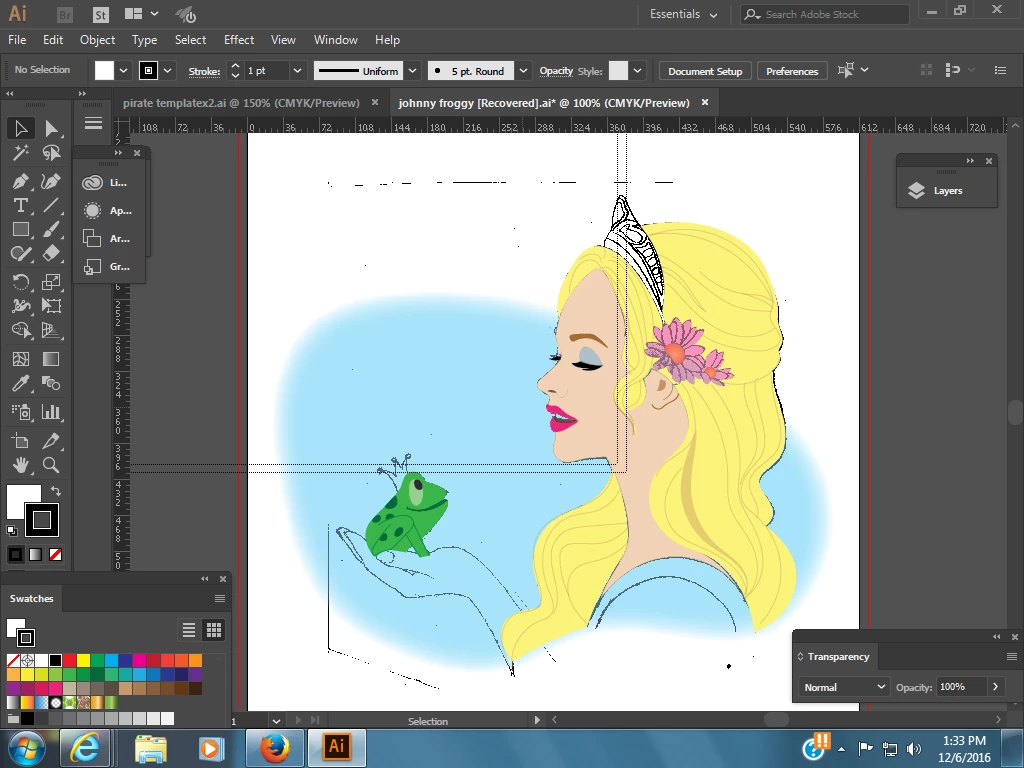
  • December 6, 2016
  • 1 reply
  • 2061 views

Two questions: How can I get rid of the double dotted line box that overlaps the illustration above?  It may be a extra art board outline.  I don't know how it happened.  Also--when I try to say changes on this art or even different art from another file--I get a "access denied" alert which won't let me save changes.  How do I correct the access denied problem as well?

    This topic has been closed for replies.
    Correct answer Monika Gause

    View > Hide Print Tiling

    1 reply

    Monika Gause
    Community Expert
    Monika GauseCommunity ExpertCorrect answer
    Community Expert
    December 6, 2016

    View > Hide Print Tiling

    Participant
    December 6, 2016

    Thank you so much for helping me eliminate the print tiling.  Now does anyone know how to get a round the "access denied" when trying to save changes on a image?

    Participant
    December 8, 2016

    are you saving to a network drive?


    Thank you for your response.  No, I am not saving to a network drive.  I tried doing a save as rather than just a save and a dialog box suggested I save in a different location..  Perhaps that is the solution.  I was able to save changes once I designated a different place.  (Ramona's documents rather than pictures.)