craigostertag
Participant
December 8, 2016
Answered

Download Error

  • December 8, 2016
  • 1 reply
  • 797 views

Hello everybody,

In general, some Adobe applications are not downloading and installing on my Mac.

I recently uninstalled my adobe suit from my MacBook Pro 2015 due to constant error messages. I am trying to get all my applications back on my Mac, however, Illustrator, Photoshop, and InDesign are giving me issues. All other apps like Premiere Pro and Lightroom are downloading and installing correctly. My issue with Illustrator, Photoshop, and InDesign is that I will:

1. Click the download button from my creative cloud application panel.

2. It then "downloads" although it jumps from 1% to 99%.

3. I get a notification stating "Adobe Illustrator has been installed".

4. I check my Mac's application list to see if it is there and it is not.

I would really like to resolve this issue as soon as possible. I am a student that works part time and needs the software over winter break for work. I have a lot of work to do by January. Please help!!

Thank you!
This topic has been closed for replies.
Correct answer Mike_Gondek10189183

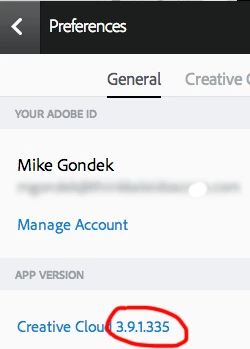
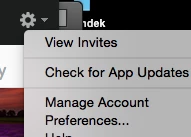
What version of the cloud app do you have. Click on the gear icon and choose preferences.

Update that first  if you have an older version.

1 reply

Mike_Gondek10189183
Community Expert
Mike_Gondek10189183Community ExpertCorrect answer
Community Expert
December 8, 2016

What version of the cloud app do you have. Click on the gear icon and choose preferences.

Update that first  if you have an older version.

craigostertag
Participant
December 9, 2016

I am using the same software version as presented above. I logged out of creative cloud and signed back in thinking it would correct an error but it did not. Any other ideas?

I appreciate your help!

Mike_Gondek10189183
Community Expert
Community Expert
December 9, 2016

I am guessing you did not intend to make this post as solved.

Do you have any 3rd party software installed (e.g.: Avast virus protection). I would restart and make the Adobe Cloud updates the first thing you do before you both nay browser or other software.

As a last effort, i would run the clearer to uninstall and then try installing.

Use the Creative Cloud Cleaner Tool to solve installation problems