
Tifhogan
Participant
January 5, 2017
Answered

Drawing curved road receding in the distance

  • January 5, 2017
  • 1 reply
  • 13161 views

Hello Adobe Community,

I am (very unsuccessfully) trying to replicate this vector image of a curved road receding in the distance:

I have been drawing a curved line using the pen tool, increasing the stroke size, and using the perspective grid to create the illusion of distance. My version looks horrible. I cannot find a tutorial on this anywhere... Please help. I am self-taught and hate to be struggling so much with something that seems so simple. Snapshots accompanying an explanation would be greatly appreciated!

Tif
This topic has been closed for replies.
Correct answer MBorowiec

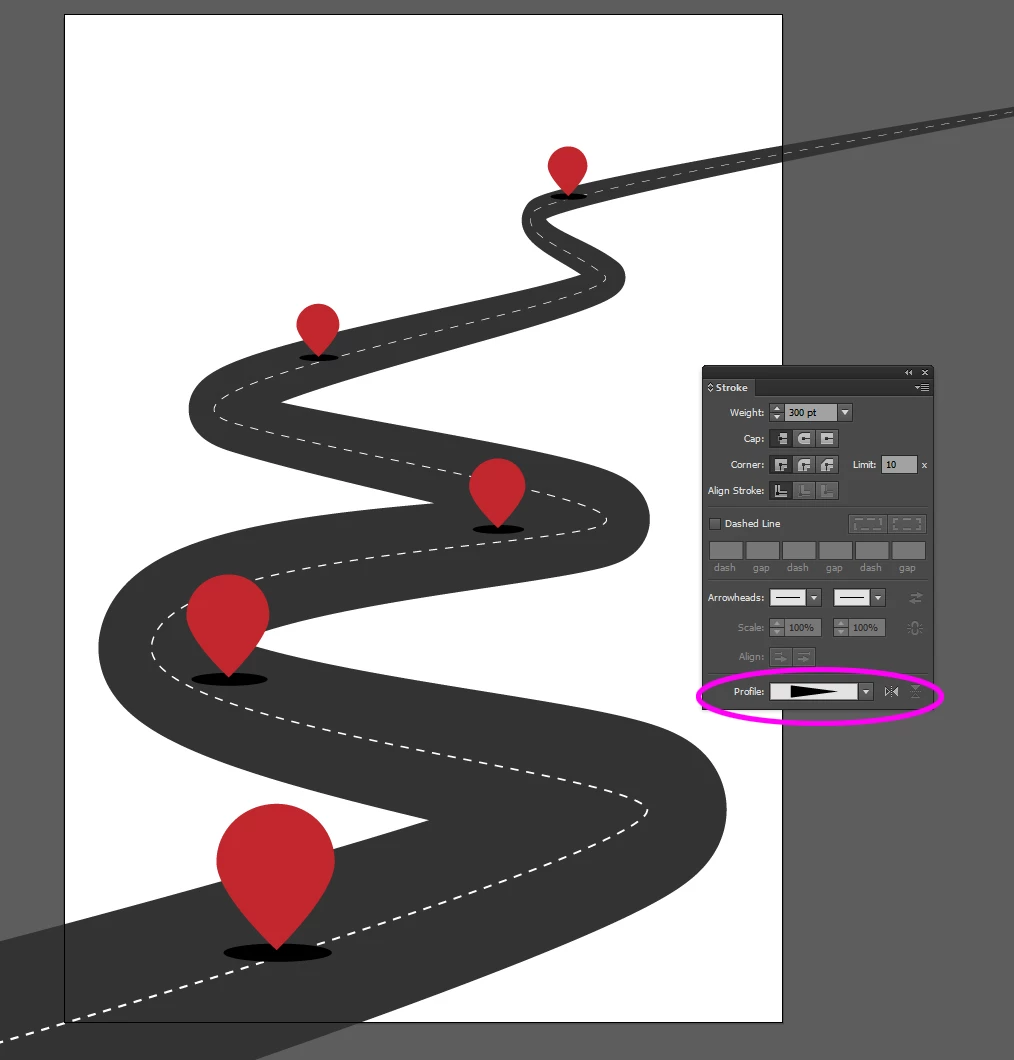
I roughly draw this image, but You can do like so:

Just with pen drive draw desired curve, give it a good stroke and chose the triangle profile, and of You go. Just take a good profile of curve, and play some with stroke weight. Also if You will be not happy with it, just expand this curve and edit each edge of the road, to desired shape

Hopefully I helped You

1 reply

MBorowiec
MBorowiecCorrect answer
Participating Frequently
January 5, 2017

I roughly draw this image, but You can do like so:

Just with pen drive draw desired curve, give it a good stroke and chose the triangle profile, and of You go. Just take a good profile of curve, and play some with stroke weight. Also if You will be not happy with it, just expand this curve and edit each edge of the road, to desired shape

Hopefully I helped You

Tifhogan
TifhoganAuthor
Participant
January 5, 2017

I cannot thank you enough! This solved my issue immediately!

Monika Gause
Community Expert
Community Expert
September 24, 2021

I dont get this im so cunfused?


You could try my video here: https://www.youtube.com/watch?v=zLLEnfk1ir4