This topic has been closed for replies.
Correct answer kphotopage

Rehana, Hi.

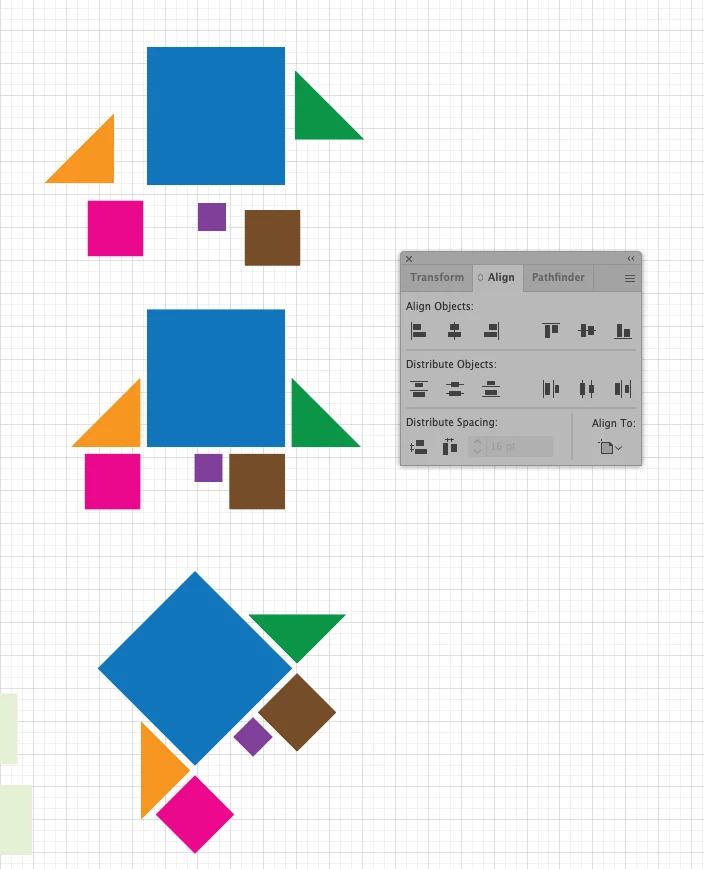
Actually you can do all this in Illustrator using the Alignment panel


There are your Shapes, unrotated.

Using the Alignment panel, start aligning to Key. I used the Blue Square as my Key.

You also want to Distribute all the same distance between.


Finally Group.

Rotate.


K
 

3 replies

Legend
November 13, 2021

Not sure about it, use the Options of the Align panel op right corner to space between, you can also start by aligning to a point, clicking and holing a corner and move it on another onr and use the arrow keys to move, nudge them up, down, left, right, or if you want to enter a fixed distance press Contrl, command on Mac, if an object is selected.


kphotopage
kphotopageCorrect answer
Legend
November 13, 2021

Rehana, Hi.

Actually you can do all this in Illustrator using the Alignment panel


There are your Shapes, unrotated.

Using the Alignment panel, start aligning to Key. I used the Blue Square as my Key.

You also want to Distribute all the same distance between.


Finally Group.

Rotate.


K


rehana36276218
Known Participant
November 13, 2021

bunddle of Thanks for all , specially for kphotopage  

Lukas Engqvist
Community Expert
Community Expert
November 13, 2021

One way to achieve a known distance is to make the points snap and then you can use the Transform or Move command to move an object a known distance. (cmd-shift-M, Ctrl-Shift-M on PC).

There is also a plugin that you could  invest in from Astute Graphics if this is an important part of your workflow.

rehana36276218
Known Participant
November 13, 2021

which astute plugin you are saying about , may i know this name plz

Lukas Engqvist
Community Expert
Community Expert
November 13, 2021

Collider Scribe you can get a freee working trial… but it is addictive.
https://astutegraphics.com/plugins/colliderscribe