
gloriad64706371
Known Participant
June 4, 2017
Answered

Drawing within an object

  • June 4, 2017
  • 1 reply
  • 844 views

I am trying to do some fashion illustration.

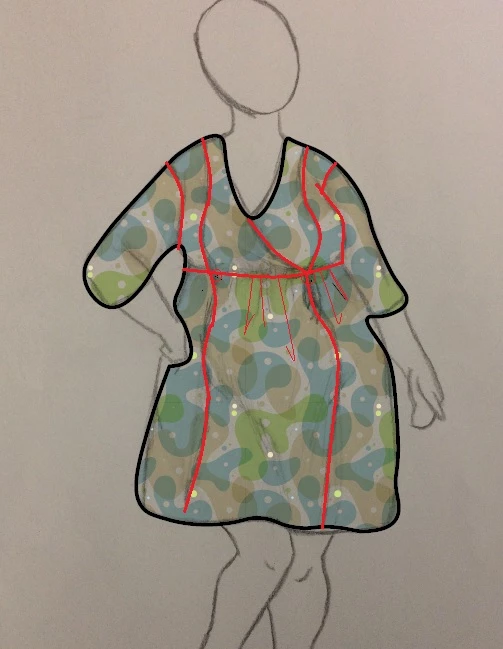
I have drawn my outline shape of a dress and filled it with a pattern.

Now I want to draw the seams, neckline, etc. within the filled shape.

I simply want the lines to intersect with the outlined shape. Every time I start, it wants to grab an anchor.

I see there is an intersect command under pathfinder, but it asks me to select 2 paths and I can't figure out how to do that, or if that's the correct thing for me to do.
    This topic has been closed for replies.
    Correct answer Ton Frederiks

    i'll have to research what a clipping mask is.

    I want lines to intersect like the red lines here (done in Paint)


    From what I understand, you have trouble adding the lines because when you start drawing you add points to the contour instead of creating a new path?

    You can ether select the contour first and lock it: Object > Lock > Selection

    Or lock the Layer with the contour and add another layer on top of it to add your seams.

    1 reply

    Monika Gause
    Community Expert
    Community Expert
    June 4, 2017

    Please show some screenshots that illustrator your issue.

    Also: which version?

    gloriad64706371
    Known Participant
    June 4, 2017

    Once I figure out what I'm doing, I'l start over with more precise lines.

    Ton Frederiks
    Community Expert
    Ton FrederiksCommunity ExpertCorrect answer
    Community Expert
    June 5, 2017

    i'll have to research what a clipping mask is.

    I want lines to intersect like the red lines here (done in Paint)


    From what I understand, you have trouble adding the lines because when you start drawing you add points to the contour instead of creating a new path?

    You can ether select the contour first and lock it: Object > Lock > Selection

    Or lock the Layer with the contour and add another layer on top of it to add your seams.