abcx89943186
Known Participant
September 11, 2018
Answered

drop shadow to text

  • September 11, 2018
  • 2 replies
  • 3769 views

hello! may i ask, how do i add drop shadow to text in illustrator? i couldnt find that option thank you!

    This topic has been closed for replies.
    Correct answer Omar.Fathy

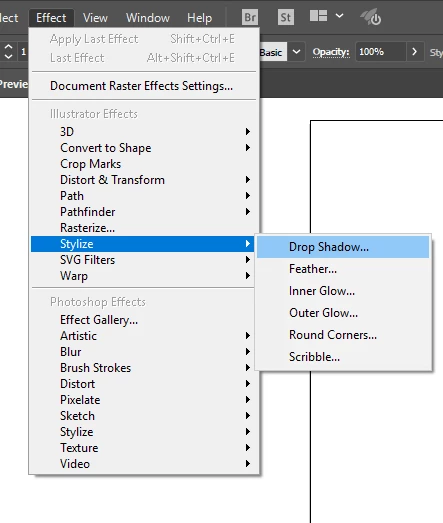
    You can find it in:

    Effects> Stylize> Drop shadow
    2 replies

    Bill Silbert
    Community Expert
    Community Expert
    September 11, 2018

    In order to apply a drop shadow, as Omar has shown, the text (either point text or area text) must be selected with one of the selection tools. If you select the text with the text tool then the options under Effects>Stylize will be greyed out.

    Omar.Fathy
    Community Expert
    Omar.FathyCommunity ExpertCorrect answer
    Community Expert
    September 11, 2018

    You can find it in:

    Effects> Stylize> Drop shadow

    abcx89943186
    Known Participant
    September 11, 2018

    My stylize doesn't have the drop shadow option.. How can I make it appear? Thanks!

    Ton Frederiks
    Community Expert
    Community Expert
    September 11, 2018

    There are 2 Stylize items in that menu. Use the first.