


- Home
- Illustrator
- Discussions
- Hi, I am not sure how did you create this and what...
- Hi, I am not sure how did you create this and what...

Copy link to clipboard
Copied
Is there a way to fix this so that all options are readable?



 1 Correct answer


also if you have a relatively short list, you can add one or two "dummy" (blank) entries at the end. Usually one empty entry at the end should do.


Explore related tutorials & articles
 9
Replies
9
9
Replies
9


Copy link to clipboard
Copied
Do you use auto layout or fixed sizes?

Copy link to clipboard
Copied
Hi,
I am not sure how did you create this and what sizes you have picked. Did you use jsx to create a UI or HTML/CSS.
Here is a snippet that will give you an idea for adobe Script UI(JSX) not HTML/CSS
var dialog = new Window("dialog");
dialog.text = "Dialog";
dialog.preferredSize.width = 400;
dialog.orientation = "column";
dialog.alignChildren = ["left", "top"];
dialog.spacing = 10;
dialog.margins = 16;

var _list_array = ["Long Text Testing", "Small Text", "Very Long Text Testing", "3"];
var _list = dialog.add("dropdownlist", undefined, undefined, { name: "_list", items: _list_array });
_list.selection = 0;
_list.alignment = ["left", "top"];

dialog.show();
Let us know if this works for you or share your code so that we can help you out in that.
Copy link to clipboard
Copied
It's just one line of code, all jsx, I'll have to play some more with those options, thanks!
w.grp5.add ("dropdownlist", undefined, ["Approximate Space", "Number"]);Copy link to clipboard
Copied
ok, may be you have given some width to the gorup or some other property, because you are adding the dropdownList inside the group. or you can try above snippet and change as per your requirement.
Copy link to clipboard
Copied
So this is what I see when I run your code... I can't scroll down to see the 4th option of "3".
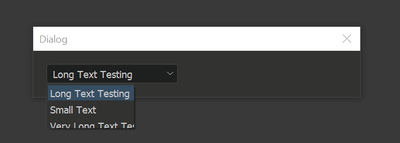
I'm not sure what the problem is exactly.

Copy link to clipboard
Copied
Try adjusting Preferences > User Interface > UI Scaling to the smallest setting. I had this same issue and that fixed it.
Hope that helps.
Copy link to clipboard
Copied
it's a known issue, the problem was introduced a few versions ago. Unfortunately there's no solution for it, other than replacing the dropdown with a list.
Copy link to clipboard
Copied
also if you have a relatively short list, you can add one or two "dummy" (blank) entries at the end. Usually one empty entry at the end should do.
Copy link to clipboard
Copied
I have strange behaviour, noticed today.
Illustrator CC 2020
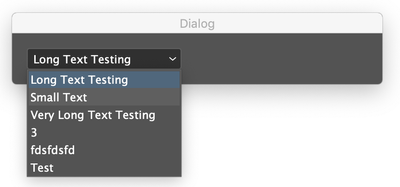
Photoshop CC 2020

I think till yesterday it was black background behind the list in Photoshop too. I just tried now. It looks like this.
Edit : Added version of Illustrator and Photoshop


Get ready! An upgraded Adobe Community experience is coming in January.
Learn more
 AdChoices