
Participant
September 14, 2023
Answered

dropshadow and feather disappear when export to pdf

  • September 14, 2023
  • 1 reply
  • 1244 views

I've worked on a few files without issue and now suddenly I'm getting this strange issue where dropshadows, inner glow, feathering etc (basically the stylised stuff) won't export.
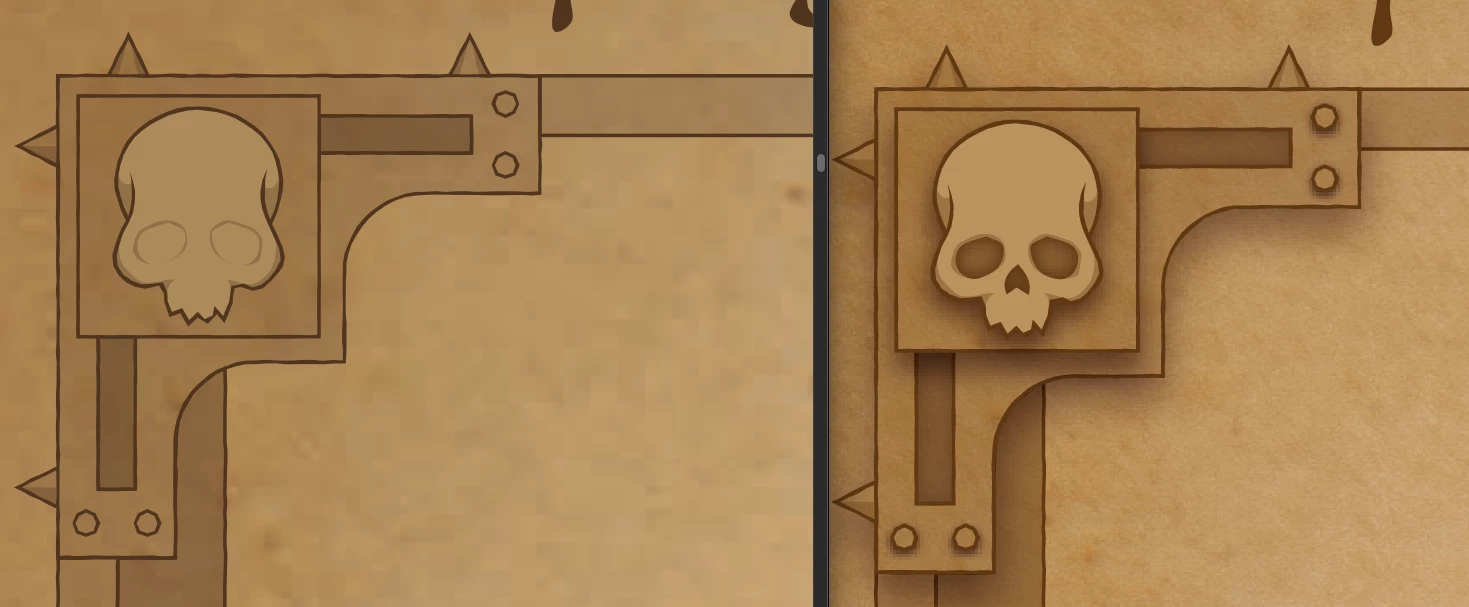
 

I checked to see if maybe it was an overprint but with it on or off it doesn't change the outcome?
anyone know what might be causing this?

Correct answer Monika Gause

CMYK

raster effect settings: 300dpi


when I export to PDF I select [High Quality Print]
I unselect - Preserve Illustrator Editing Capabilities

I change the compression Image Quality to Medium for both Bitmaps
and that's it.

I was using Macs Preview to view the PDF. never had this issue before. But interestingly enough when i printed it the effects are there


Apple Preview is not good for Prepress work. Leave it alone when checking your PDFs

1 reply

chito-auAuthor
Participant
September 14, 2023

would it be my export settings? Nothing has changed there for it to suddenly start doing this. 

Monika Gause
Community Expert
Community Expert
September 14, 2023

How is the file set up in Illustrator? color mode, effects, etc.

Exactly which settings do you use for the export?

Which application are you using to check it? If not Acrobat, use Acrobat.

Monika Gause
Community Expert
Monika GauseCommunity ExpertCorrect answer
Community Expert
September 14, 2023

CMYK

raster effect settings: 300dpi


when I export to PDF I select [High Quality Print]
I unselect - Preserve Illustrator Editing Capabilities

I change the compression Image Quality to Medium for both Bitmaps
and that's it.

I was using Macs Preview to view the PDF. never had this issue before. But interestingly enough when i printed it the effects are there


Apple Preview is not good for Prepress work. Leave it alone when checking your PDFs