
Exit
  • Global community
    • Language:
      • Deutsch
      • English
      • Español
      • Français
      • Português
  • 日本語コミュニティ
  • 한국 커뮤니티
0

dynamic symbol color change back on occasions
Explorer ,
Jan 23, 2024 Jan 23, 2024

image_2024-01-24_120225606.png


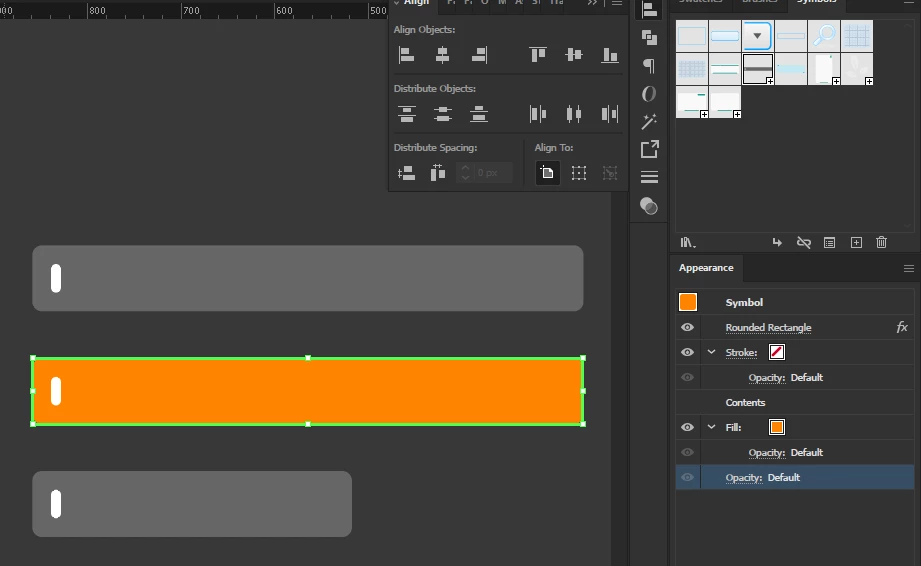
i made a dynamic symbol , for some textbox background, the color before made into dynamic symbol was dark grey.

the main function of a dynamic symbol is changable colors right ? the weird thing is, after changing the color of some of them, if i were to do something like align and change size, the color goes back to original, dark grey..

what gives ? it's frustating so much, given the money we all put on adobe every month/year..

TOPICS
Bug , Scripting
591
Translate
Report
Community guidelines
Be kind and respectful, give credit to the original source of content, and search for duplicates before posting. Learn more
community guidelines
Adobe
Community Expert ,
Jan 24, 2024 Jan 24, 2024

I wonder how your symbol is set up.

In your screendump I see a rounded rectangle effect, but no rounded corners.

I see the orange fill below the contents. Do the contents have no fill?

Translate
Report
Community guidelines
Be kind and respectful, give credit to the original source of content, and search for duplicates before posting. Learn more
community guidelines
Explorer ,
Jan 25, 2024 Jan 25, 2024

steps are :

made a rectangle . put an effect in appeqrance panel to it.

made another small rectangle,

group them, select the group,

f8 to create the symbol, choose dynamic symbol


drag drop from symbols panel to artboard

press A, select the big rectangle, change it's color in the appearance panel .

resize the symbol . 

then the color change happened.


is something i did violate Ai backend codes ?

wait. or i'm not suppose to change the color via appearance panel?

Translate
Report
Community guidelines
Be kind and respectful, give credit to the original source of content, and search for duplicates before posting. Learn more
community guidelines
Community Expert ,
Jan 25, 2024 Jan 25, 2024

If I follow your steps, I don't get the situation in the appearance panel as in your screendump.

Translate
Report
Community guidelines
Be kind and respectful, give credit to the original source of content, and search for duplicates before posting. Learn more
community guidelines
Community Expert ,
Jan 25, 2024 Jan 25, 2024
LATEST

I direct select a dynamic symbol to change the color of that instance. I do not use the Appearance panel for that.

Translate
Report
Community guidelines
Be kind and respectful, give credit to the original source of content, and search for duplicates before posting. Learn more
community guidelines
Community Expert ,
Jan 24, 2024 Jan 24, 2024

You should really dive into the Appearance panel:


https://youtu.be/zXvRbN03MzQ

https://youtu.be/YZooJyG2UT4 

The Appearance Panel is the most powerful functionality in Illustrator. You can boost your efficiency using it. In this video I'm showing you how it works and what the items in it and their specific order means. If you'd like to dive deeper into the layers and appearance system, I'd recommend ...
Have you ever clicked on the circle in Illustrator's Appearance panel in order to select all the object on the same layer? In this video I'll explain what this has to do with rebellious strokes and why you should select differently. Learn more about the Appearance panel ...
Translate
Report
Community guidelines
Be kind and respectful, give credit to the original source of content, and search for duplicates before posting. Learn more
community guidelines
Explorer ,
Jan 25, 2024 Jan 25, 2024

i'm pretty good with Appearance panel myself. it's not the appearance i wanna know. but how dynamic symbol sometimes have this issues. 

even i deliberately avoid it since cc2015 cause so many issues i found when using dynamic symbols.

static symbols are fine tho.

Translate
Report
Community guidelines
Be kind and respectful, give credit to the original source of content, and search for duplicates before posting. Learn more
community guidelines
Community Expert ,
Jan 25, 2024 Jan 25, 2024

Dynamic symbols can have different fills and strokes applied. That's their job. 


They do not change by themselves - you change them.


And on top of that you have an additional appearance applied which is below the "Contents" in your screenshot. Is that by accident or deliberately? Because usually when it's below the "Contents", it's invisible.

Translate
Report
Community guidelines
Be kind and respectful, give credit to the original source of content, and search for duplicates before posting. Learn more
community guidelines