Participant
February 2, 2021
Answered

Easy way to draw connections between dots?

  • February 2, 2021
  • 4 replies
  • 4577 views

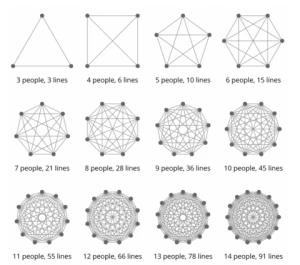
I like this image and don't want to straight up copy/steal it. Is there a way to EASILY get all dots and all possible connections drawn in Illustrator? I'd hate to manually draw hundreds of lines. Thanks for any help you might offer. 


Correct answer Silly-V

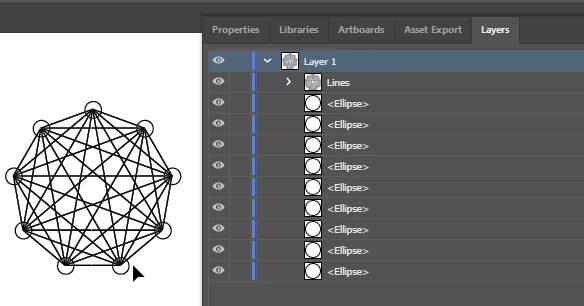
Yea, just use the Radial repeat to make enough circles, make sure to expand the object so you get the Radial Repeat split up into circle paths, and use this script, it should do what you want:


#target illustrator
function test () {

	var doc = app.activeDocument;
	var sel = doc.selection;
	var pathUuids = [];
	var thisItem;
	for (var i = 0; i < sel.length; i++) {
		thisItem = sel[i];
		pathUuids.push(thisItem.uuid);
	}
	var thisPath, thisOtherPath, newLine;
	var newGroup = doc.groupItems.add();
	newGroup.name = "Lines";
	for (var i = 0; i < pathUuids.length; i++) {
		thisPath = doc.getPageItemFromUuid(pathUuids[i]);
		for (var j = 0; j < pathUuids.length; j++) {
			thisOtherPath = doc.getPageItemFromUuid(pathUuids[j]);
			newLine = newGroup.pathItems.add();
			newLine.setEntirePath([
				[
					thisPath.left + (thisPath.width / 2),
					thisPath.top - (thisPath.height / 2)
				],
				[
					thisOtherPath.left + (thisOtherPath.width / 2),
					thisOtherPath.top - (thisOtherPath.height / 2)
				],
			]);
			newLine.stroked = true;
		}
	}

};
test();


It is not handling duplicated lines, so there are a lot of duplicated lines on top of each other as the lines are drawn from each and every shape to each other shape - like in the case of the triangle it would make 6 lines total. Matter of fact, it also draws a line to itself - haha.
 

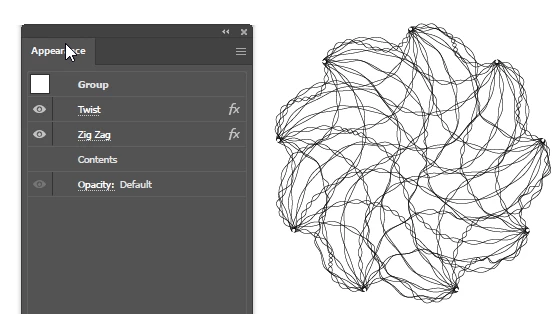
Hey, you can come up with cool jellyfish art using some effects on this.


4 replies

Participant
June 4, 2025

does anyone know a website that automatically does this? i've been trying to but cant for the life of me

Inventsable
Legend
February 4, 2021

This seemed like a good exercise so I figured I'd also give it a shot:


// You can set direct property values for the appearance here:
var options = {
    anchor: {
        size: 20,
        filled: true,
        stroked: true,
        strokeWidth: 2,
        fillColor: [255, 0, 0]
    },
    line: {
        stroked: true,
        strokeWidth: 2,
        strokeCap: StrokeCap.ROUNDENDCAP,
        strokeColor: "#ff0000"
    }
};

/**
 * Utilities
 */
Array.prototype.forEach = function (callback) {
    for (var i = 0; i < this.length; i++) callback(this[i], i, this);
};
if (!Array.isArray) 
    Array.isArray = function (arg) {
        return Object.prototype.toString.call(arg) === "[object Array]";
    };
RGBColor.prototype.create = function (params) {
    if (/string/i.test(typeof params)) {
        var result = /^#?([a-f\d]{2})([a-f\d]{2})([a-f\d]{2})$/i.exec(params);
        this.red = parseInt(result[1], 16);
        this.green = parseInt(result[2], 16);
        this.blue = parseInt(result[3], 16);
        return this;
    } else if (Array.isArray(params)) {
        this.red = +params[0];
        this.green = +params[1];
        this.blue = +params[2];
        return this;
    }
};
function get(type, parent) { 
    parent = parent ? parent : app.activeDocument;
    var result = [];
    if (!parent[type]) return [];
    for (var i = 0; i < parent[type].length; i++)
        result.push(parent[type][i]);
    return result;
}

/**
 * Main functions
 */
get('selection', app).forEach(function (pathItem) {
    var group = app.activeDocument.groupItems.add();
    get('pathPoints', pathItem).forEach(function (pathPoint, i, list) {
        drawLinesFrom(pathPoint, list.slice(i + 1), group);
        setAppearance(group.pathItems.ellipse(
            pathPoint.anchor[1] + options.anchor.size / 2,
            pathPoint.anchor[0] - options.anchor.size / 2,
            options.anchor.size,
            options.anchor.size
        ), 'anchor');
    })
    pathItem.remove();
})
function setAppearance(shape, type) {
    for (var key in options[type])
        shape[key] = (/Color$/.test(key))
            ? new RGBColor().create(options[type][key])
            : options[type][key];
}
function drawLinesFrom(point, list, parent) {
    list.forEach(function (sibling) {
        var shape = parent.pathItems.add();
        shape.setEntirePath([point.anchor, sibling.anchor]);
        setAppearance(shape, 'line');
    })
}


 I've found myself doing things like this often but I'd personally rather just draw a polygon or closed shape, not the circles. So this script works off the currently selected shapes:

Converts them with configurable options to set stroke/fill colors, line widths, size of anchor shapes, etc:

It also groups the resulting shapes, removes the original path, and doesn't produce any redundant paths (triangle here is 6 paths, 3 lines + 3 ellipses):

tromboniator
Community Expert
Community Expert
February 4, 2021

Not a script guy. All I can tell is that it didn't work. Was it something I said? Wrong latitude?


m1b
Community Expert
Community Expert
February 4, 2021

Good catch! This is actually a simplified version of a much larger recursive function that I normally use, I'd copy/pasted then deleted a large chunk of it when I'd placed it in here since we don't need recursion or the full function, though now that you mention it, that's probably unnecessary even in that one.


There's probably a few other mistakes or ways it could be improved still. I tend to write in Typescript, not .jsx, so I normally use ES6 syntax like arrow functions which is why my code looks a lot different than what people normally post like nested functions inside other function arguments and prototype extensions.


That's cool. I'm interested in Typescript. Have you managed to get set up so that you can code in TypeScript/ES6 and generate ExendScript code from it automatically?

Silly-V
Silly-VCorrect answer
Legend
February 2, 2021

Yea, just use the Radial repeat to make enough circles, make sure to expand the object so you get the Radial Repeat split up into circle paths, and use this script, it should do what you want:


#target illustrator
function test () {

	var doc = app.activeDocument;
	var sel = doc.selection;
	var pathUuids = [];
	var thisItem;
	for (var i = 0; i < sel.length; i++) {
		thisItem = sel[i];
		pathUuids.push(thisItem.uuid);
	}
	var thisPath, thisOtherPath, newLine;
	var newGroup = doc.groupItems.add();
	newGroup.name = "Lines";
	for (var i = 0; i < pathUuids.length; i++) {
		thisPath = doc.getPageItemFromUuid(pathUuids[i]);
		for (var j = 0; j < pathUuids.length; j++) {
			thisOtherPath = doc.getPageItemFromUuid(pathUuids[j]);
			newLine = newGroup.pathItems.add();
			newLine.setEntirePath([
				[
					thisPath.left + (thisPath.width / 2),
					thisPath.top - (thisPath.height / 2)
				],
				[
					thisOtherPath.left + (thisOtherPath.width / 2),
					thisOtherPath.top - (thisOtherPath.height / 2)
				],
			]);
			newLine.stroked = true;
		}
	}

};
test();


It is not handling duplicated lines, so there are a lot of duplicated lines on top of each other as the lines are drawn from each and every shape to each other shape - like in the case of the triangle it would make 6 lines total. Matter of fact, it also draws a line to itself - haha.


Hey, you can come up with cool jellyfish art using some effects on this.



m1b
Community Expert
Community Expert
February 2, 2021

Great use of uuids. Thanks for showing! - Mark

femkeblanco
Legend
February 2, 2021
var n = prompt("Enter number ≥ 3", 3, "Number of points");
var d = app.activeDocument.artboards[0].artboardRect;
var paths = app.activeDocument.pathItems;
var polygon1 = paths.polygon(d[2]/2, d[3]/2, 250, n);
var points1 = polygon1.pathPoints;
for (var i = 0; i < points1.length; i++) {
    for (var j = i + 1; j < points1.length; j++) {   
        var line1 = paths.add();
        var points2 = [points1[i].anchor, points1[j].anchor];
        line1.setEntirePath(points2);
    }
}
polygon1.remove();
Silly-V
Legend
February 2, 2021

You beat me to it! lol!