


Edit Text

Copy link to clipboard
Copied
I am new to Illustrator and am attempting to edit text in a file. I have taken a previously created document and saved as a new file. It's just simple text (a person's name) that I need to edit and change to a new name. This file will be saved as an svg file to cut out on vinyl and adhered to a sign. Any help is appreciated!!



Explore related tutorials & articles
 14
Replies
14
14
Replies
14


Copy link to clipboard
Copied
Can you give some details of what is preventing you from succeeding?
Copy link to clipboard
Copied
Sure, I have tried highlighting the text to edit but it doesn't work. I saw another post that said something editing layers. On the right side of the screen it says Layer 1.
Copy link to clipboard
Copied
Select your text. Open up the layer so you can see what it contains, i.e.:
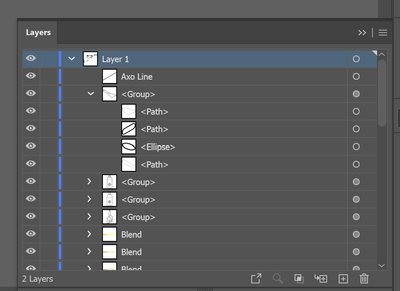
Post a screenshot of what you find.
Copy link to clipboard
Copied
Copy link to clipboard
Copied
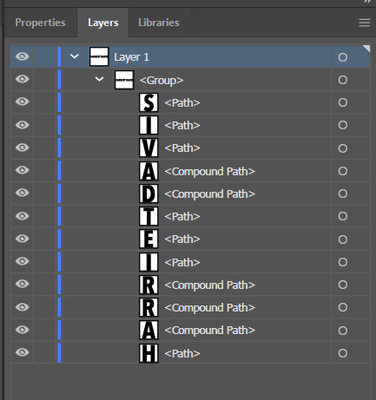
The letters have been converted to objects rather than text. You will need to delete the existing text and place your own new text object.
Copy link to clipboard
Copied
Ok, I tried that before and I can't get the new text to have the same formatting and look the same even though the properties look the same (same font, etc).
Copy link to clipboard
Copied
What is the font? Can you post a comparison?
Copy link to clipboard
Copied
Myriad Pro

Copy link to clipboard
Copied
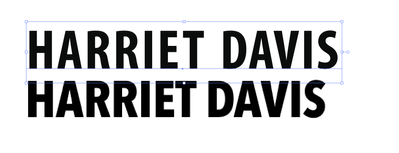
It doesn't look like the original was Myriad Pro. Here's your text compared to Myriad Bold Condensed (the closest variant I can find):
Copy link to clipboard
Copied
This is what the file says. So how do I make the new text look the same?

Copy link to clipboard
Copied
That information is the settings for your text tool. It doesn't tell you anything about the letters that exist in the file (because as far as AI is concerned, there is no longer any text in the file.
Try posting an image to this link to identify the font:
Copy link to clipboard
Copied
I will try that. In the meantime, how do I create a new document using Myriad Pro? Thanks for your help with this.

Copy link to clipboard
Copied
Harriet Hi.
Avenir Next Condensed Bold is a good match.
I already had this font installed and activated.
Here is one site you can find.
https://fontsfree.net/avenir-next-condensed-bold-font-download.html
K

Copy link to clipboard
Copied
Thank you, I will try that.


Get ready! An upgraded Adobe Community experience is coming in January.
Learn more
 AdChoices