

LuisFavas
Participant
September 15, 2020
Answered

Edit tint from custom made Scatter Brush in Illustrator

  • September 15, 2020
  • 1 reply
  • 1125 views

Hi there, 


I created a Scatter Brush originaly with the color blue (I didn't knew that it should be black) so when I recolor the brush it isn't 100%, the color is faded (as expected).

Now I can't recreate the brush, I put the same values (scale, rotation . . .) and it never shows the same result as the first try.


Now:

Is there a way to edit the tint value of brush?


This topic has been closed for replies.
Correct answer carlosgarro

Hi.

To recolor the brush, deselect everything.

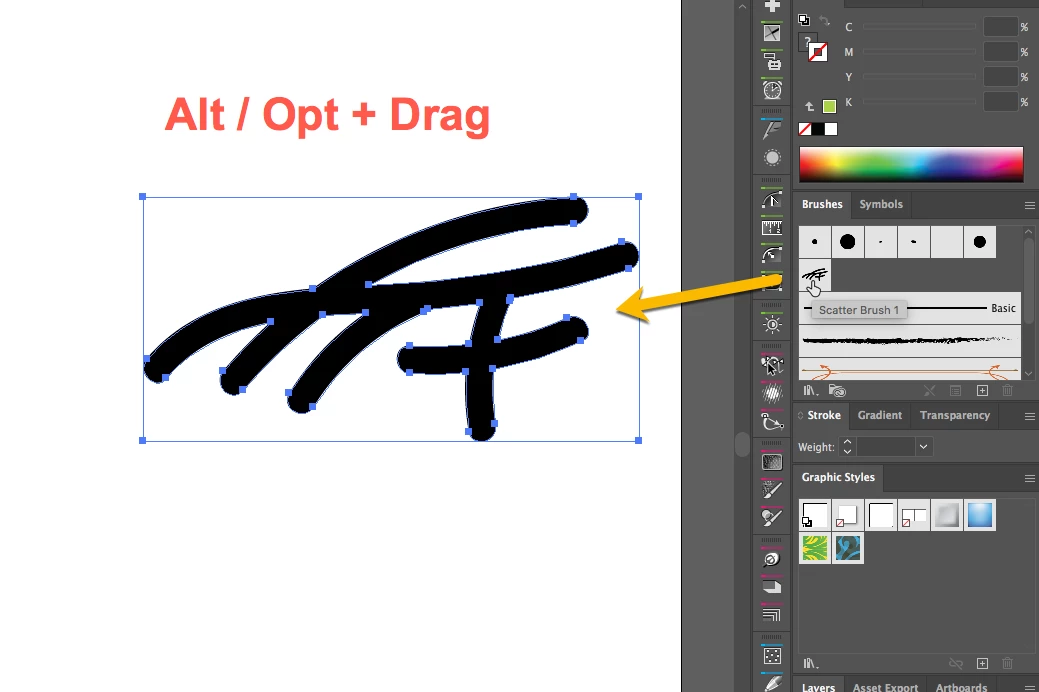
Then press the (Alt or Option) key while dragging the brush out the Brushes Panel.


Edit the brush tip with the standard tools.

To replace the previous one, grab the artwork and again (press Alt or Option) while dragging over the old brush.

Best Regards

1 reply

carlosgarro
Community Expert
carlosgarroCommunity ExpertCorrect answer
Community Expert
September 15, 2020

Hi.

To recolor the brush, deselect everything.

Then press the (Alt or Option) key while dragging the brush out the Brushes Panel.


Edit the brush tip with the standard tools.

To replace the previous one, grab the artwork and again (press Alt or Option) while dragging over the old brush.

Best Regards

LuisFavas
LuisFavasAuthor
Participant
September 16, 2020

Hi Carlos, 

you can't believe how happy I am after spending 2 days trying to fix this problem. 

and fix it in 1 min with your help.

Thank you so much,

Best regards,

Luís