
Participant
November 21, 2020
Question

Editing/removing a frame section without it going crazy?

  • November 21, 2020
  • 4 replies
  • 503 views

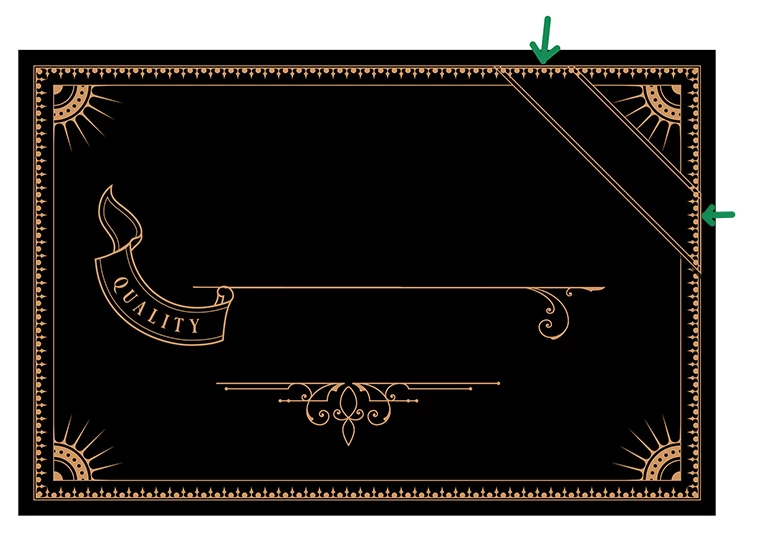
Hi i purchased a font set which came with some ornaments and a few frames that i need to edit .

i need to remove two sections of the frame where the sort of corner banner overlaps but im stumped.

Cutting or erasing is a no go, i believe the frame might've been made using the brush tool.

Can anybody give me any ideas please?
This topic has been closed for replies.

4 replies

pixxxelschubser
Community Expert
Community Expert
November 21, 2020

I disagree.


At first use menu: Object --> Expand Appearance

All Pathfinder operations should then be available.


Sidenote:

If you're trying something else, take a hard look at the "open endpoints".

Ton Frederiks
Community Expert
Community Expert
November 21, 2020

Adding 2 points to the path where you want a gap, direct select the segment inbetween and choosing Clear would have done it without Pathfinder.

Participant
November 21, 2020

sorry i wasnt clear because it was very late, the image is for gold foil printing so i think would need all gold lines on one layer with sections missing in the frame.


this is what happens when i edit a section of the frame with the knife tool or eraser


Participant
November 21, 2020

and this is what happens when i use a shape, Pathfinder>Minus Front

Ton Frederiks
Community Expert
Community Expert
November 21, 2020

I think that selecting these 2 lines with the Direct Selection tool (A) and hitting Delete will give you the result you are looking for.

tromboniator
Community Expert
Community Expert
November 21, 2020

Without knowing how this is put together, I just covered what I wanted to get rid of.

Can you please show a screenshot of your Layers panel with the disclosure arrows twirled open so we can see how this is put together?


Thanks,
Peter