Participant
July 4, 2019
Answered

Ellipse tool missing from Toolbar in Illustrator

  • July 4, 2019
  • 3 replies
  • 20137 views

I don't understand why my elipse tool continues to disappear.  I had someone on this forum help me restore it yesterday and now its disabled again

{Renamed by MOD}

    This topic has been closed for replies.
    Correct answer barbara_a7746676

    Click the 3 dots at the bottom of the Tools panel.
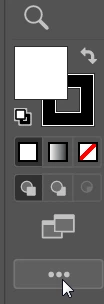
    From the menu that appears, choose Advanced. The Advanced toolbar contains ALL tools.

    If the tool disappears, it may be that your workspace has changed.
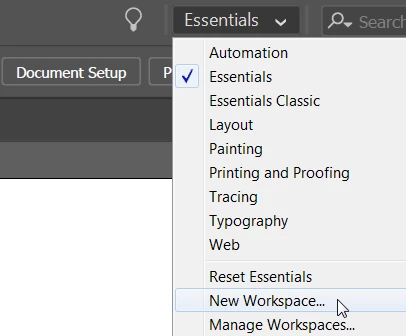
    You can save your custom workspace by showing and hiding the tools and panels that you want. Then choose New Workspace and give it a name. It will appear at the top of the workspace list. That way if anything disappears, you can simply choose your workspace from the list, or if necessary, you can Reset your custom workspace.

    3 replies

    barbara_a7746676
    Community Expert
    barbara_a7746676Community ExpertCorrect answer
    Community Expert
    July 6, 2019

    Click the 3 dots at the bottom of the Tools panel.

    From the menu that appears, choose Advanced. The Advanced toolbar contains ALL tools.

    If the tool disappears, it may be that your workspace has changed.

    You can save your custom workspace by showing and hiding the tools and panels that you want. Then choose New Workspace and give it a name. It will appear at the top of the workspace list. That way if anything disappears, you can simply choose your workspace from the list, or if necessary, you can Reset your custom workspace.

    Participant
    May 12, 2021

    DOES NOT APPEAR on Advanced tool list nor on basic.  I've never created a workspace.  This is a fresh download. Does not appear in the listing or as disabled or inactive.  PITA. Have installed this software twice properly including uninstalls.  

    Monika Gause
    Community Expert
    Community Expert
    May 12, 2021

    Please show a screenshot.

    Srishti Bali
    Community Manager
    Community Manager
    July 4, 2019

    Hi Luke,

    Thanks for reaching out. As per your query, ellipse tool was there sometime back but got disappeared all of a sudden. That's definitely not usual. I would request if you can share a few more details like:

    • OS and version of Illustrator
    • Click on three dots at the bottom of toolbar and check if you see ellipse tool in the list of All tools


    • If yes, you can simply drag it from there.

    Looking forward to your response!

    Regards,

    Srishti

    Doug A Roberts
    Community Expert
    Community Expert
    July 4, 2019

    When you say 'disabled', do you mean you can see it but not use it?

    What happens when you use the shortcut 'L'?

    If you click on the three dots at the base of the toolbar palette, can you see the ellipse tool on the list, and if so, can you drag it to your active tools?