


Exit
  • Global community
    • Language:
      • Deutsch
      • English
      • Español
      • Français
      • Português
  • 日本語コミュニティ
  • 한국 커뮤니티
0

Embedded images in illustrator

New Here ,
Jul 20, 2017 Jul 20, 2017

Hi there

I have multiple illustrator files where I have imported images from an external hard drive. This means that, when the hard drive is not plugged in illustrator asks me whether I want to replace these files.

Is there any way that while my external drive is plugged in, I can get illustrator to save these files somewhere else on my laptop so that this doesn't happen every time?

Ta

Abi
5.2K
Translate
Report
Community guidelines
Be kind and respectful, give credit to the original source of content, and search for duplicates before posting. Learn more
community guidelines

correct answers 1 Correct answer

Community Expert , Jul 20, 2017 Jul 20, 2017

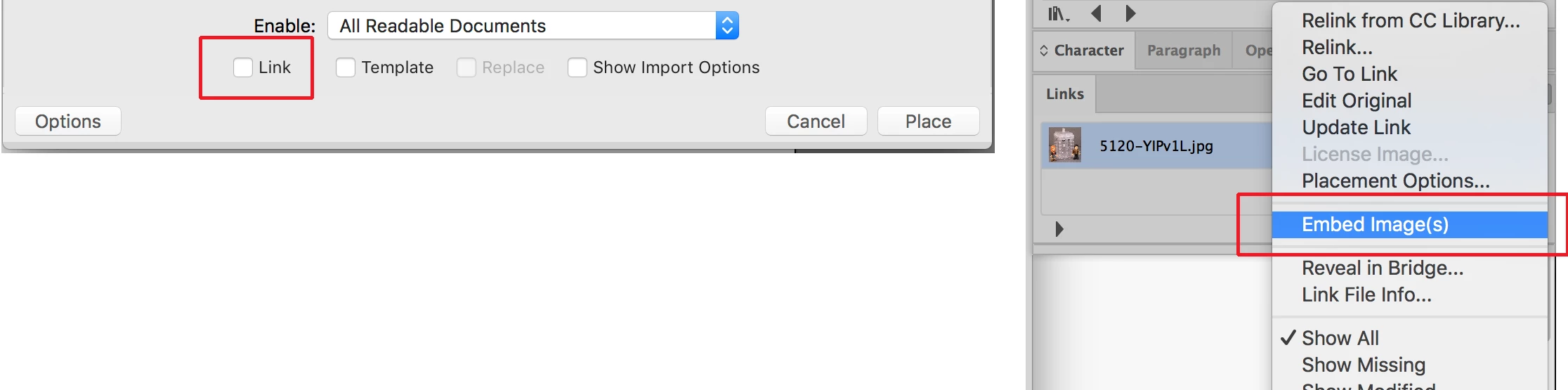
The best way to maintain imported images without worrying about their source files is to embed them. When you embed an image Illustrator makes a pixel by pixel copy of the image at the exact resolution that it has been imported and sized. The Illustrator files will be larger but in most cases entirely manageable. A file can be automatically embedded upon import by clicking on Options and unchecking "Link" in Illustrator's Place dialog box. An already linked image can be embedded through that opt

...
Translate
Adobe
Community Expert ,
Jul 20, 2017 Jul 20, 2017

File >> package

The links will be collected in a folder named "Links". Illustrator looks for a folder named links next to the .ai file, and if the images are there, they will link themselves.

Translate
Report
Community guidelines
Be kind and respectful, give credit to the original source of content, and search for duplicates before posting. Learn more
community guidelines
Community Expert ,
Jul 20, 2017 Jul 20, 2017

The best way to maintain imported images without worrying about their source files is to embed them. When you embed an image Illustrator makes a pixel by pixel copy of the image at the exact resolution that it has been imported and sized. The Illustrator files will be larger but in most cases entirely manageable. A file can be automatically embedded upon import by clicking on Options and unchecking "Link" in Illustrator's Place dialog box. An already linked image can be embedded through that option in the Links panel drop-down menu. See screenshot below:

EMBED.png

If there are later changes to an image it can be updated by clicking on it in the Links Panel and choosing "Relink..." from the drop-down menu. After relinking it can be once again embedded.

Translate
Report
Community guidelines
Be kind and respectful, give credit to the original source of content, and search for duplicates before posting. Learn more
community guidelines
Community Beginner ,
Mar 27, 2018 Mar 27, 2018
LATEST

Thank you Bill! I've been placing images in Illustrator for years, and forgot about the link vs. embedded option. When I packaged an Illustrator document recently, my assets were not being collected inside a Links folder. Your explanation solved the problem.

Translate
Report
Community guidelines
Be kind and respectful, give credit to the original source of content, and search for duplicates before posting. Learn more
community guidelines