

BEGINNER_X
Legend
December 8, 2017
Answered

Enable Knockout Group

  • December 8, 2017
  • 1 reply
  • 1617 views

Hi All,

Is it possible to apply knockout group for Textframe contents(ie., XXXXX) through scripting?
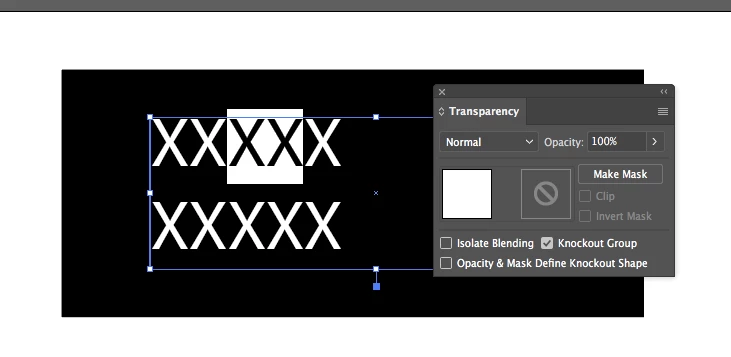
Succeed by applying knockout for Stroke or PageItems.

//Point 4: Disable overprint for all white text.

var items = app.activeDocument.pageItems;

var myCheck1 = 0;

for (i = 0; i < items.length; i++) {

    if (items.typename == 'PathItem') {

        //fill color

        if (items.fillColor.cyan == 0 && items.fillColor.magenta == 0 && items.fillColor.yellow == 0 && items.fillColor.black == 0)

                items.artworkKnockout = KnockoutState.ENABLED;

        else if (items.fillColor == "[GrayColor]")

            if (items.fillColor.gray == 0)

                  items.artworkKnockout = KnockoutState.ENABLED;

        //stroke color

        if (items.strokeColor.cyan == 0 && items.strokeColor.magenta == 0 && items.strokeColor.yellow == 0 && items.strokeColor.black == 0)

              items.artworkKnockout = KnockoutState.ENABLED;

        else if (items.strokeColor == "[GrayColor]")

            if (items.fillColor.gray == 0)

                   items.artworkKnockout = KnockoutState.ENABLED;

    }

    if(items.typename == 'TextFrame'){   

        for ( var j = 0; j < items.textRanges.length; j++ ) {     

            if (items.textRanges.fillColor.cyan == 0 && items.textRanges.fillColor.magenta == 0 && items.textRanges.fillColor.yellow == 0 && items.textRanges.fillColor.black == 100){   


                items.textRanges.artworkKnockout = KnockoutState.ENABLED;   //ERROR or NEED THIS LINE


                }}}


}

Regards

Siraj

This topic has been closed for replies.
Correct answer OMOTI

Hi, BEGINNER_X.

I also couldn't find the property "artworkKnockout" in a TextRange. So I tried using the action.

Silly-V 's great post:

Creating a dynamic action to use with app.doScript() method.

How is this?

var textFrames = app.activeDocument.textFrames,

    actStr = [

        "/version 3",

        "/name [ 15",

        "53616d706c65416374696f6e536574",

        "]",

        "/isOpen 1",

        "/actionCount 1",

        "/action-1 {",

        "/name [ 12",

        "53616d706c65416374696f6e",

        "]",

        "/keyIndex 0",

        "/colorIndex 0",

        "/isOpen 1",

        "/eventCount 1",

        "/event-1 {",

        "/useRulersIn1stQuadrant 0",

        "/internalName (ai_plugin_transparency)",

        "/localizedName [ 12",

        "5472616e73706172656e6379",

        "]",

        "/isOpen 1",

        "/isOn 1",

        "/hasDialog 0",

        "/parameterCount 1",

        "/parameter-1 {",

        "/key 1802399587",

        "/showInPalette 4294967295",

        "/type (enumerated)",

        "/name [ 3",

        "596573",

        "]",

        "/value 1",

        "}",

        "}",

        "}"

    ].join("\n"),

    actFile = File(Folder.desktop + "/SampleActionSet.aia"),

    i,

    max;

try {

    actFile.open("w");

    actFile.write(actStr);

} catch (e) {

    alert("Sorry. The file could not be written.");

} finally {

    actFile.close();

}

app.loadAction(actFile);

actFile.remove();

for (i = 0, max = textFrames.length; i < max; i += 1) {

    textFrames.textRange.select();

    app.doScript("SampleAction", "SampleActionSet");

}

app.unloadAction("SampleActionSet", "");

1 reply

OMOTI
OMOTICorrect answer
Inspiring
December 8, 2017

Hi, BEGINNER_X.

I also couldn't find the property "artworkKnockout" in a TextRange. So I tried using the action.

Silly-V 's great post:

Creating a dynamic action to use with app.doScript() method.

How is this?

var textFrames = app.activeDocument.textFrames,

    actStr = [

        "/version 3",

        "/name [ 15",

        "53616d706c65416374696f6e536574",

        "]",

        "/isOpen 1",

        "/actionCount 1",

        "/action-1 {",

        "/name [ 12",

        "53616d706c65416374696f6e",

        "]",

        "/keyIndex 0",

        "/colorIndex 0",

        "/isOpen 1",

        "/eventCount 1",

        "/event-1 {",

        "/useRulersIn1stQuadrant 0",

        "/internalName (ai_plugin_transparency)",

        "/localizedName [ 12",

        "5472616e73706172656e6379",

        "]",

        "/isOpen 1",

        "/isOn 1",

        "/hasDialog 0",

        "/parameterCount 1",

        "/parameter-1 {",

        "/key 1802399587",

        "/showInPalette 4294967295",

        "/type (enumerated)",

        "/name [ 3",

        "596573",

        "]",

        "/value 1",

        "}",

        "}",

        "}"

    ].join("\n"),

    actFile = File(Folder.desktop + "/SampleActionSet.aia"),

    i,

    max;

try {

    actFile.open("w");

    actFile.write(actStr);

} catch (e) {

    alert("Sorry. The file could not be written.");

} finally {

    actFile.close();

}

app.loadAction(actFile);

actFile.remove();

for (i = 0, max = textFrames.length; i < max; i += 1) {

    textFrames.textRange.select();

    app.doScript("SampleAction", "SampleActionSet");

}

app.unloadAction("SampleActionSet", "");

Silly-V
Legend
December 8, 2017

Another thing I was not aware of! Per-character knockout group options. Can I ask, what visual effect this will produce for you? I can't envision right now how it would work as my experience with knockout group options is only using it on group items to have one of the group's shapes create a transparent area cut out of the shape behind it.