
Participant
December 27, 2021
Question

Envelope Distort

  • December 27, 2021
  • 3 replies
  • 463 views

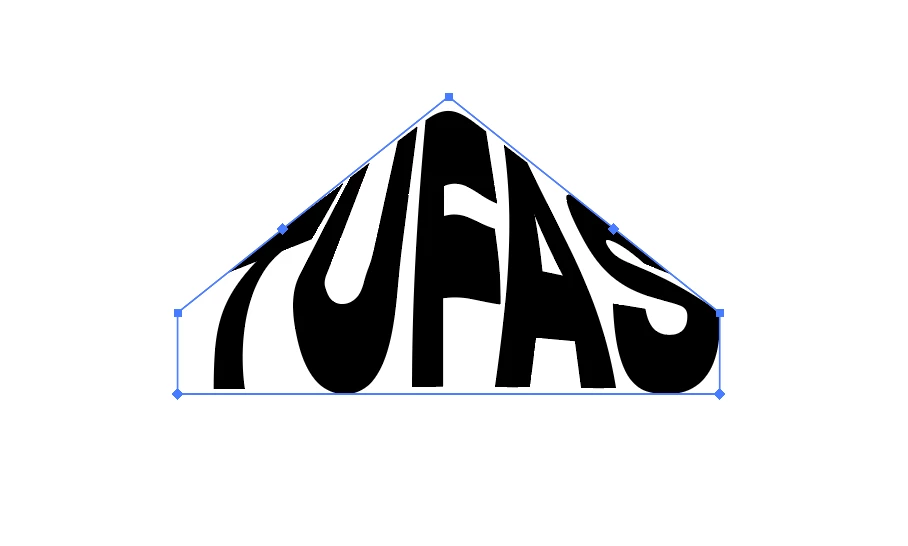
Hey, I'm having an issue with envelope distort - make with top object. I've already read that I need to have four points selected and make a gradient mesh but no one has seemed to successfully mention why this method "works". It does to an extent but I'm continuing to have issue with it not filling the shape the way I'd like it to. Mainly it's continuing to add extra points that aren't there and it's curving the text towards the top peak when I'd like it to fill that space. Can anyone help with this?
This topic has been closed for replies.

3 replies

Jacob Bugge
Community Expert
Community Expert
December 28, 2021

Jenny,


For the true old fashioned vintage look you may consider the old fashioned manual drawing mentioned by Monika.


We had a rather complete set of exquisite old threads describing such ways covering all sorts of shapes, including some that corresponded exactly to your sample.


Unfortunately, a few years ago we lost two thirds of all old threads, including all of those.


One (dis)similar case was covered by this thread, and it may form some inspiration if you wish to dive into it; as you can see, it is about a rounded bounding shape, and mentions chevron shapes as in your case.


https://community.adobe.com/t5/illustrator-discussions/how-can-i-keep-top-third-of-text-untouched-while-curving-bottom-half/td-p/12186490

Ton Frederiks
Community Expert
Community Expert
December 27, 2021
Anna Lander
Inspiring
December 27, 2021

Be careful: not Gradient mesh but Envelope Distort > Make with Mesh. This way is more flexible than making with Top Object.
Could you try to create the Envelope Distort with mesh, try to move the mesh nodes, and show the result? Also, will be helpful if you show a sketch of what you want to achieve. In this case, we could say more about the best way.

Participant
December 27, 2021

Tried your method out. Didn't make much sense to me.This is what i'm trying to go for. 

Monika Gause
Community Expert
Community Expert
December 27, 2021
quote

Tried your method out. Didn't make much sense to me.This is what i'm trying to go for. 


By @Dopeitsdomino


You can forget that.

Draw it manually. There will always be distortion on the inside of the letters even if you get the outside of the word correctly.


Did you watch my video? It explains the mesh/gradient. Every mesh is built like a table, which means it has 4 corners, not more, not less. If you need a 5th  corner, you will have to fake it by editing a curve mesh point and breaking the handles.


There are plugins and apps that can do more precise dictortions, such as FilterIT. Maybe they get you closer to your desired result.