
stefanogismondi
Known Participant
March 22, 2019
Question

Eraser tool , erase but disorts resulting lines, why?
  • March 22, 2019
  • 2 replies
  • 3534 views

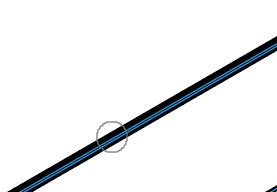
This above is the line before using eraser tool, below the same after having used it
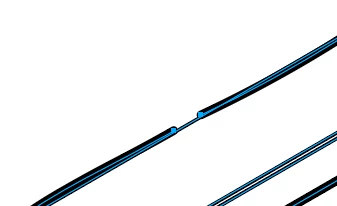
Is there a way to avoid this distortion?

Thank you!

    This topic has been closed for replies.

    2 replies

    Kurt Gold
    Community Expert
    Community Expert
    March 22, 2019

    Does your version of Illustrator have the Shape Builder tool? If yes, I'd recommend to use it to cut the stroked paths.

    Using the Shaper tool (it's not the same as the Shape Builder tool) would also be a possible way, but its behaviour is sometimes a bit cumbersome.

    rcraighead
    Legend
    March 22, 2019

    You're right, that is an unfortunate side-effect of the "Eraser" tool. You can use the "Scissor" tool, instead, to cut out a portion of the line.

    stefanogismondi
    Known Participant
    March 22, 2019

    Thank you Sir! Scissor is a more precise tool, but you can only cut line by line. Instead i need to cut several line at once. Eraser tool seemed to be the easiest and quick way at the moment, but not practicable because of these distortions.

    Most of the drawing i have are a result of a 3d cad modeling tools , there're plenty of line to manage when importing from ".step" or ".dxf".

    Furthermore due to bugs on clipping mask tool (there's a lot of discussions here about this item/bug) let's say ...I'm obligated to cut some way the drawings i have.

    rcraighead
    Legend
    March 22, 2019

    If the strokes were "Expanded" you could using the Knife tool (holding "Option" to constrain to straight line).