
renél80416020
Inspiring
May 18, 2020
Question

Erreur Prefix not related to a name space

  • May 18, 2020
  • 5 replies
  • 1861 views

Un client m'a fourni un document .ai dont j'ignore la source qui est la base d'un projet important.

Le projet est est terminé et le client satisfait, mais j'ai pour ma part découvert une particularité que je ne m'explique pas sur les tracés du document de base.

Par hasard en voulant effectué un "Enregistrer sous SVG", à la visualisation sur le navigateur Firefox il s'est produit l'erreur suivante:
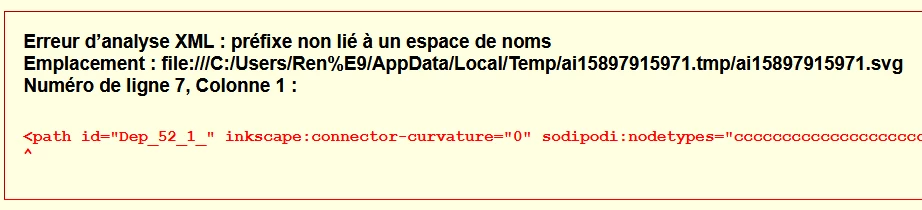
 

Voici un extrait d'un des tracés concernés, pour supprimer la source d'erreur, il faut joindre le tracé à un nouveau tracé, ici un trait.
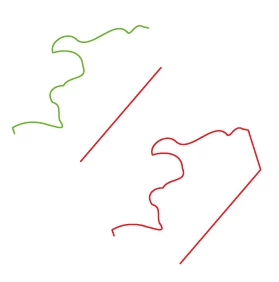
 

Je voudrais savoir d'où provient cette propriété "pathItem" ou "pageItem" que je ne connaît pas ?

inkscape:connector-curvature="0" sodipodi:nodetypes="cccccccccccccccccccccccccccccccccccccccccccccccccccc
ccccccccccccccccccccccccccccccccccccccccccccccc"

Merci de bien vouloir m'éclairer sur ce point.

René

Lien de cet extrait, document .ai version CS6. https://share.orange.fr/#rDU7YzALug2a07d65051


This topic has been closed for replies.

5 replies

CarlosCanto
Community Expert
Community Expert
May 20, 2020

if you convert each item to compoundPath, all the attributes get deleted. You won't get the error anymore.

CarlosCanto
Community Expert
Community Expert
May 19, 2020

oh ok, the latest version of Illustrator removes the foreign attributes and renders the svg correctly so we don't have that error.


I check with CS6 and I've got the same error you did. As pixxxel pointed out, these are Inkscape Attributes, it should work ok but it's missing the associated namespace. Removing the attributes listed on the Error message fixes the problem.


remove these two

sodipodi:nodetypes="ccccccccccccccccccccccccccccccccccccccccccccccccccccccccccccccccccccccccccccccccccccccccccccccccccccc" inkscape:connector-curvature="0"
renél80416020
Inspiring
May 19, 2020

Merci à vous deux, inkscape c'est ok.

Ce que je trouve étonnant est que faisant un copier/coller d'un de ces tracés dans un nouveau document, le tracé conserve ces preopriétés...

Comment le savoir ?? (en enregistrant en svg)

J'ai repris tous les tracés et ils sont nombreux en utilisant la méthode indiquée dans mon premier poste.

Merci encore.


pixxxelschubser
Community Expert
Community Expert
May 19, 2020

Maybe the customers creator tool was Inkscape. And he was using a Inkscape function which is not usable in Illustrator or is not conform with SVG requirements ???

pixxxelschubser
Community Expert
Community Expert
May 19, 2020

Hi René,

no error here with CC2020 and Firefox.


Sorry, but I don't understand French, the automatic translation into German is a bit bad - and I don't have a CS6 to test.


Here the svg code:

<?xml version="1.0" encoding="utf-8"?>
<!-- Generator: Adobe Illustrator 24.0.2, SVG Export Plug-In . SVG Version: 6.00 Build 0)  -->
<svg version="1.1" id="Calque_1" xmlns="http://www.w3.org/2000/svg" xmlns:xlink="http://www.w3.org/1999/xlink" x="0px" y="0px"
	 viewBox="0 0 595.3 841.9" style="enable-background:new 0 0 595.3 841.9;" xml:space="preserve">
<style type="text/css">
	.st0{fill:none;stroke:#6EB126;stroke-width:0.75;stroke-linecap:round;stroke-linejoin:round;}
	.st1{fill:none;stroke:#E42224;stroke-width:0.75;stroke-linecap:round;stroke-linejoin:round;}
	.st2{fill:none;stroke:#254B98;stroke-width:0.75;stroke-linecap:round;stroke-linejoin:round;}
</style>
<path id="Dep_52_1_" class="st0" d="M11.8,70.3l-0.5-1.5l-0.6-1.5c5.2-3.2,11.9-3.6,17.6-1.5c3.6,0.7,10.2,3.7,6-2.1
	c-1.2-4.4,1.1-7.8-3.6-9.1c-3.4-5,0.9-8.4,5.5-8.3c2.8-5.2,12.6-2.6,9.7-9.9c-0.3-8-9.4-8.4-14.9-6.6c-2.2-5.3,6.8-11.1,11.4-7
	c6.8,6.9,18.8-10.1,25.5-3.6c1.8,3.2,4-5.1,8.1-2.4l1.5,0.3l1.4,0.4"/>
<line id="Dep_52_2_" class="st1" x1="44.8" y1="84.2" x2="85.1" y2="37.2"/>
<path id="Dep_52" class="st1" d="M94.6,135.3l40.3-47l-6.2-19.7l-1.4-0.4l-1.5-0.3c-4.1-2.7-6.3,5.6-8.1,2.4
	C111,63.9,98.9,81,92.2,74c-4.6-4.1-13.6,1.7-11.4,7c5.5-1.8,14.6-1.5,14.9,6.6c3,7.2-6.9,4.7-9.7,9.9c-4.6-0.1-8.9,3.3-5.5,8.3
	c4.7,1.3,2.4,4.7,3.6,9.1c4.2,5.8-2.4,2.8-6,2.1c-5.7-2.1-12.4-1.7-17.6,1.5l0.6,1.5l0.5,1.5"/>
<rect class="st2" width="150" height="150"/>
</svg>
renél80416020
Inspiring
May 19, 2020

Hi Pixxxell-schubser!

Here the svg code:

<?xml version="1.0" encoding="iso-8859-1"?>
<!-- Generator: Adobe Illustrator 16.0.0, SVG Export Plug-In . SVG Version: 6.00 Build 0)  -->
<!DOCTYPE svg PUBLIC "-//W3C//DTD SVG 1.1//EN" "http://www.w3.org/Graphics/SVG/1.1/DTD/svg11.dtd">
<svg version="1.1" id="Calque_1" xmlns="http://www.w3.org/2000/svg" xmlns:xlink="http://www.w3.org/1999/xlink" x="0px" y="0px"
	 width="595.28px" height="841.89px" viewBox="0 0 595.28 841.89" style="enable-background:new 0 0 595.28 841.89;"
	 xml:space="preserve">
<style type="text/css">
<![CDATA[
	.st0{fill:none;stroke:#35499A;stroke-width:0.75;stroke-linecap:round;stroke-linejoin:round;}
	.st1{fill:none;stroke:#E52420;stroke-width:0.75;stroke-linecap:round;stroke-linejoin:round;}
	.st2{fill:none;stroke:#6AB431;stroke-width:0.75;stroke-linecap:round;stroke-linejoin:round;}
]]>
</style>
<path id="Dep_52_1_" inkscape:connector-curvature="0" sodipodi:nodetypes="ccccccccccccccccccccccccccccccccccccccccccccccccccccccccccccccccccccccccccccccccccccccccccccccccccccc" class="st2" d="
	M11.77,70.339l-0.458-1.468l-0.593-1.459c5.211-3.209,11.942-3.573,17.645-1.518c3.601,0.705,10.198,3.665,6.016-2.097
	c-1.208-4.397,1.051-7.844-3.612-9.138c-3.41-5.023,0.85-8.384,5.468-8.3c2.762-5.2,12.635-2.633,9.672-9.871
	c-0.257-8.042-9.381-8.426-14.905-6.586c-2.214-5.278,6.788-11.07,11.417-6.955c6.754,6.933,18.841-10.131,25.483-3.615
	c1.812,3.209,4.025-5.082,8.141-2.413l1.464,0.263l1.387,0.386"/>
<line id="Dep_52_2_" class="st1" x1="44.807" y1="84.249" x2="85.064" y2="37.249"/>
<path id="Dep_52" class="st1" d="M94.579,135.338l40.258-47l-6.17-19.679l-1.387-0.386l-1.464-0.263
	c-4.115-2.669-6.329,5.622-8.141,2.413c-6.642-6.516-18.729,10.547-25.483,3.615c-4.629-4.115-13.63,1.677-11.417,6.955
	c5.524-1.84,14.648-1.457,14.905,6.586c2.963,7.237-6.91,4.671-9.672,9.871c-4.618-0.084-8.878,3.276-5.468,8.3
	c4.663,1.294,2.404,4.741,3.612,9.138c4.182,5.761-2.415,2.801-6.016,2.097c-5.703-2.055-12.434-1.691-17.645,1.518l0.593,1.459
	l0.458,1.468"/>
<rect class="st0" width="150" height="150"/>
</svg>

Mon anglais est tellement mauvais...

Le forum français a été supprimé lors de la création du nouveau site.

René


CarlosCanto
Community Expert
Community Expert
May 18, 2020

Hi Rene, how do we test the error?

I open the ai file in illustrator, saved as svg, then open the svg in Firefox. Is that what you're doing to get the error?

renél80416020
Inspiring
May 19, 2020

Bonjour Carlos et merci pour la répondre,

J'ouvre le fichier .ai dans Illustrator puis j'exécute la commande "Enregistrer sous... SVG et en bas da la fenêtre, il y a deux boutons.

Lance un navigateur Web pour afficher le fichier SVG

Code svg...

René

Version CS6 est Windows 7