
Participant
February 3, 2018
Question

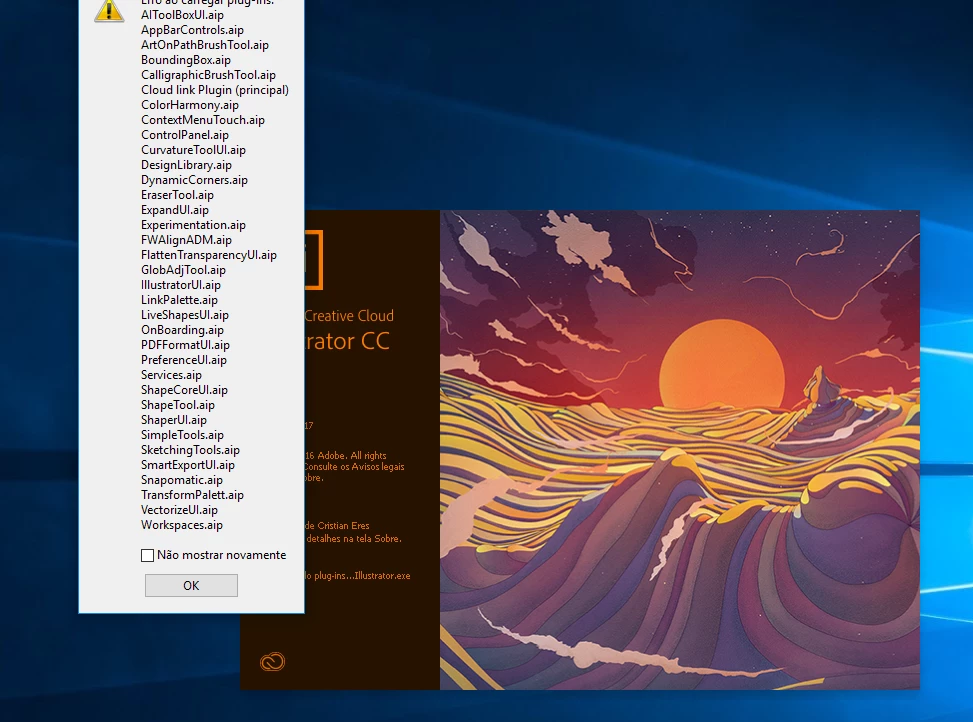
Erro ao carregar Plug-ins .aip

  • February 3, 2018
  • 2 replies
  • 4695 views

Olá, bom dia. Enfim, eu segui todas as orientações e instalei o Illustrator certinho, e até um momento ele estava funcionando corretamente, mas no dia seguinte, ele começou a dar erro e apareceu esta mensagem, até então, não consigo fazer nada nele, pois nenhuma barra de ferramentas, paleta, nada aparece. Já pesquise como instalar .aip file, se haviam pessoas com o mesmo problema que eu, mas não obtive resposta. Se alguém puder me ajudar um tanto quanto urgente, agradeço, pois necessito deste programa para o curso técnico da escola. 
This topic has been closed for replies.

2 replies

Srishti Bali
Legend
February 8, 2018

Hi barbaralguerra,

I would like to know if the steps suggested above worked for you, or the issue still persists.

Kindly update the discussion if you need further assistance with it.

Thanks,

Srishti

Participant
April 10, 2018

It didn't work for me.

Srishti Bali
Legend
April 20, 2018

Hi josé%20luizb9432403,

May I please know which Operating System and Version of Illustrator you are using?

Regards,

Srishti

Srishti Bali
Legend
February 5, 2018

Hi barbaralguerra,

Please try resetting preferences for Illustrator:

Close all Adobe applications.

Go to Locations C:\Users\user\AppData\Roaming\Adobe and.

Delete or rename  Adobe Illustrator and Adobe Illustrator 22 Settings folders.

Launch Illustrator from the creative cloud.

If it still does not work please try to clean uninstall and reinstall Illustrator. Please check this link for the CC Cleaner tool: Use the Creative Cloud Cleaner Tool to solve installation problems

Regards,

Srishti