Exit
  • Global community
    • Language:
      • Deutsch
      • English
      • Español
      • Français
      • Português
  • 日本語コミュニティ
  • 한국 커뮤니티
0

Error 1200: an Illustrator error occurred: 1095724867 ('AOoC')

Explorer ,
Jun 24, 2021 Jun 24, 2021

Does anyone know what this error code means?

Thanks

TOPICS
Scripting
2.8K
Translate
Report
Community guidelines
Be kind and respectful, give credit to the original source of content, and search for duplicates before posting. Learn more
community guidelines
Adobe
Mentor ,
Jun 24, 2021 Jun 24, 2021


Need more information. Have you run the code in ExtendScript Toolkit or VS Code to locate the error? Can you share the code that's giving you this error?


To better answer the question (beyond just googling that error message, which i assume you've done) we would need to know one or more of the following:

  • What is happening when the error occurs? In other words, which line of code triggers the error?
  • Are you manipulating pageItems, layers, artboards, documents, swatches, graphic styles, variables?
  • Adding something?
  • Moving something?
  • Removing something?


Translate
Report
Community guidelines
Be kind and respectful, give credit to the original source of content, and search for duplicates before posting. Learn more
community guidelines
Explorer ,
Jun 25, 2021 Jun 25, 2021

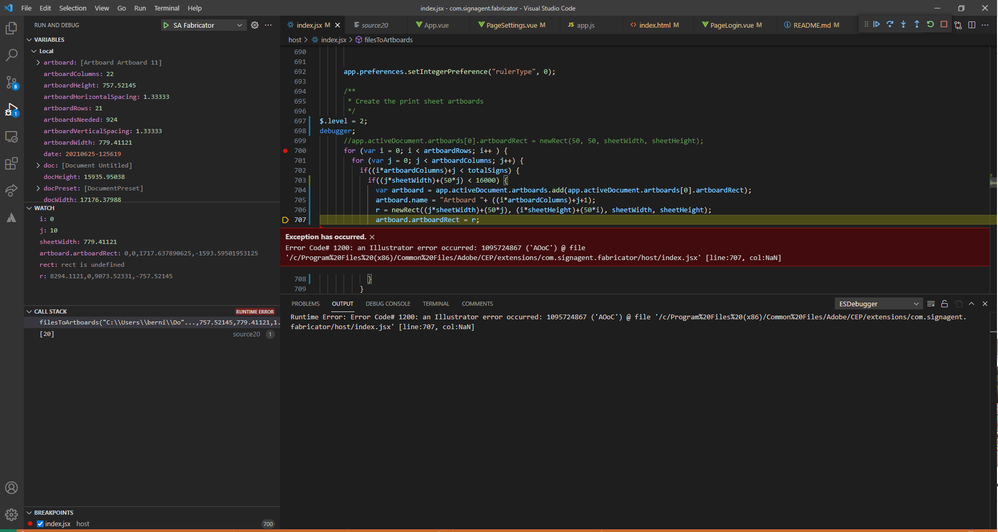
Here is a screen shot of my debugging session.adobe.png


As you can see I am atttempting to assign an artboardrect. The dimensions of which are 8294.1121,0,9073.52331,-757.52145.

Translate
Report
Community guidelines
Be kind and respectful, give credit to the original source of content, and search for duplicates before posting. Learn more
community guidelines
Mentor ,
Jun 25, 2021 Jun 25, 2021

is newRect a function that you've defined yourself? If so, what does it return?


Artboard.artboardRect requires an array. If you're passing in a rectangle object, that's going to give you this error.


Try replacing your newRect() function call with an explicit array. like this:


r = [8294.1121, 0, 9073.52331, -757.52145];

artboard.artboardRect = r;


edit*** i just tried the above with your numbers.. and it doesn'twork. My guess its that x position 8294 is off the left side of the drawing area, or x position 9073 is off the right side of the drawing area, or both.


You can't write a script that draws artwork in a place where you can't draw artwork. Try to manually draw a rectangle with those dimensions and see if you can even do it. I tried to check your math, but i don't know what most of those variables are so when i do the math in my head i just keep getting undefined. 😜

Translate
Report
Community guidelines
Be kind and respectful, give credit to the original source of content, and search for duplicates before posting. Learn more
community guidelines
Explorer ,
Jun 21, 2023 Jun 21, 2023
LATEST

can confirm, had this error today when cretaing artboard out of bounds

Translate
Report
Community guidelines
Be kind and respectful, give credit to the original source of content, and search for duplicates before posting. Learn more
community guidelines
Mentor ,
Jun 25, 2021 Jun 25, 2021

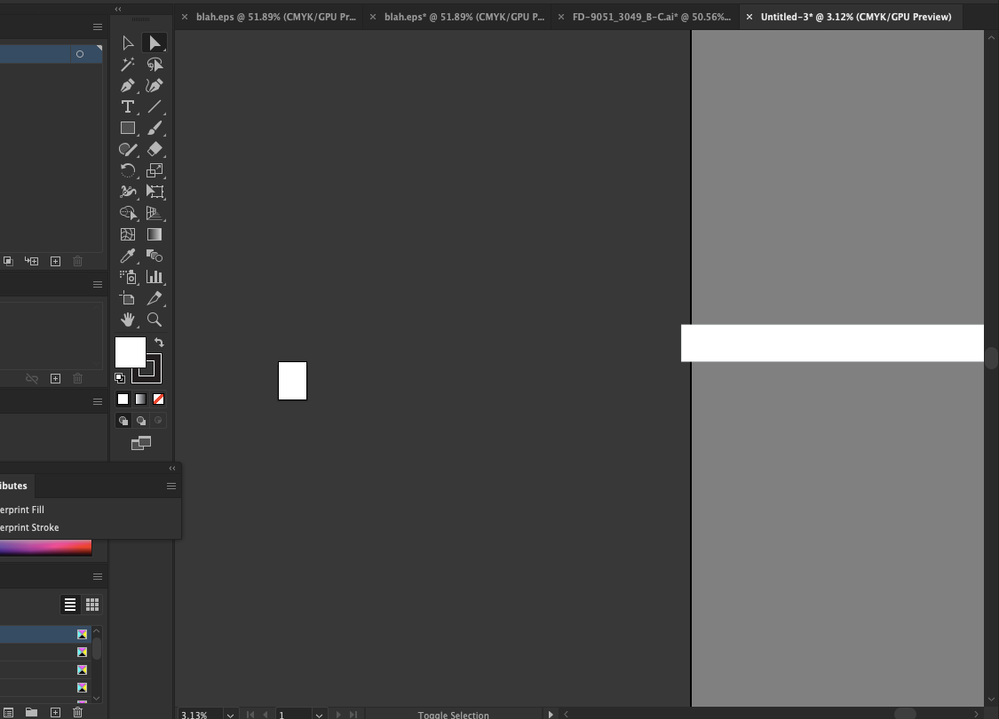
i just changed the code so instead of updating the artboardRect, it creates a rectangle. This is what I got.. As you can see, the left edge of the rectangle is starting very near the edge of the canvas. Then it extends for 9000 points to the right. it's possible your x value should be negative instead of positive?

Screen Shot 2021-06-25 at 10.20.10 AM.png

Translate
Report
Community guidelines
Be kind and respectful, give credit to the original source of content, and search for duplicates before posting. Learn more
community guidelines