Exit
  • Global community
    • Language:
      • Deutsch
      • English
      • Español
      • Français
      • Português
  • 日本語コミュニティ
  • 한국 커뮤니티
0

Error loading plugins

New Here ,
Jun 14, 2024 Jun 14, 2024

  I recently installed Windows 10 Pro on my computer, and now every time I open Adobe Illustrator, "error loading plugins" appears on the screen, I tried to solve it and no tutorial was effective.
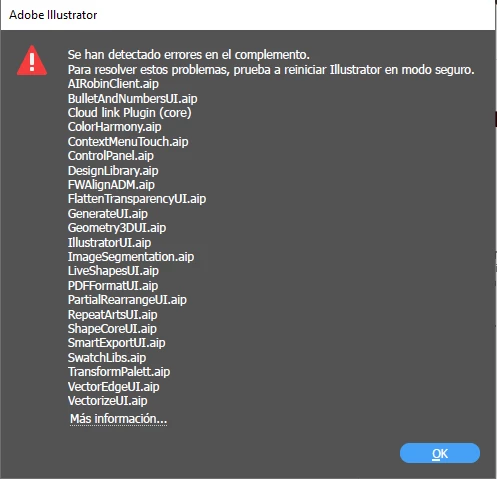

Juan38058007626z_0-1718427204528.png


TOPICS
Bug
333
Translate
Report
Community guidelines
Be kind and respectful, give credit to the original source of content, and search for duplicates before posting. Learn more
community guidelines
Adobe
Community Expert ,
Jun 15, 2024 Jun 15, 2024

Did you have an antivirus running while installing?

You could try running this https://helpx.adobe.com/creative-cloud/kb/cc-cleaner-tool-installation-problems.html

and then install again.

Translate
Report
Community guidelines
Be kind and respectful, give credit to the original source of content, and search for duplicates before posting. Learn more
community guidelines
Adobe Employee ,
Jun 17, 2024 Jun 17, 2024

Hi @Juan38058007626z,


I’m sorry to hear you’re experiencing this issue. I hope Monika's suggestions have been helpful in resolving it. If you’re still encountering problems, please try the additional suggestions provided here. We’d appreciate it if you could update us on the outcome. Your feedback is important to us, and we're here to assist you further if needed.


Regards,

Srishti

Translate
Report
Community guidelines
Be kind and respectful, give credit to the original source of content, and search for duplicates before posting. Learn more
community guidelines
Adobe Employee ,
Jun 27, 2024 Jun 27, 2024
LATEST

Hello @JuanRinaldi,

We're still waiting for your response on this issue. Please update the discussion to let us know if it has been resolved or if you still need assistance.

Thanks,
Anubhav

Translate
Report
Community guidelines
Be kind and respectful, give credit to the original source of content, and search for duplicates before posting. Learn more
community guidelines