
Participant
May 1, 2025
Answered

Error Opening CorelDRAW .ai Files After Illustrator Update

  • May 1, 2025
  • 2 replies
  • 2080 views


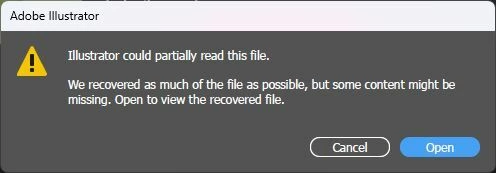
After updating Adobe Illustrator to latest version this morning, I'm getting the error "Illustrator could partially read this file..." when opening .ai files that were created in Corel Draw originally. I've been using this workflow for quite some time now, without any problems.

These files were originally created in CorelDRAW and saved directly as the .ai file type. I noticed that it's a text issue. So if my drawings have text, it won't open. If i remove the text, it's fine.

This issue only started after the Illustrator update. Any known issues or fixes?


Correct answer Monika Gause

I seem to remember that someone else reported this some time ago.


You can have multiple versions of Illustrator installed parallel. So if you need to open that kind of file regularly, I would just install version 2024 on top.

2 replies

Community Expert
May 2, 2025

The problem is the current version of Illustrator will not open Illustrator .AI files exported from CorelDRAW if the exported file has any live text objects in it. That error box "Illustrator could partially read this file" will be displayed. If all the objects are just vector shapes, including text objects converted to curves, the file will open successfully.

Obviously the current work-around is having a previous version of Illustrator installed alongside the current version. If the CorelDRAW-generated .AI file is re-saved in Illustrator 28.7.7 it will then open in Illustrator 29.5. This work-around is going to be good for only so long. In a few months version 28 builds will no longer be available to download/install once Illustrator 30 is released.


There is something about the text objects in .AI files exported from CorelDRAW that Illustrator just does not like. Prior to this current error where the exported .AI file wouldn't open there were other problems. Text objects created in CorelDRAW would have all sorts of line spacing issues when brought into Illustrator. Point text objects with multiple lines of copy would have hardly any line spacing at all. Area text objects would have line spacing that is dramatically reduced. These issues still exist when opening a Corel-exported .AI file in Illustrator 28.7.7. Usually I fix this problem by creating a new blank document in Illustrator and then creating point text and area text objects that match the type style and size settings in the Corel-generated document. I'll copy those new text objects into the Corel-generated document and use the eyedropper tool to copy the properties of the corrected text objects to the ones that aren't spaced correctly.

Monika Gause
Community Expert
Monika GauseCommunity ExpertCorrect answer
Community Expert
May 1, 2025

I seem to remember that someone else reported this some time ago.


You can have multiple versions of Illustrator installed parallel. So if you need to open that kind of file regularly, I would just install version 2024 on top.

Participant
May 2, 2025

Thanks a lot! I've installed v28.77 alongside latest version and it has worked flawlessly!