
Participant
July 7, 2020
Answered

Everything in my svg image is not resized correctly

  • July 7, 2020
  • 1 reply
  • 945 views

I have an svg file that I open in illustrator. It is too big so I resize it by selecting the image and dragging one of the corners while pressing shift. It resizes, but some parts of the image is not resized correctly. Maybe it has to do with the image from the beginning (which is created by a visualizing software) or am I doing something wrong?

I can select the parts manually and resize them if they are few, but most often they are so many and not easily selected. 


As you can see in the file, the lines between the blocks and the text are not resized correctly, at least not all of them.


Thanks in advance!
This topic has been closed for replies.
Correct answer jane-e

Hi

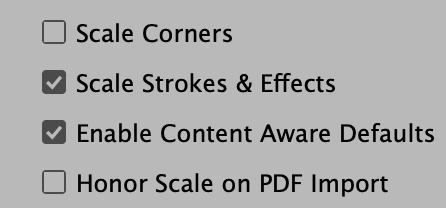
Is the issue with the strokes or with rounded corners? Scaling for those can be turned on / off in multiple places. Try Preferences > General.


~ Jane

1 reply

jane-e
Community Expert
jane-eCommunity ExpertCorrect answer
Community Expert
July 7, 2020

Hi

Is the issue with the strokes or with rounded corners? Scaling for those can be turned on / off in multiple places. Try Preferences > General.


~ Jane

avonmAuthor
Participant
July 7, 2020

YES!!!


Thank you Jane, saved a lot of time for me!!


Have a nice day/evening where ever you are 😉

jane-e
Community Expert
Community Expert
July 7, 2020

You're welcome, Avon, and I'm glad it's working now. 😊

~ Jane