
Inspiring
August 30, 2022
Question

Exact Corners "3D" Built Shape

  • August 30, 2022
  • 2 replies
  • 532 views

I'm needing to build a 3-dimensional box in Illustrator and can't remember how to 'cut the corners' so that they don't overlap past the image. It needs to have outside edges, so removing them will only make things harder on the overall work.
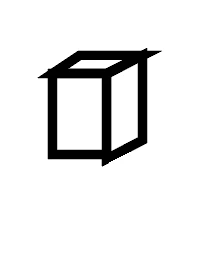
My anchor points are all in-line, which is good, but when I attempt to 'match' the corners perfectly, this is a struggle (line weight is 1pt, also width-specific).


Isn't there a way to match these so it looks cleaner? I swear I used to do this with older versions of the program.

This topic has been closed for replies.

2 replies

Doug A Roberts
Community Expert
Community Expert
August 30, 2022

You have a few options:

  1. Use a stroke aligned inside
  2. Use a stroke with rounded joints
  3. Draw the outside of the image as one complete path
  4. Outline the stroke and use Shape Builder/any editing method to get rid of the overlapping mitres


Just in case you don't understand why they are appearing: they are the mitres of each diamond shape in that drawing. They are a necessary effect of having abutting shapes with sharp corners

Inspiring
August 30, 2022

These are great ideas but with problems I've faced (unless I don't know what I'm doing... which is possible).

The image is being used for a technical drawing, and can/should have a similar feel to Lego instuctions (example below)


I'm responding to suggestions so we can hopefully come to a better understanding.

1. Aligned inside has a similar issue -

2. Rounded edges do not properly represent the item I am creating

3. They are already considered shapes, so Illustrator will not convert them

4. This one is close, but the faces are different colors/shades for clarity, and the problem still exists regardless of using the pen/rectangle tool because of multiple faces


Thank you for the great suggestions. I welcome more, if you have them

Doug A Roberts
Community Expert
Community Expert
August 30, 2022
quote

3. They are already considered shapes, so Illustrator will not convert them


By @Formost Fuji Corporate


How familiar are you with Illustrator? You need to construct your example like this if no other option is acceptable:

The internal lines must be separate from the external.


Inspiring
August 30, 2022

Theoretically, the box should be something similar to this, except with black outlines (created in Photoshop, not Illustrator, but need this as a vector, not pixel image)