
Participating Frequently
April 27, 2018
Answered

Export Artboards in JPG's

  • April 27, 2018
  • 3 replies
  • 1237 views

Okay, at work I'm using Illustrator CC. This is my issue, I have a multiple Artboards on one tab. I need to export the artboards individually as JPG's files. Now, basically, when I go to export >save as JPG and I have no options to export boards INDIVIDUALLY, just as a whole.

Now that I'm home on my laptop, I can't show a screenshot, because for some reason, I don't have this problem with my own Illustrator CC.

What am I doing wrong? I remember it being straightforward in my last version of illustrator. I need to simple exports all artboards on the same file as JPG's.

*Note I find it super easy to export PNG files  >File >Export>save for screens, easy. JPG's I can't do!
This topic has been closed for replies.
Correct answer Nitish Agarwal

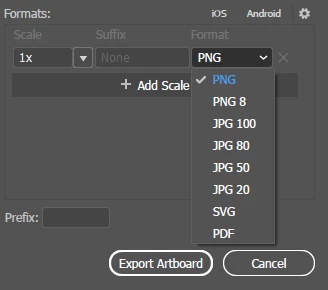
You can click on Format drop down in Export for Screens and Select the JPEG format out of it.

3 replies

Nitish Agarwal
Adobe Employee
Nitish AgarwalCorrect answer
Adobe Employee
April 27, 2018

You can click on Format drop down in Export for Screens and Select the JPEG format out of it.

Ares Hovhannesyan
Community Expert
Community Expert
April 27, 2018

Which version you use? In latest one you can use new Export Panel for exporting all artboards at one in many formats.

Collect assets and export in batches

Collect assets and export in batches

michelew83603738
Community Expert
Community Expert
April 27, 2018

You go to File>Export>then you should be able to click Use Artboards for either .png or .jpeg. You have this at home but not at work? Are they the same versions and platforms of AI?