
Export item to PNG / Import back Sizing Issues
Hey guys,
I'm trying to achieve the following with Illustrator's JSX scripting:
- Export an item to a PNG
- Import the item back to the document
- Adjust the imported PNG to match the size of the exported item
This is done in order to rasterize the item to a PNG which is then used down the road.
Unfortunately, the exported PNG does not match the sizes of the original item and when imported back gives results like:
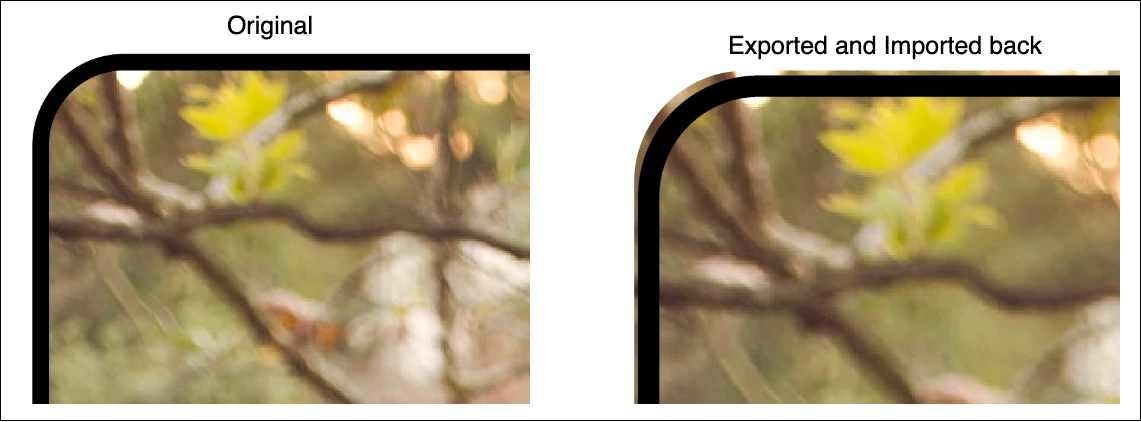
The script to achieve this is:
function exportItemToPng(item, saveFileDest) {
    var typename = item.typename;
    var itemsToBeDuplicated = [item];

    if (typename === "GroupItem" || typename === "Layer") {
        if (item.pageItems.length === 0) {
            return;
        }
        itemsToBeDuplicated = item.pageItems;
    }

    var newDocument = app.documents.add(activeDocument.documentColorSpace);
    app.coordinateSystem = CoordinateSystem.ARTBOARDCOORDINATESYSTEM;

    for (var i = 0; i < itemsToBeDuplicated.length; i++) {
        itemsToBeDuplicated[i].duplicate(newDocument.activeLayer, ElementPlacement.PLACEATEND);
    }
    app.executeMenuCommand('selectall');
    newDocument.artboards[0].artboardRect = newDocument.visibleBounds;
    var exportOptions = initExportOptions();
    var type = ExportType.PNG24;
    var pngFileToSave = new File(saveFileDest);
    app.activeDocument.exportFile(pngFileToSave, type, exportOptions);
    newDocument.close(SaveOptions.DONOTSAVECHANGES);

    function initExportOptions() {
        var exportOptions = new ExportOptionsPNG24();
        exportOptions.antiAliasing = true;
        exportOptions.transparency = true;
        exportOptions.saveAsHTML = false;
        exportOptions.horizontalScale = 720;
        exportOptions.verticalScale = 720;
        return exportOptions;
    }
}

function replaceWithFile(item, importFileLocation) {
    var fileToImport = new File(importFileLocation);

    if (item.typename === "Layer") {
        var pageItems = item.pageItems;

        if (pageItems.length == 0) {
            return;
        }

        // current selection is stored so that it can be restored after file replacement
        var oldSelection = app.selection;
        app.selection = null;

        // current layer properties are also stored for the same reason
        var oldProperties = extractLayerStatusProperties(item);
        prepareLayerForRasterization(item);

        /*
            All layer items are selected and grouped to properly create the new replacement file.
            Grouping ensures that items' reference is still kept even after deletion.
            Thus when selecting deleted item does not produce 'Object is invalid' error.

        */
        selectItems(pageItems);
        app.executeMenuCommand("group");
        var originalDimensions = extractDimensions(item.groupItems[0]);
        originalDimensions.absoluteZOrderPosition = item.absoluteZOrderPosition;
        pageItems.removeAll();
        app.executeMenuCommand("ungroup");
        var importedFile = item.groupItems.createFromFile(fileToImport);

        /*
            Ensure newly created file's dimensions match the layer's
            original dimensions
        */
        setRasterItemDimensions(importedFile, originalDimensions);

        /*
            Finally, we restore both the layer's original properties
            as well as the original selection
        */
        restoreLayerStatusProperties(item, oldProperties);
        selectItems(oldSelection);
    } else {
        var layer = item.parent;
        var oldActiveLayer = app.activeDocument.activeLayer;
        var oldProperties = extractLayerStatusProperties(layer);
        prepareLayerForRasterization(layer);
        layer.groupItems.createFromFile(fileToImport);
        app.executeMenuCommand("ungroup");
        setRasterItemDimensions(app.selection[0], item);
        restoreLayerStatusProperties(layer, oldProperties);
        app.activeDocument.activeLayer = oldActiveLayer;
    }

    function extractLayerStatusProperties(layer) {
        var properties = {};
        properties.selected = layer.selected;
        properties.locked = layer.locked;
        properties.visible = layer.visible;
        return properties;
    }

    /*
        Enables the modification of the layer,
        e.g. replacing its contents with a file
    */
    function prepareLayerForRasterization(layer) {
        app.activeDocument.activeLayer = layer;
        app.activeDocument.activeLayer.hasSelectedArtwork = true;
        layer.selected = true;
        layer.locked = false;
        layer.visible = true;
    }

    function selectItems(collection) {
        app.selection = null;
        for (var i = 0; i < collection.length; i++) {
            collection[i].selected = true;
        }
    }

    function extractDimensions(item) {
        var dimensions = {};
        dimensions.geometricBounds = item.geometricBounds;
        dimensions.width = item.width;
        dimensions.height = item.height;
        return dimensions;
    }

    function setRasterItemDimensions(rasterItem, dimensions) {
        rasterItem.height = dimensions.height;
        rasterItem.width = dimensions.width;
        rasterItem.absoluteZOrderPosition = dimensions.absoluteZOrderPosition;
        var originalBounds = dimensions.geometricBounds;
        rasterItem.position = new Array(originalBounds[0], originalBounds[1]);
    }

    function restoreLayerStatusProperties(item, properties) {
        item.selected = properties.selected;
        item.locked = properties.locked;
        item.visible = properties.visible;
    }
}

exportItemToPng(item, assetName);
replaceWithFile(item, assetName);
The main idea here is so that the file is first exported, then placed back at the original one's place.
My understanding is that this happens due to Illustrator using this as its export options:
exportOptions.horizontalScale = 720;
exportOptions.verticalScale = 720;
Nomatter what values I input the result differs from the original.
My question is - is it possible for an exported PNG to exactly match the item that was exported, if it's even possible when exporting with PNG (or alternatively, any other format)?
 AdChoices