Known Participant
July 14, 2018
Answered

Export only one artboard as a new .ai file

  • July 14, 2018
  • 3 replies
  • 2882 views

Hi.

I have three artboards. Is possible save only one artboard as a new .ai file or I have create file copy, open the  faile and delete the other two artboards?

If is possible... How? I don't find how.

Thanks

This topic has been closed for replies.
Correct answer edgrimley

3 replies

CuriosoAuthor
Known Participant
July 15, 2018

I don't get it.

Yesterday at the end I had to go. I turned off the computer. I just turned it on, I went back into Illustrator and now if that second window comes out ...

Weird things from computers! It seemed strange to me that illustrator could'nt do this.

Thank's so much for everything

edgrimleyCorrect answer
Participating Frequently
July 14, 2018

CuriosoAuthor
Known Participant
July 14, 2018

At the time I tried it as export but it turns out to be disabled.

Monika Gause
Community Expert
Community Expert
July 14, 2018

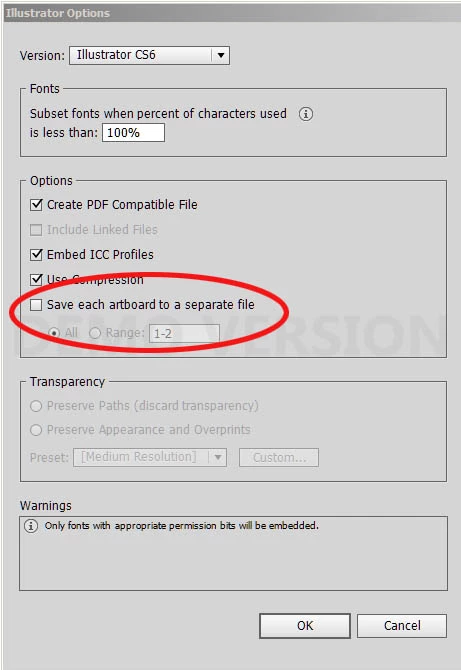
click ok and wait for the second dialog box

Monika Gause
Community Expert
Community Expert
July 14, 2018

"Save a copy" as an AI file. Then in the second dialog box enter the artboard you want to save