
New Participant
March 15, 2009
Answered

Export only what's inside artboard

  • March 15, 2009
  • 4 replies
  • 250740 views
Hi

I have an object whose shadow strays outside the artboard, but I'm
interested in exporting to jpg only what is inside the artboard. As
it is, I have to manually crop the exported jpg using paint shop.

I tried drawing a slice, but I don't see a way of just exporting the
slice.

sorry for the newbie question. thanks in advance.
Correct answer vibhootik75035315

Hello Everyone

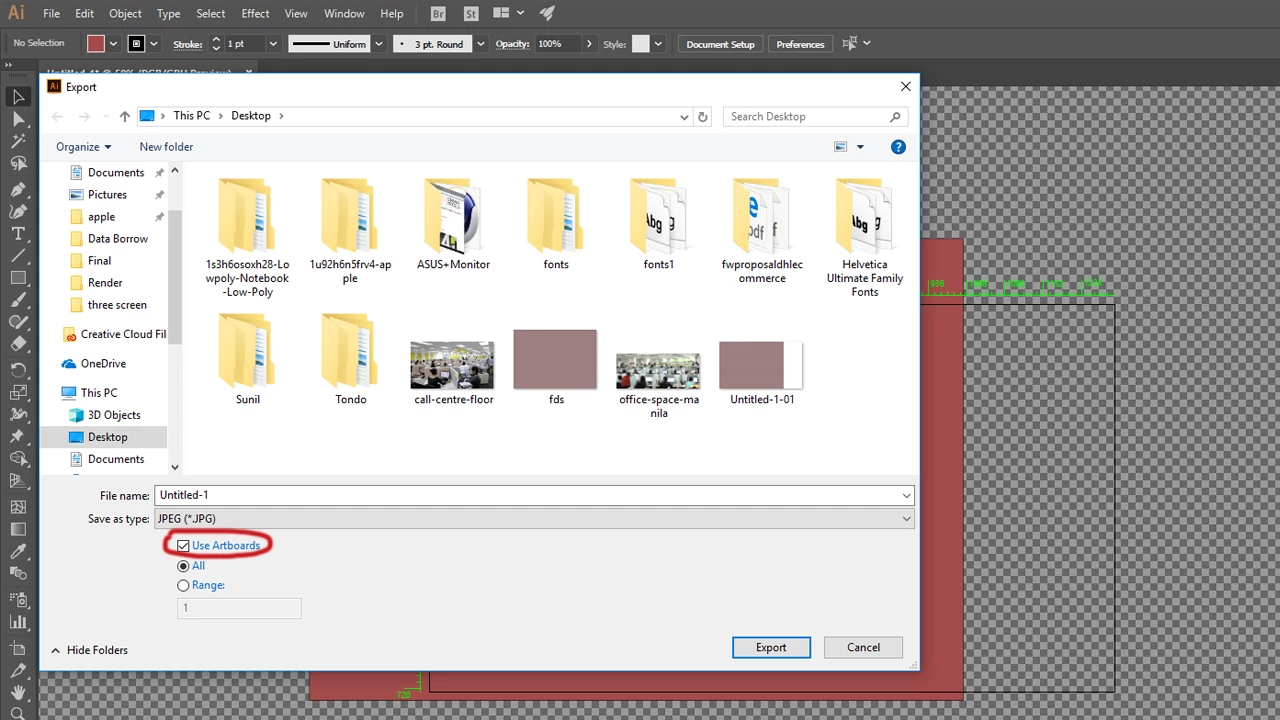
If you want to export Only artboard area in illustrator CC.

Go to Export> Export As >Check  "Use Artboards".

And choose  desired formate. And then Click On Export.

Thanks

vibhooti kishor

4 replies

New Participant
January 19, 2024

I also had the same problem, and despite all the solutions here it didn't help me - export for web made the image fuzzy.


I found the solution - check "export for screens" and if "include bleed" is checked, "export as" will also include bleed!


uncheck include bleed in export for screens, then "export as" will also not include bleed.

vibhootik75035315Correct answer
New Participant
December 12, 2017

Hello Everyone

If you want to export Only artboard area in illustrator CC.

Go to Export> Export As >Check  "Use Artboards".

And choose  desired formate. And then Click On Export.

Thanks

vibhooti kishor

New Participant
June 21, 2018

The only problem with this option is it was leaving a white border around my file. Save for the web got rid of the white border.

Participating Frequently
March 15, 2009
No Prob.
Participating Frequently
March 15, 2009
Use the Save For Web option, and under the Image Size tab, check the box for "Crop to Artboard".
New Participant
March 15, 2009
that was easy, thanks!