
Participant
May 22, 2020
Answered

Export Tiled Artboard as PDF and Retain Layers.

  • May 22, 2020
  • 2 replies
  • 3641 views

Hi There, 

I'm working with Illustrator CS6. I'm drafting sewing patterns in several sizes which sometimes are larger than A4.

I need to export these layers into 4 x A4 PDFs tiled from my larger artboards, as they are to be part of a complete A4 document. I am able to tile the artboard and not retain layers in the PDF or retain layers in the PDF and not tile the artboard.

I have tried printing to postscript and converting in distiller. and have tried exporting and saving as to PDF with tiles in more ways than I can remember.

Any advice would be greatly appreciated.

If this isnt possible.. is there a way I can seperate my A2 artboard into 4 A4 and split my objects with them?
This topic has been closed for replies.
Correct answer Ton Frederiks

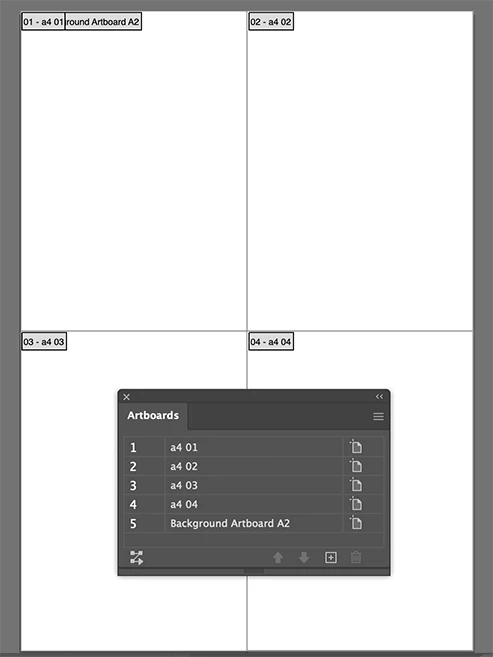
Yes, you can create 4 A4 rectangles and convert each to artboards (Object > Artboards > Convert to Artboards).

You can keep the large artboard too,

Save as PDF

2 replies

Ton Frederiks
Community Expert
Community Expert
May 22, 2020

I did resave my link as a CS6 compatible file.

Ton Frederiks
Community Expert
Ton FrederiksCommunity ExpertCorrect answer
Community Expert
May 22, 2020

Yes, you can create 4 A4 rectangles and convert each to artboards (Object > Artboards > Convert to Artboards).

You can keep the large artboard too,

Save as PDF

Participant
April 20, 2023

Could you please re-share this link? I am unable to access the file and this would be very helpful for me!

Participant
April 20, 2023

I do not have the file anymore, but the image should show you how it is done


Thanks! I see the image now, for some reason I couldn't see it before.