
Exit
  • Global community
    • Language:
      • Deutsch
      • English
      • Español
      • Français
      • Português
  • 日本語コミュニティ
  • 한국 커뮤니티
0

Export Tiled Artboard as PDF and Retain Layers.

New Here ,
May 22, 2020 May 22, 2020

Hi There, 

I'm working with Illustrator CS6. I'm drafting sewing patterns in several sizes which sometimes are larger than A4.

I need to export these layers into 4 x A4 PDFs tiled from my larger artboards, as they are to be part of a complete A4 document. I am able to tile the artboard and not retain layers in the PDF or retain layers in the PDF and not tile the artboard.

I have tried printing to postscript and converting in distiller. and have tried exporting and saving as to PDF with tiles in more ways than I can remember.

Any advice would be greatly appreciated.

If this isnt possible.. is there a way I can seperate my A2 artboard into 4 A4 and split my objects with them?
TOPICS
Import and export
3.8K
Translate
Report
Community guidelines
Be kind and respectful, give credit to the original source of content, and search for duplicates before posting. Learn more
community guidelines

correct answers 1 Correct answer

Community Expert , May 22, 2020 May 22, 2020

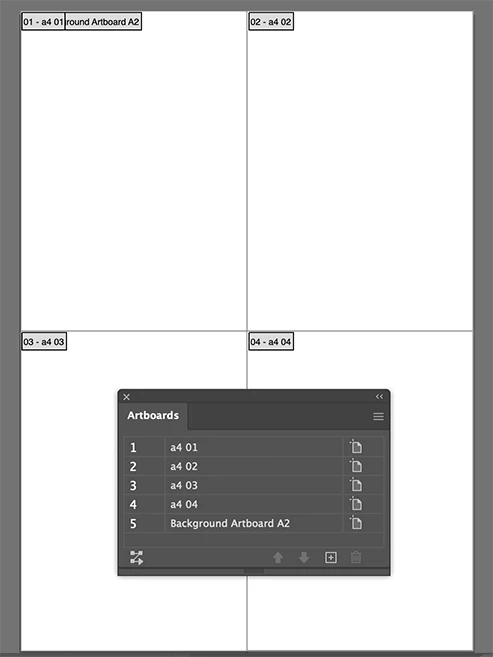
Yes, you can create 4 A4 rectangles and convert each to artboards (Object > Artboards > Convert to Artboards).

You can keep the large artboard too,

Save as PDF

tiled.png

Translate
Adobe
Community Expert ,
May 22, 2020 May 22, 2020

Yes, you can create 4 A4 rectangles and convert each to artboards (Object > Artboards > Convert to Artboards).

You can keep the large artboard too,

Save as PDF

tiled.png

Translate
Report
Community guidelines
Be kind and respectful, give credit to the original source of content, and search for duplicates before posting. Learn more
community guidelines
New Here ,
May 23, 2020 May 23, 2020

Brilliant! Thankyou so much, I had a feeling I was over thinking it xD 

Much appreciated 🙂

Translate
Report
Community guidelines
Be kind and respectful, give credit to the original source of content, and search for duplicates before posting. Learn more
community guidelines
Community Expert ,
May 23, 2020 May 23, 2020

Good to hear that helped.

Translate
Report
Community guidelines
Be kind and respectful, give credit to the original source of content, and search for duplicates before posting. Learn more
community guidelines
New Here ,
Apr 20, 2023 Apr 20, 2023

Could you please re-share this link? I am unable to access the file and this would be very helpful for me!

Translate
Report
Community guidelines
Be kind and respectful, give credit to the original source of content, and search for duplicates before posting. Learn more
community guidelines
Community Expert ,
Apr 20, 2023 Apr 20, 2023

I do not have the file anymore, but the image should show you how it is done

Translate
Report
Community guidelines
Be kind and respectful, give credit to the original source of content, and search for duplicates before posting. Learn more
community guidelines
New Here ,
Apr 20, 2023 Apr 20, 2023

Thanks! I see the image now, for some reason I couldn't see it before. 

Translate
Report
Community guidelines
Be kind and respectful, give credit to the original source of content, and search for duplicates before posting. Learn more
community guidelines
Community Expert ,
Apr 20, 2023 Apr 20, 2023
LATEST

That's possible, I could not find the link and substituted it for an image I made today. Hope that helps.

Translate
Report
Community guidelines
Be kind and respectful, give credit to the original source of content, and search for duplicates before posting. Learn more
community guidelines
Community Expert ,
May 22, 2020 May 22, 2020

I did resave my link as a CS6 compatible file.

Translate
Report
Community guidelines
Be kind and respectful, give credit to the original source of content, and search for duplicates before posting. Learn more
community guidelines