
Participant
August 10, 2021
Answered

Exported Illustrator JPEG (.JPG) Turning Black When Opened

  • August 10, 2021
  • 4 replies
  • 16222 views

Hello! Whenever I export a file from Adobe Illustrator, when I open it up I can see the image for a second and then the file turns black. I'm using Windows (normally I'm a Mac user) and I'm exporting files in the same way I would as if I was using a Mac. Anyone know why this is happening? It also happens to people when I email them the file. Thank you!
This topic has been closed for replies.
Correct answer Anshul_Saini

Hi there,


Sorry to hear about this trouble. Some users have reported this issue. Are you using the Photos app to view the CMYK jpegs? Recently, there was a bug CMYK images turned black while viewing them in the Windows Photos app, but they looked fine in Paint or Windows Photo Viewer apps. If you are facing a similar issue, please try one of these workarounds

until it gets fixed by the Microsoft Windows Product team:

  • Export images in RGB
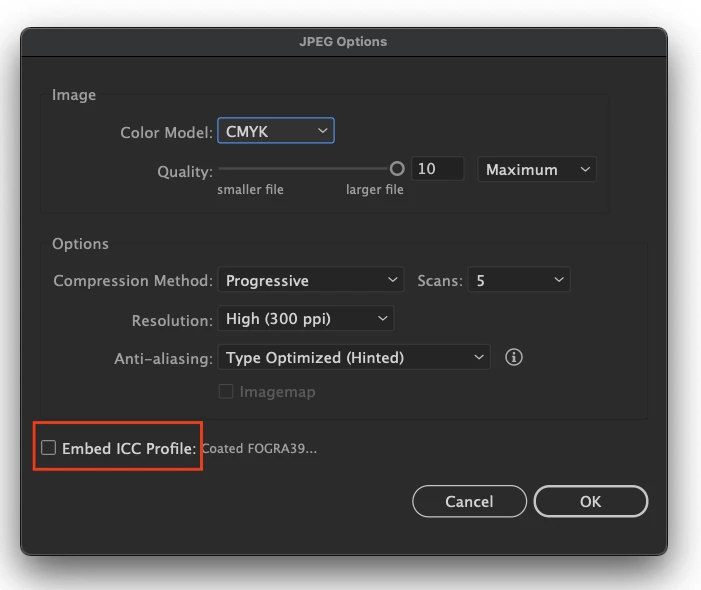
  • While exporting the images, uncheck the Embed ICC Profile option.
  • Open the images by default in the Windows Photo viewer app.


Let us know if you need any further assistance; we'd be happy to help.


Thanks & Regards,

Anshul Saini

4 replies

elpisk
Participant
October 9, 2021

will they fix it? still the problem exists, if i export files for screen there is no option for unchecking the embed ICC profile and files turn black.

Monika Gause
Community Expert
Community Expert
October 9, 2021

You mean Microsoft?

It's their viewer that doesn't display CMYK images.

elpisk
Participant
October 9, 2021

yes, microsoft, i see, thank you for your answer, but they should probably fix the display of CMYK then. 

Inspiring
August 24, 2021

I have the same issue


Ton Frederiks
Community Expert
Community Expert
August 24, 2021

Did you try the solutions given above (or complain to Microsoft)?

Anshul_Saini
Community Manager
Anshul_SainiCommunity ManagerCorrect answer
Community Manager
August 10, 2021

Hi there,


Sorry to hear about this trouble. Some users have reported this issue. Are you using the Photos app to view the CMYK jpegs? Recently, there was a bug CMYK images turned black while viewing them in the Windows Photos app, but they looked fine in Paint or Windows Photo Viewer apps. If you are facing a similar issue, please try one of these workarounds

until it gets fixed by the Microsoft Windows Product team:

  • Export images in RGB
  • While exporting the images, uncheck the Embed ICC Profile option.
  • Open the images by default in the Windows Photo viewer app.


Let us know if you need any further assistance; we'd be happy to help.


Thanks & Regards,

Anshul Saini

Participant
September 3, 2021

Thanks for the solution.

I had the same issue opening the image with Windows default photo viewer app. Then, I tried uncheck the ICC Profile, it worked seemingly, I was able to view the image in my PC.

But then there is another issue, when I use the image to build an eDM with eMarketing system, the color od the image went all wrong.

This is a bit annoying. 

Ton Frederiks
Community Expert
Community Expert
August 10, 2021

Are these RGB or CMYK jpegs? CMYK is not alwayse supported by viewing apps.

G1997Author
Participant
August 10, 2021

They were exported as CMYK. I just tried exporting as RGB and it fixed my problem! My follow up question is though- if I'm sending this file for someone to print, how will the printing turn out? 

Monika Gause
Community Expert
Community Expert
August 10, 2021

Why would you want to send a JPEG for printing?

Send a PDF.


It will depend on the printer. You need to ask them what kind of file they want for printing. If they insist on a CMYK JPEG then I would assume they have the equipment to print from that.