
Exported images from Illustrator missing parts of 1-bit tiff art
Hi everyone,
I've been having this problem since the upgrade to V22. When exporting an Illustrator image that contains 1-bit tiff images, the results are haphazard. Some parts export, but chunks of the 1-bit tiff are missing.
I've tried exporting in a number of formats (PSD with and without layers) and in RGB and CMYK. I've tried ungrouping. I've tried unchecking the overprinting attributes. I've tried different antialiasing options. I've tried going around exporting and opening the AI files with Photoshop. Even copying the shapes with the 1-bit images and pasting in to Photoshop gives me art with chunks missing.
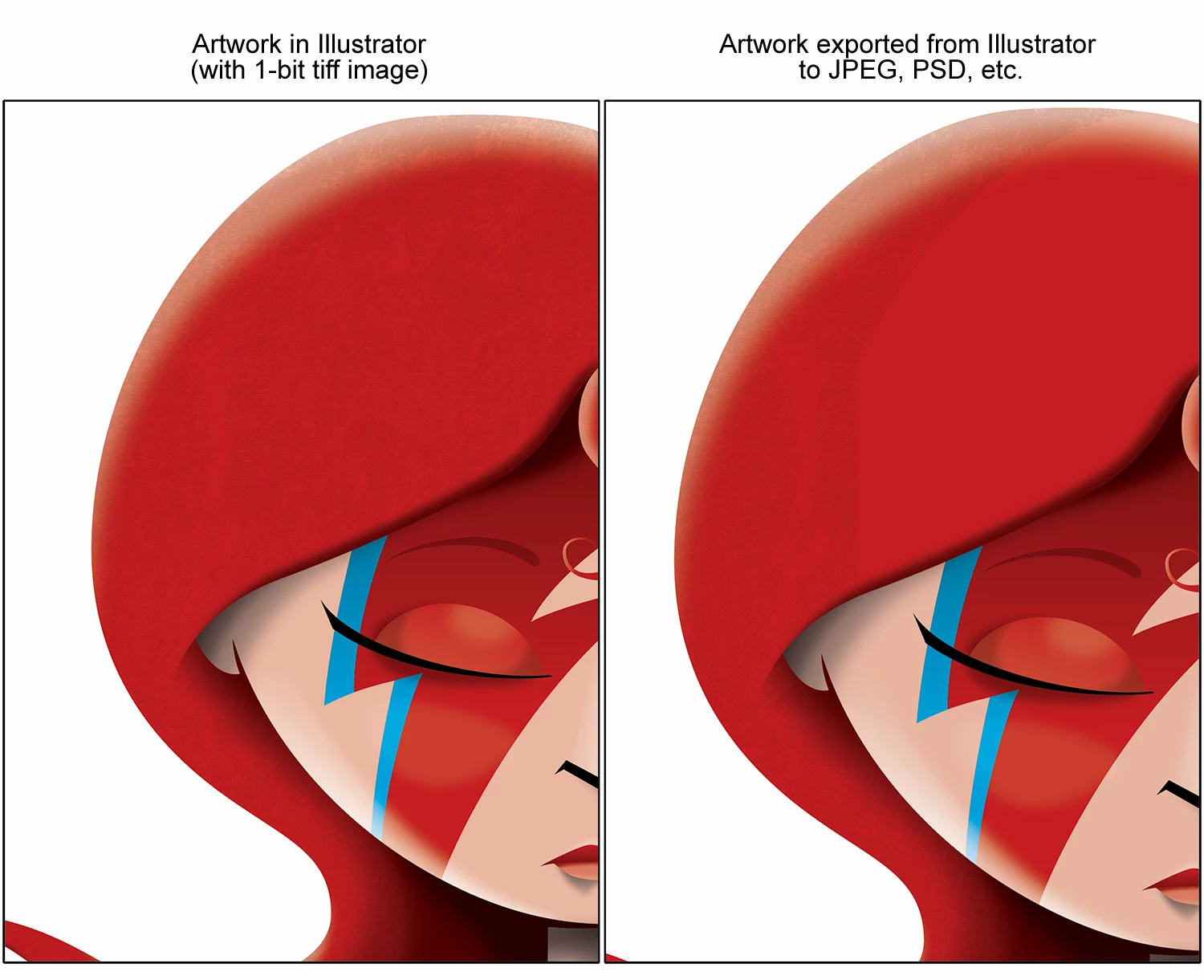
Below is an example. The image on the left is the art showing the 1-bit texture in the hair, but when exported, the tiff image is strangely cut off. This is happening with any of my illustrations that have 1-bit tiff files embedded (or linked).
I would really appreciate any help!
 AdChoices