
Participant
January 6, 2021
Answered

exported PDF larger than artboard size

  • January 6, 2021
  • 1 reply
  • 3016 views

Hi, I created artboards of 1945 x 1257px which, when viewed in Illustrator at 100% are just slightly smaller than the size of my screen, but when I export these artboards to PDF the scale is suddenly much larger. If I view them at 100% in Acrobat, they are much bigger than they should be, about 130% of the Illustrator artboards. Why is 100% in Acrobat not the same as 100% in Illustrator? 


Ai document raster settings are 72dpi. Exported PDF is set "Smallest file size" with mage compression set to 72dpi. No matter what settings I change, the PDF in Acrobat is always bigger. 


I've been using Illustrator for many years and I don't remember ever having run into this problem before. I recently bought a new Macbook pro and installed Illustrator. Is there some setting I missed??


Thanks 
This topic has been closed for replies.
Correct answer Doug A Roberts

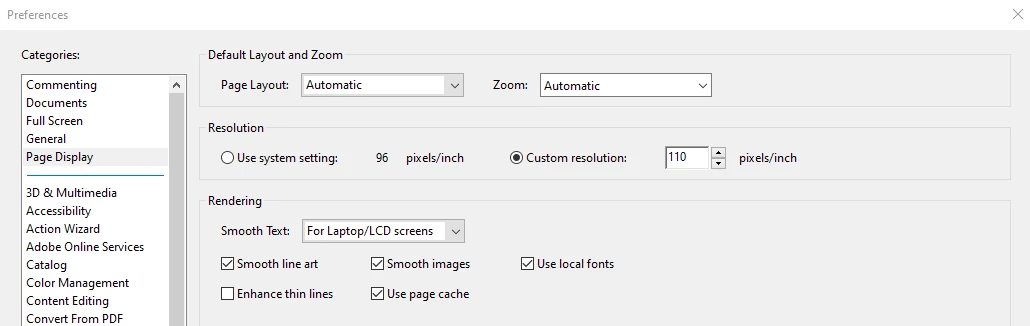
Probably because, in Acrobat, you can specify what screen resolution you want it to simulate (in PPI), and this setting may not match that of Illustrator.


1 reply

Doug A Roberts
Community Expert
Doug A RobertsCommunity ExpertCorrect answer
Community Expert
January 6, 2021

Probably because, in Acrobat, you can specify what screen resolution you want it to simulate (in PPI), and this setting may not match that of Illustrator.


radhikan2408
Participant
March 21, 2024

Hello,

I am having the same issue where my artboard size is bigger than intended size when I export in pdf. I want to export in 300 ppi as it's for printing on wallpaper. So how can i maintain the ppi and keep the board to the size I want as I export to pdf?


Ton Frederiks
Community Expert
Community Expert
March 21, 2024

A PDF does not have a resolution, images in a PDF have a resolution.

Can you describe what kind of artwork (vector, images or both) you save from Illustrator as PDF?