
Participant
July 19, 2017
Answered

Exporting drop shadow with clear background

  • July 19, 2017
  • 3 replies
  • 7703 views

Hello, I created a logo whitch has a drop shadow effect however when I try to export it to PNG to have a clear background the drop shadow disappears. Can anyone advise me what would be the bast way to export the Logo with the drop shadow and clear background? 
    This topic has been closed for replies.
    Correct answer Bill Silbert

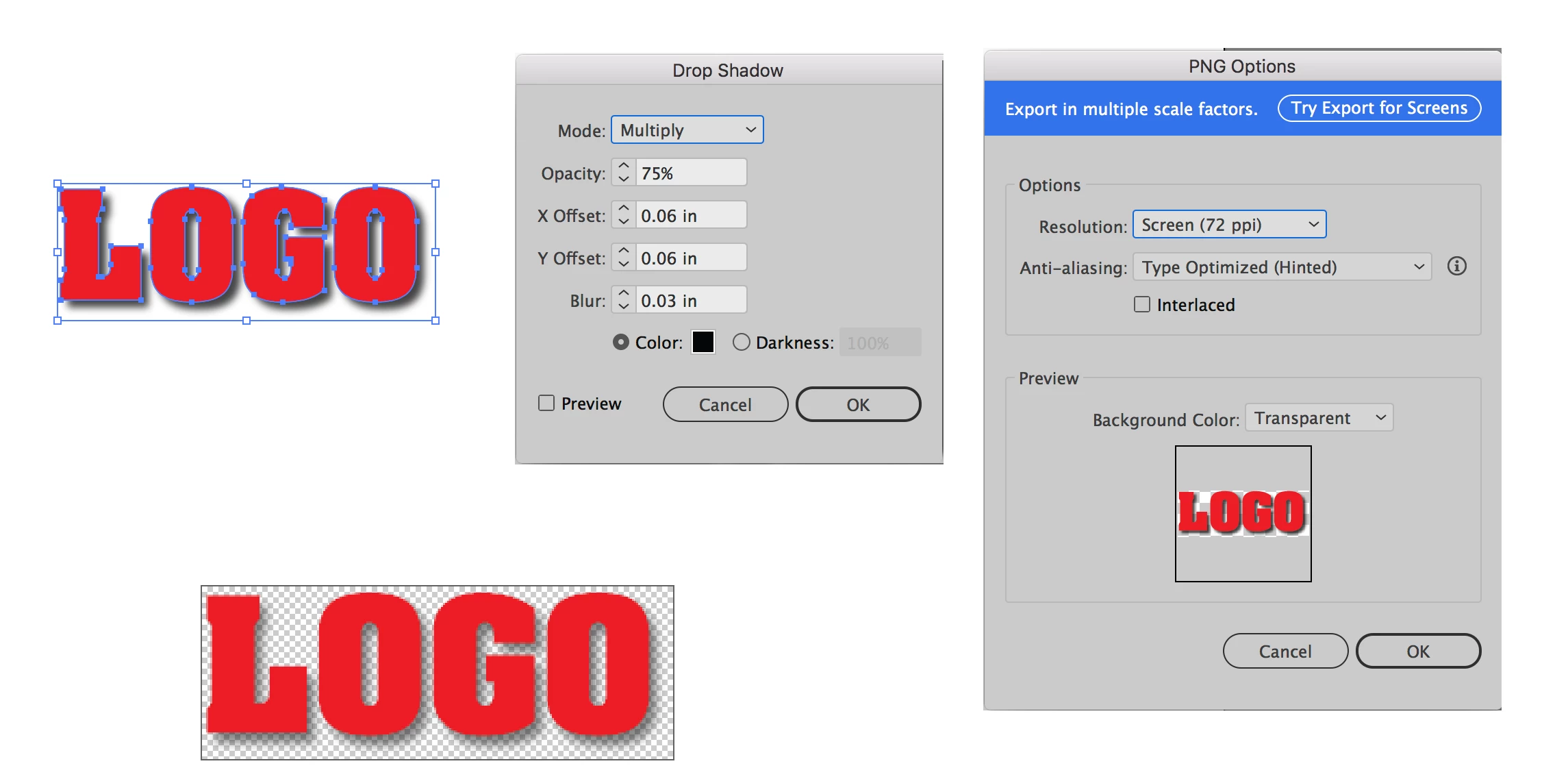
    If you have followed the steps in the screen shot below your drop shadow should export with your logo.

    The drop shadow has been applied in Illustrator using the Drop Shadow feature found through the Effects Menu>Stylize. Then the file is exported by going through File>Export>Export As>PNG. The file then will retain transparency as shown in the bottom left screen shot of the logo opened in Photoshop.

    3 replies

    Bill Silbert
    Community Expert
    Bill SilbertCommunity ExpertCorrect answer
    Community Expert
    July 19, 2017

    If you have followed the steps in the screen shot below your drop shadow should export with your logo.

    The drop shadow has been applied in Illustrator using the Drop Shadow feature found through the Effects Menu>Stylize. Then the file is exported by going through File>Export>Export As>PNG. The file then will retain transparency as shown in the bottom left screen shot of the logo opened in Photoshop.

    Monika Gause
    Community Expert
    Community Expert
    July 19, 2017

    https://forums.adobe.com/people/Bill+Silbert  schrieb

    If you have followed the steps in the screen shot below your drop shadow should export with your logo.

    It should export as PNG correctly no matter which export way you choose.

    Kurt Gold
    Community Expert
    Community Expert
    July 19, 2017

    Which version of Illustrator are you using?

    What do you mean by "clear background"? How are you exporting the document? What export settings are you using?

    Also, you may post a screenshot that shows your issue.

    Monika Gause
    Community Expert
    Community Expert
    July 19, 2017

    Please show how this looks in Illustrator?

    How exactly do you export it?

    Which version?

    Which system?

    Marie0220Author
    Participant
    July 19, 2017

    I use llustrator CS6 I exported the file as PNG 8 and PNG 24 also as Gif, I will upload a screenshot if I'm able later.