

m1b
Community Expert
Community Expert
June 2, 2023
Answered

[ExtendScript] Get bounds of selected text

  • June 2, 2023
  • 4 replies
  • 1025 views

Hi all, I've been asked (by @danezeq) in the Indesign forum to convert a script I wrote for returning the bounds of selected text to an Illustrator version.


Examples:
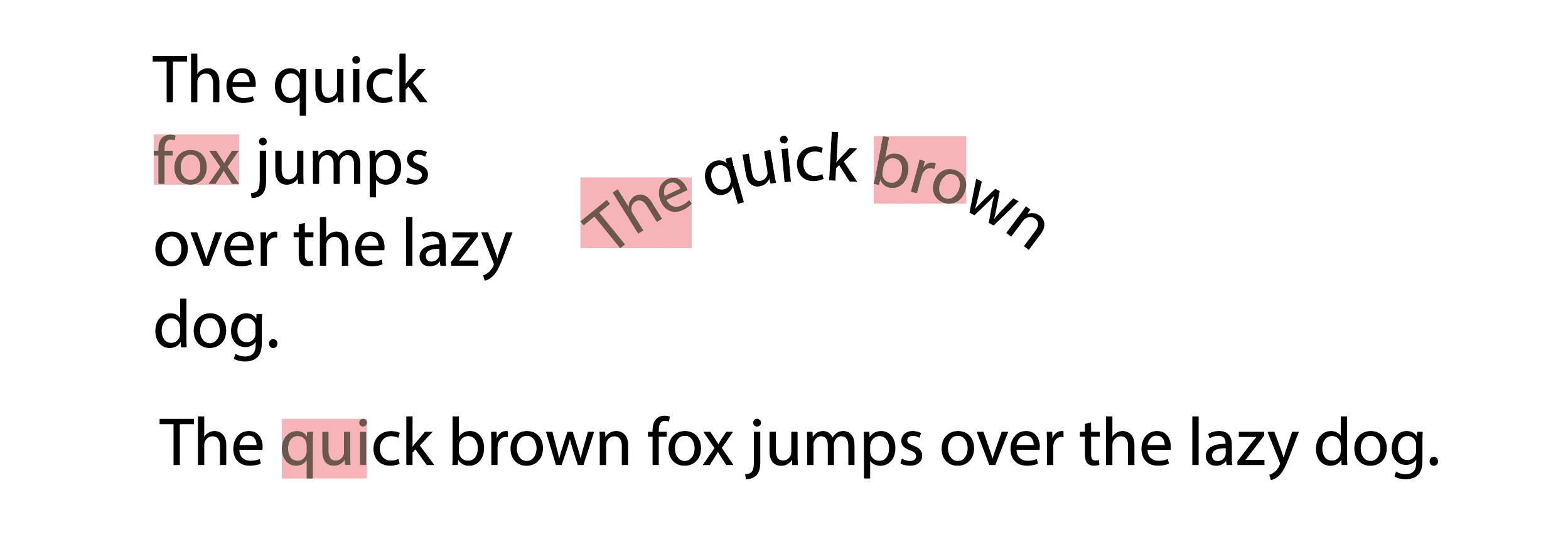
The rectangles are just for demonstration purposes—you can do whatever you like with the bounds.


Here is the script. It will need some testing, so let me know if you find bugs.

- Mark


/**
 * Draw rectangle showing selected text's bounds.
 * @author m1b
 * @discussion https://community.adobe.com/t5/illustrator-discussions/how-to-draw-a-graphic-on-hidden-character-in-illustrator/m-p/13833618
 */
(function () {

    var doc = app.activeDocument,
        text = doc.selection,
        bounds = getTextOutlineBounds(text);

    if (bounds == undefined) {
        alert('Could not calculate bounds. Please select some text and try again.');
        return;
    }

    // draw a rectangle just for showing the bounds
    var rect = doc.pathItems.rectangle(bounds[1], bounds[0], bounds[2] - bounds[0], -(bounds[3] - bounds[1])); // TLWH
    rect.fillColor = doc.swatches[4].color;
    rect.opacity = 30;

})();


/**
 * Returns bounds of Text object [L, T, R, B].
 * @author m1b
 * @version 2023-06-02
 * @param {Text|Paragraph|Line|Word|Character} text - an Indesign text object.
 * @returns {Array<Number>} - the bounds [T, L, B, R].
 */
function getTextOutlineBounds(text) {

    var bounds;

    if (text.constructor.name == 'Array') {

        // process each element of array
        for (var i = 0; i < text.length; i++)
            bounds = expandBoundsForIllustrator(bounds, getTextOutlineBounds(text[i]));

        return bounds;

    }

    else if (text.constructor.name == 'TextFrame') {
        // process the text of the text frame
        return getTextOutlineBounds(text.textRange);
    }

    else if (
        !text.hasOwnProperty('characters')
        || text.characters.length == 0
        || !text.hasOwnProperty('fillColor')
    )
        // can't work with this
        return;

    var tf = text.parent.textFrames[0],
        arbitraryValue = 61.803;

    // we'll paint the text with this
    // color so that when it's outlined,
    // we can differentiate it
    var markerColor = new CMYKColor();
    markerColor.cyan = arbitraryValue;
    markerColor.magenta = arbitraryValue;
    markerColor.yellow = arbitraryValue;
    markerColor.black = arbitraryValue;

    var dup = tf.duplicate(),
        start = text.start,
        end = text.end;

    // mark the selected characters
    for (var i = start; i < end; i++)
        dup.characters[i].fillColor = markerColor;

    // a stringified version for matching purposes
    var matchMarker = stringify(dup.characters[start].fillColor);

    // the outlines are always compoundPathItems
    var outlines = dup.createOutline().compoundPathItems;

    // find the marked outlines
    for (var i = 0; i < outlines.length; i++)
        if (stringify(outlines[i].pathItems[0].fillColor) == matchMarker)
            bounds = expandBoundsForIllustrator(bounds, outlines[i].visibleBounds);

    // delete temporary items
    for (var i = outlines.length - 1; i >= 0; i--)
        outlines[i].remove();

    return bounds;

};


/**
 * Returns bounds that encompass both bounds.
 * @author m1b
 * @version 2022-07-24
 * @param {Array} b1 - bounds array [l, t, r, b].
 * @param {Array} b2 - bounds array [l, t, r, b].
 * @returns {Array} - the encompassing bounds.
 */
function expandBoundsForIllustrator(b1, b2) {

    if (!b1 && !b2)
        return;

    if (!b1 && b2)
        return b2.slice();

    if (!b2 && b1)
        return b1.slice();

    var expanded = b2.slice();

    for (var i = 0; i < 4; i++) {
        if (b1[i] != undefined && b2[i] == undefined) expanded[i] = b1[i];
        if (b1[i] == undefined && b2[i] != undefined) expanded[i] = b2[i];
        if (b1[i] == undefined && b2[i] == undefined) return;
    }

    if (b1[0] < b2[0]) expanded[0] = b1[0];
    if (b1[1] > b2[1]) expanded[1] = b1[1];
    if (b1[2] > b2[2]) expanded[2] = b1[2];
    if (b1[3] < b2[3]) expanded[3] = b1[3];

    return expanded;

};


/**
 * Stringify tailored for the purpose
 * of identifying identical Swatches.
 * @author m1b
 * @version 2023-04-26
 * @param {Object} obj - the object to stringify.
 * @returns {String}
 */
function stringify(obj) {

    var str = obj.toString();

    for (var key in obj) {

        if (!obj.hasOwnProperty(key))
            continue;

        if (
            key == 'spot'
            || key == 'color'
        )
            str += stringify(obj[key]);

        else
            str += (obj[key]);

    }

    return str;

};


This topic has been closed for replies.
Correct answer Sergey Osokin

I added to Mark's code 1) the exact color for the rectangle instead of the unpredictable swatch index, 2) get selected text layer to create the rectangle, and 3) the isSelectRect boolean key to select the rectangle after the script runs.


/**
 * Draw rectangle showing selected text's bounds.
 *  m1b
 * @discussion https://community.adobe.com/t5/illustrator-discussions/how-to-draw-a-graphic-on-hidden-character-in-illustrator/m-p/13833618
 */
(function () {

    var isSelectRect = true,
        doc = app.activeDocument,
        text = doc.selection,
        bounds = getTextOutlineBounds(text);

    if (bounds == undefined) {
        alert('Could not calculate bounds. Please select some text and try again.');
        return;
    }

    var rectColor = new CMYKColor();
    rectColor.cyan   = 0;
    rectColor.magenta = 100;
    rectColor.yellow = 100;
    rectColor.black  = 0;
    var lay = (text.typename == 'TextRange') ? text.parent.textFrames[0].layer : text[0].layer;

    // draw a rectangle just for showing the bounds
    var rect = lay.pathItems.rectangle(bounds[1], bounds[0], bounds[2] - bounds[0], -(bounds[3] - bounds[1])); // TLWH
    rect.fillColor = rectColor;
    rect.opacity = 30;
    // reset text selection requires CS6 or CC
    if (parseInt(app.version) >= 16 && isSelectRect) {
      app.executeMenuCommand('deselectall');
      rect.selected = true;
    }
})();


/**
 * Returns bounds of Text object [L, T, R, B].
 *  m1b
 *  2023-06-02
 *  {Text|Paragraph|Line|Word|Character} text - an Indesign text object.
 *  {Array<Number>} - the bounds [T, L, B, R].
 */
function getTextOutlineBounds(text) {

    var bounds;

    if (text.constructor.name == 'Array') {

        // process each element of array
        for (var i = 0; i < text.length; i++)
            bounds = expandBoundsForIllustrator(bounds, getTextOutlineBounds(text[i]));

        return bounds;

    }

    else if (text.constructor.name == 'TextFrame') {
        // process the text of the text frame
        return getTextOutlineBounds(text.textRange);
    }

    else if (
        !text.hasOwnProperty('characters')
        || text.characters.length == 0
        || !text.hasOwnProperty('fillColor')
    )
        // can't work with this
        return;

    var tf = text.parent.textFrames[0],
        arbitraryValue = 61.803;

    // we'll paint the text with this
    // color so that when it's outlined,
    // we can differentiate it
    var markerColor = new CMYKColor();
    markerColor.cyan = arbitraryValue;
    markerColor.magenta = arbitraryValue;
    markerColor.yellow = arbitraryValue;
    markerColor.black = arbitraryValue;

    var dup = tf.duplicate(),
        start = text.start,
        end = text.end;

    // mark the selected characters
    for (var i = start; i < end; i++)
        dup.characters[i].fillColor = markerColor;

    // a stringified version for matching purposes
    var matchMarker = stringify(dup.characters[start].fillColor);

    // the outlines are always compoundPathItems
    var outlines = dup.createOutline().compoundPathItems;

    // find the marked outlines
    for (var i = 0; i < outlines.length; i++)
        if (stringify(outlines[i].pathItems[0].fillColor) == matchMarker)
            bounds = expandBoundsForIllustrator(bounds, outlines[i].visibleBounds);

    // delete temporary items
    for (var i = outlines.length - 1; i >= 0; i--)
        outlines[i].remove();

    return bounds;

};


/**
 * Returns bounds that encompass both bounds.
 *  m1b
 *  2022-07-24
 *  {Array} b1 - bounds array [l, t, r, b].
 *  {Array} b2 - bounds array [l, t, r, b].
 *  {Array} - the encompassing bounds.
 */
function expandBoundsForIllustrator(b1, b2) {

    if (!b1 && !b2)
        return;

    if (!b1 && b2)
        return b2.slice();

    if (!b2 && b1)
        return b1.slice();

    var expanded = b2.slice();

    for (var i = 0; i < 4; i++) {
        if (b1[i] != undefined && b2[i] == undefined) expanded[i] = b1[i];
        if (b1[i] == undefined && b2[i] != undefined) expanded[i] = b2[i];
        if (b1[i] == undefined && b2[i] == undefined) return;
    }

    if (b1[0] < b2[0]) expanded[0] = b1[0];
    if (b1[1] > b2[1]) expanded[1] = b1[1];
    if (b1[2] > b2[2]) expanded[2] = b1[2];
    if (b1[3] < b2[3]) expanded[3] = b1[3];

    return expanded;

};


/**
 * Stringify tailored for the purpose
 * of identifying identical Swatches.
 *  m1b
 *  2023-04-26
 *  {Object} obj - the object to stringify.
 *  {String}
 */
function stringify(obj) {

    var str = obj.toString();

    for (var key in obj) {

        if (!obj.hasOwnProperty(key))
            continue;

        if (
            key == 'spot'
            || key == 'color'
        )
            str += stringify(obj[key]);

        else
            str += (obj[key]);

    }

    return str;

};


4 replies

m1b
Community Expert
m1bCommunity ExpertAuthor
Community Expert
June 5, 2023

Thank you all for testing and for your improvements @Sergey Osokin. @Egor Chistyakov good pickup about the locked layer problem and the swatch.


I didn't focus on drawing the rectangle—you can put it in any swatch you want, or just get rid of that part—the function getTextOutLineBounds is the real script. Drawing the rectangle was just a quick example—in most cases you wouldn't want that, but it was handy to show that the function returned a sensible result.


Thanks again, and @Charu Rajput, for giving it a run. 🙂

- Mark

Egor Chistyakov
Inspiring
June 5, 2023

@m1b, I decided to read the original post. So it’s all about my precious font height options 🙂 I could have guessed.

Egor Chistyakov
Inspiring
June 5, 2023

Hey, this can shave off some time in some cases!

Testing... Gives error when the top layer is locked and the selected art is on a layer below.

A choise of a fill to apply was strange in my case — the standard b/w gradient.

Sergey Osokin
Sergey OsokinCorrect answer
Inspiring
June 5, 2023

I added to Mark's code 1) the exact color for the rectangle instead of the unpredictable swatch index, 2) get selected text layer to create the rectangle, and 3) the isSelectRect boolean key to select the rectangle after the script runs.


/**
 * Draw rectangle showing selected text's bounds.
 *  m1b
 * @discussion https://community.adobe.com/t5/illustrator-discussions/how-to-draw-a-graphic-on-hidden-character-in-illustrator/m-p/13833618
 */
(function () {

    var isSelectRect = true,
        doc = app.activeDocument,
        text = doc.selection,
        bounds = getTextOutlineBounds(text);

    if (bounds == undefined) {
        alert('Could not calculate bounds. Please select some text and try again.');
        return;
    }

    var rectColor = new CMYKColor();
    rectColor.cyan   = 0;
    rectColor.magenta = 100;
    rectColor.yellow = 100;
    rectColor.black  = 0;
    var lay = (text.typename == 'TextRange') ? text.parent.textFrames[0].layer : text[0].layer;

    // draw a rectangle just for showing the bounds
    var rect = lay.pathItems.rectangle(bounds[1], bounds[0], bounds[2] - bounds[0], -(bounds[3] - bounds[1])); // TLWH
    rect.fillColor = rectColor;
    rect.opacity = 30;
    // reset text selection requires CS6 or CC
    if (parseInt(app.version) >= 16 && isSelectRect) {
      app.executeMenuCommand('deselectall');
      rect.selected = true;
    }
})();


/**
 * Returns bounds of Text object [L, T, R, B].
 *  m1b
 *  2023-06-02
 *  {Text|Paragraph|Line|Word|Character} text - an Indesign text object.
 *  {Array<Number>} - the bounds [T, L, B, R].
 */
function getTextOutlineBounds(text) {

    var bounds;

    if (text.constructor.name == 'Array') {

        // process each element of array
        for (var i = 0; i < text.length; i++)
            bounds = expandBoundsForIllustrator(bounds, getTextOutlineBounds(text[i]));

        return bounds;

    }

    else if (text.constructor.name == 'TextFrame') {
        // process the text of the text frame
        return getTextOutlineBounds(text.textRange);
    }

    else if (
        !text.hasOwnProperty('characters')
        || text.characters.length == 0
        || !text.hasOwnProperty('fillColor')
    )
        // can't work with this
        return;

    var tf = text.parent.textFrames[0],
        arbitraryValue = 61.803;

    // we'll paint the text with this
    // color so that when it's outlined,
    // we can differentiate it
    var markerColor = new CMYKColor();
    markerColor.cyan = arbitraryValue;
    markerColor.magenta = arbitraryValue;
    markerColor.yellow = arbitraryValue;
    markerColor.black = arbitraryValue;

    var dup = tf.duplicate(),
        start = text.start,
        end = text.end;

    // mark the selected characters
    for (var i = start; i < end; i++)
        dup.characters[i].fillColor = markerColor;

    // a stringified version for matching purposes
    var matchMarker = stringify(dup.characters[start].fillColor);

    // the outlines are always compoundPathItems
    var outlines = dup.createOutline().compoundPathItems;

    // find the marked outlines
    for (var i = 0; i < outlines.length; i++)
        if (stringify(outlines[i].pathItems[0].fillColor) == matchMarker)
            bounds = expandBoundsForIllustrator(bounds, outlines[i].visibleBounds);

    // delete temporary items
    for (var i = outlines.length - 1; i >= 0; i--)
        outlines[i].remove();

    return bounds;

};


/**
 * Returns bounds that encompass both bounds.
 *  m1b
 *  2022-07-24
 *  {Array} b1 - bounds array [l, t, r, b].
 *  {Array} b2 - bounds array [l, t, r, b].
 *  {Array} - the encompassing bounds.
 */
function expandBoundsForIllustrator(b1, b2) {

    if (!b1 && !b2)
        return;

    if (!b1 && b2)
        return b2.slice();

    if (!b2 && b1)
        return b1.slice();

    var expanded = b2.slice();

    for (var i = 0; i < 4; i++) {
        if (b1[i] != undefined && b2[i] == undefined) expanded[i] = b1[i];
        if (b1[i] == undefined && b2[i] != undefined) expanded[i] = b2[i];
        if (b1[i] == undefined && b2[i] == undefined) return;
    }

    if (b1[0] < b2[0]) expanded[0] = b1[0];
    if (b1[1] > b2[1]) expanded[1] = b1[1];
    if (b1[2] > b2[2]) expanded[2] = b1[2];
    if (b1[3] < b2[3]) expanded[3] = b1[3];

    return expanded;

};


/**
 * Stringify tailored for the purpose
 * of identifying identical Swatches.
 *  m1b
 *  2023-04-26
 *  {Object} obj - the object to stringify.
 *  {String}
 */
function stringify(obj) {

    var str = obj.toString();

    for (var key in obj) {

        if (!obj.hasOwnProperty(key))
            continue;

        if (
            key == 'spot'
            || key == 'color'
        )
            str += stringify(obj[key]);

        else
            str += (obj[key]);

    }

    return str;

};


Egor Chistyakov
Inspiring
June 5, 2023

Great! Thank you both, folks.

Charu Rajput
Community Expert
Community Expert
June 4, 2023

@m1b -

Hi Mark,

Nice script..  👍 

No bugs found.

Best regards
Sergey Osokin
Inspiring
June 4, 2023

Hi Mark, interesting technical script. I did some quick tests. No bugs found, the script draws rectangles on the selected text.