Participant
March 22, 2024
Answered

Extra line in .svg file

  • March 22, 2024
  • 2 replies
  • 517 views

hello this is my graphic in illustrator 
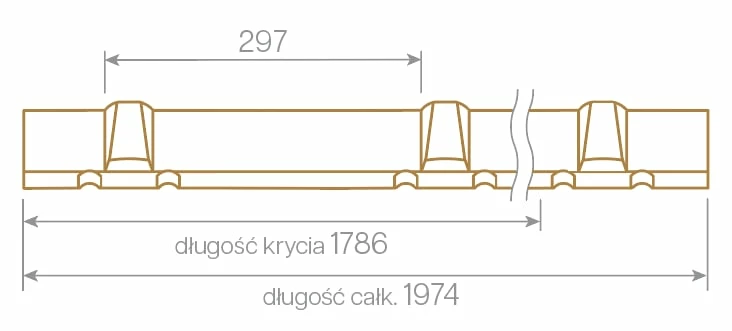


and this is my export in .svg 
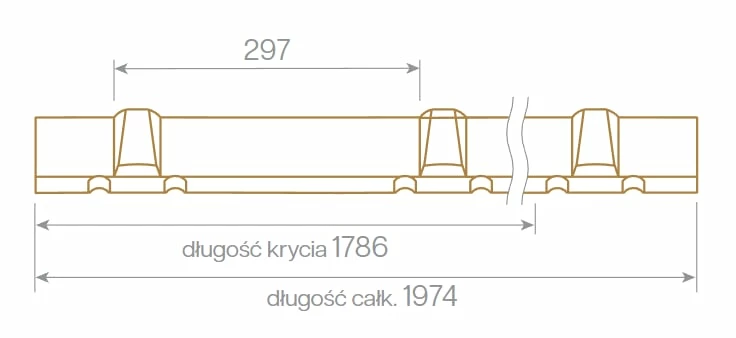
i dont understand whats that extra line doing there


can someone help

This topic has been closed for replies.
Correct answer Mike_Gondek10189183

Cześć Mariola,


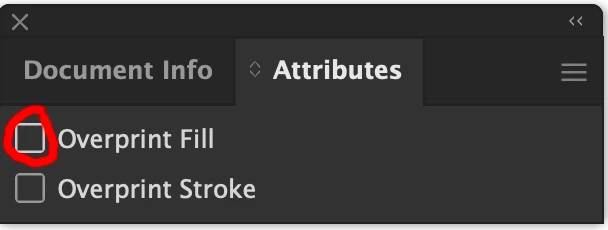
You may have inherited a file that had overprint fill on a white fill.  Select the object and in Attributes uncheck. If you do not have any placed images, you can select all, then uncheck in attributes.


You can use View >> Overprint Preview to proof if it has gone away


2 replies

Mike_Gondek10189183
Community Expert
Mike_Gondek10189183Community ExpertCorrect answer
Community Expert
March 23, 2024

Cześć Mariola,


You may have inherited a file that had overprint fill on a white fill.  Select the object and in Attributes uncheck. If you do not have any placed images, you can select all, then uncheck in attributes.


You can use View >> Overprint Preview to proof if it has gone away


Participant
March 23, 2024

thank you, this fixed the line problem, but im having another issue now - why does .svg file change the font on mobile devices ? its completly fine on my pc  on any browser


do i change text to outlines? 


Monika Gause
Community Expert
Community Expert
March 22, 2024

Please select that object in the original AI file and show the appearance panel?

Or upload both those files. You need to change AI to PDF in order to do that.

Participant
March 22, 2024

Monika Gause
Community Expert
Community Expert
March 22, 2024

THere is something in that group. It looks like there is an open path and it has been closed automatically. Or maybe the stacking order has been changed. Or a fill got deleted. I guess it would be good if you could upload the actual file.