kevinm35160881
Participant
March 27, 2019
Question

Extract image and text off of napkin

  • March 27, 2019
  • 4 replies
  • 1129 views

Hello all,

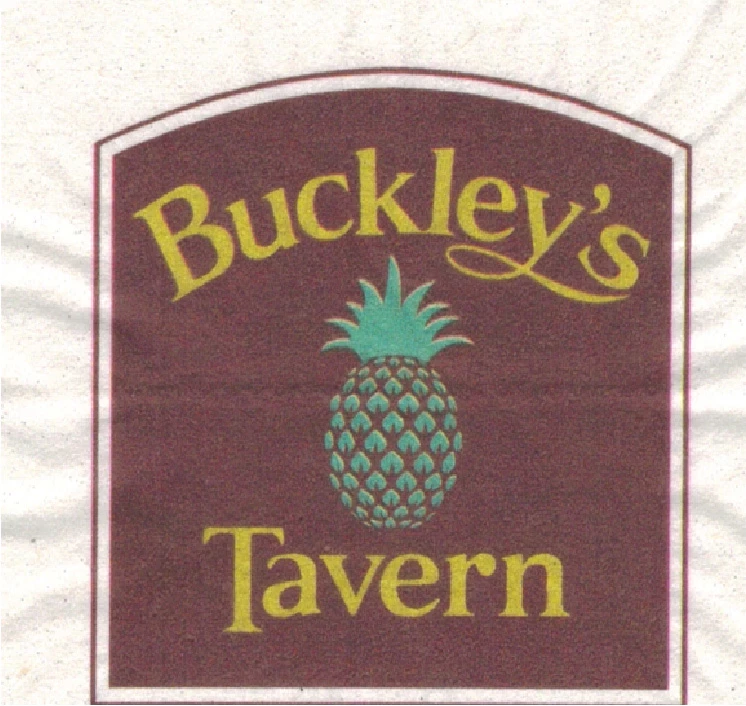
How would I go about extracting the image and text off this napkin and making it a vector graphic so I make all one color for future printing

projects?

    This topic has been closed for replies.

    4 replies

    Ray Yorkshire
    Participating Frequently
    March 28, 2019

    The Tavern itself appears to have a Facebook page with much higher definition  reproduction of it ,  perhaps you could Image Trace  that (assuming the owners permission) , or is it a student project where you are tasked with recreating a design from a low image source ..

    Jacob Bugge
    Community Expert
    Community Expert
    March 28, 2019

    Kevin,

    In addition to what Monika and Eugenio said, you can place the image and lock it, then recreate the artwork with the suitable tools including Ellipse, and Rectangle (and Unite and Offset Path) for the frame, and the Pen Tool (also for the y once the (outlined) Type is in place); given the font you will need to use Path Type (on a path created from the frame using Offset Path), and to add the special swoosh to the y and move the T.

    kevinm11612629
    Participant
    March 28, 2019

    Yeah I'm just getting back into Illustrator. Why would you use Ellipse, and Rectangle? Can you explain more "

    given the font you will need to use Path Type (on a path created from the frame using Offset Path), and to add the special swoosh to the y and move the T."

    Jacob Bugge
    Community Expert
    Community Expert
    March 28, 2019

    Kevin,

    The outer frame can be created from a rectangle and an upper part of a circle, so the most accurate way would be to create the rectangle, then fit a circle (with the Ellipse Tool) to have a top part with the right shape (combination of Diameter and position, the top Anchor Point being vertically above the centre of the rectangle). You can then use the Shape Builder Tool or a combination of Pathfinders such as Divide and Unite then delete unneeded parts.

    The inner filled part can be created from the outer frame with the use of Offset Path (negative offset) and switch from stroke to fill.

    You can use Offset Path again to create a path for the text using Path Type.

    The descender of the y is custom made and you have to redo it once the rest is in place on the curved path.

    The position of T is customized by its being pulled up, and the distance between the T and the a is reduced (Baseline Shift and Kerning).

    Eugenio.NYC
    Participating Frequently
    March 28, 2019

    Yes, in my opinion, if you want a good result, Illustrator from scratch

    E

    kevinm35160881
    Participant
    March 28, 2019

    This is the answer I got in the Photoshop forum.

    You will reconstruct the image.

    Direct your inquiry here for details and instructions: Illustrator

    Monika Gause
    Community Expert
    Community Expert
    March 28, 2019

    You need to draw it. It's such a bad quality that autotracing won't be an option. For the text find out which font has been used and then typeset it.

    John Mensinger
    Community Expert
    Community Expert
    March 28, 2019

    That's the problem something happened and the owner doesn't have the font, I thought of that.


    kevinm35160881  wrote

    . . . something happened and the owner doesn't have the font

    The service that printed the napkins has the artwork.

    I agree when there's no other option, manual reconstruction is the correct approach, but have you and the owner exhausted all the other possibilities for recovering the original graphic?