Inspiring
March 16, 2012
Answered

Extracting data from Excel To Illustrator javascript or vbscript

  • March 16, 2012
  • 1 reply
  • 10474 views

Hi all-

I was wondering if there was a way to extract data from Excel to be used in Illustrator. I know there is an option of variables and xml, and I don't want that. I've seen and tried out how to read illustrator and write to excel, and I get that.  What I would like to do is pretty much the opposite:

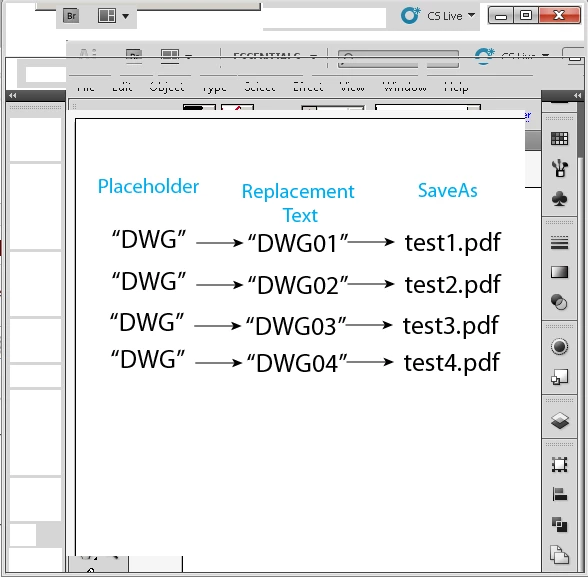
1.Pre-fill in an Excel file(.xls,.csv, doesn't matter) with data such as a filename in column 1 and (Replacement Text) in column 2 and close manually.

2. Run script(VBSCRIPT,Javascript, doesn't matter)

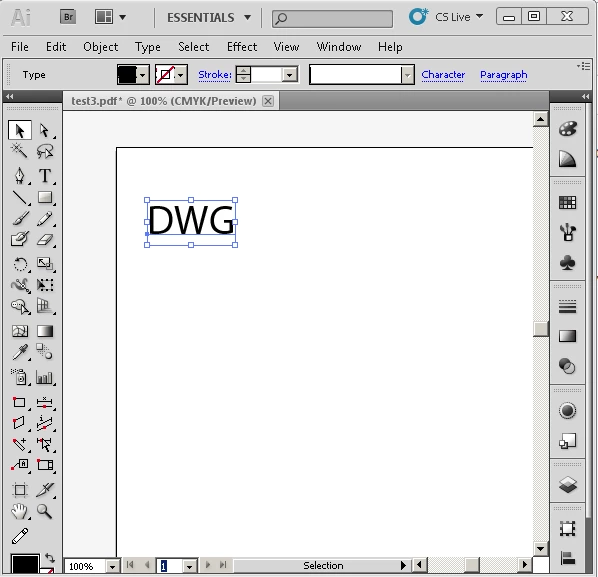
3.For each column in Excel file where cell in first column is not empty, open Illustrator Template with placeholder of "DWG" textframe and replace the frame titled "DWG" with Replacement text from Excel in Column2.

4, Save each to a PDF file and name file with text from Excel Column1(Filename)

In a nutshell, there will be a single illustrator template with a premade textFrame with a name of "DWG". Excel will contain two columns, one for the filename to be named and one for the relative text to replace with the placeholder in AI. I hoped I explained this well enough without causing too much confusion. Thanks in advance.

FilenameReplacement Text

test1.pdf

DWG01
test2.pdfDWG02
test3.pdfDWG03
test4.pdfDWG04

This topic has been closed for replies.
Correct answer Muppet Mark

Are the \n and \r regex or something else?


As text… \n is new line character and \r is return character. I can't remember which excel uses but they both equate to a line/paragraph… I very quickly threw together an example for you…

#target Illustrator

textToPDF();

function textToPDF() {

          if ( app.documents.length == 0 ) { return; }

          var doc, csvFile, i, fileArray, opts;

          csvFile = File( '~/Desktop/ScriptTest/Test.csv' );

          if ( !csvFile.exists ) { return; }

          fileArray = readInCSV( csvFile );

          doc = app.activeDocument;

          opts = new PDFSaveOptions();

          opts.pDFPreset = '[Press Quality]';


          // Here we loop the main array

          for ( i = 0; i < fileArray.length; i++ ) {


                    // Here we get the second item of sub array i

                    doc.textFrames.getByName( 'DWG' ).contents = fileArray.[1];


                    // Here we get the first item of sub array i

                    doc.saveAs( File( fileArray.[0] ), opts );

          };

};

function readInCSV( fileObj ) {

          var fileArray, thisLine, csvArray;

          fileArray =[];

          fileObj.open( 'r' );

          while( !fileObj.eof ) {

                    thisLine = fileObj.readln();

                    csvArray = thisLine.split( ',' );

                    fileArray.push( csvArray );

          };

          fileObj.close();

          return fileArray;

};

I haven't tested it but it should be close…?

1 reply

Inspiring
March 16, 2012

You will find several topics in this forum where me and others have covered this… Search for CSV or TDT its very easy to do. The discussions will be ExtendScript… Just save your workbook to text file that script can read…

Inspiring
March 16, 2012

Thanks Mark! I was able to find this:

#target Illustrator

var csvFile = new File('~/Desktop/ScriptTest/Test.csv');

if (csvFile.exists) {
     var fileArray = readInCSV(csvFile);
     alert('CSV file has ' + fileArray[0].length + ' columns…');
     alert('CSV file has ' + fileArray.length + ' rows…');
}

function readInCSV(fileObj) {
     var fileArray = new Array();
     fileObj.open('r');
     while(!fileObj.eof) {
          var thisLine = fileObj.readln();
          var csvArray = thisLine.split(',');
          fileArray.push(csvArray);
     }
     fileObj.close();
     return fileArray;
}

This is very useful and everything works, but I'm still unsure about using "FOR" statements to make it do what I want or if that kind of statement is needed. Would you mind giving me a little insight into this? I'm just stuck on the syntax for doing something for each line in the row. I can figure out the saveOptions and changing the text, but getting it to do it for each line in the CSV file is the problem.


Inspiring
March 16, 2012

It can take a couple of looks at the data to get your head around but it's actually very straight forward once you have… Your workbook to *.csv should look like…

firstText,firstPDF \n or \r

anotherText,anotherPDF \n or \r

lastText,lastPDF \n or \r

The basic function you found is going to read line by line… readln(); and split it to an array split(','); and push each line into the main array giving you…

{ // fileArray

{'firstText','firstPDF'}, // fileArray.[0] is firstText  fileArray.[1] is firstPDF and so on…

{'anotherText','anotherPDF'}, // fileArray.[0] is anotherText

{'lastText','lastPDF'} // fileArray.[0] is lastText

} // fileArray

You traverse the main array fileArray with your for loop… and your excel columns are the items of the sub arrays [0], [1] and so on…