
Inspiring
August 27, 2025
Answered

Eyedropper picking strange colors from pattern-fill shapes (holding shift)

  • August 27, 2025
  • 1 reply
  • 431 views

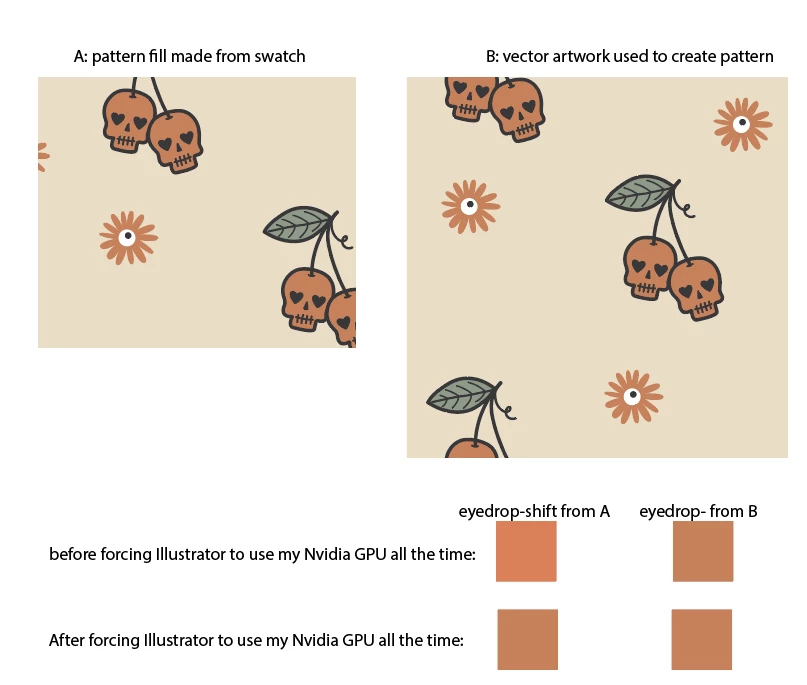
If I eyedropper a color from the vector art or pixel image I use to make a pattern swatch, I get the correct color. If I eyedropper (with shift held down) over a shape that is filled with that same pattern, I get the wrong color. Not sure if this is a bug or just a complicated color profile issue, but it occurs only in pattern-filled shapes, whether the pattern is generated from vector art or from an embedded pixel image.


Anyone know what's going on here?


I've attached a screencapture gif of me doing this, because I feel like I'm going crazy and I need y'all to see what's actually happening. 

The work-around is: I expand or rasterize a small shape off the artboard and fill it with the pattern, then color-select from that. With high-res images or complex vector art this can slow me down a little, but it works. It's just a baffling issue that's hard to catch and has lead to mistakes. Sometimes the color differences are less obvious than in this example.
 

Correct answer kurara2

Hi kurara2 


Thank you for sharing the recording. Would you mind updating Illustrator to the current version, 29.7.1, and letting us know if you still experience the issue?


We will try our best to investigate the issue.


Thanks,

Harshika


https://we.tl/t-JuiwXWEZ3l (WeTransfer link, exp in 3 days)

Here's the file I was using. 

I think I solved it, though, so I added those notes.  Looks like it was being caused by graphics card color management.  I changed my Nvidia Control Panel settings for Illustrator (and Photoshop) to always use the Nvidia card rather than deciding automatically, and now both the pattern fill and the vector art are displaying and grabbing the same color.


I suppose that means that pattern-fill color profile management was defaulting to the integrated graphics processor rather than my Nvidia, and now the Nvidia is handling both. I've attached a screenshot as well for historical reference. 

1 reply

Anubhav M
Community Manager
Community Manager
August 27, 2025

Hello @kurara2,

I tried replicating this behavior on my end, but could not. Would you mind sharing a link to a sample file you're having trouble with, confirming the version of Illustrator installed, and resharing a screen recording of your exact workflow, so I can check this with the team?

Looking forward to hearing from you.
Anubhav

kurara2Author
Inspiring
August 27, 2025

Here's a file that's causing this issue for me, and a screencapture of me demonstrating the issue. I'm running 29.4

HARSHIKA_VERMA
Community Manager
Community Manager
August 28, 2025

Hi kurara2 


Thank you for sharing the recording. Would you mind updating Illustrator to the current version, 29.7.1, and letting us know if you still experience the issue?


We will try our best to investigate the issue.


Thanks,

Harshika