
watermelon5
Inspiring
October 6, 2024
Answered

Eyedropper tool not picking up colors

  • October 6, 2024
  • 2 replies
  • 914 views

I've checked the eyedropper tools settings and it is set as follows:
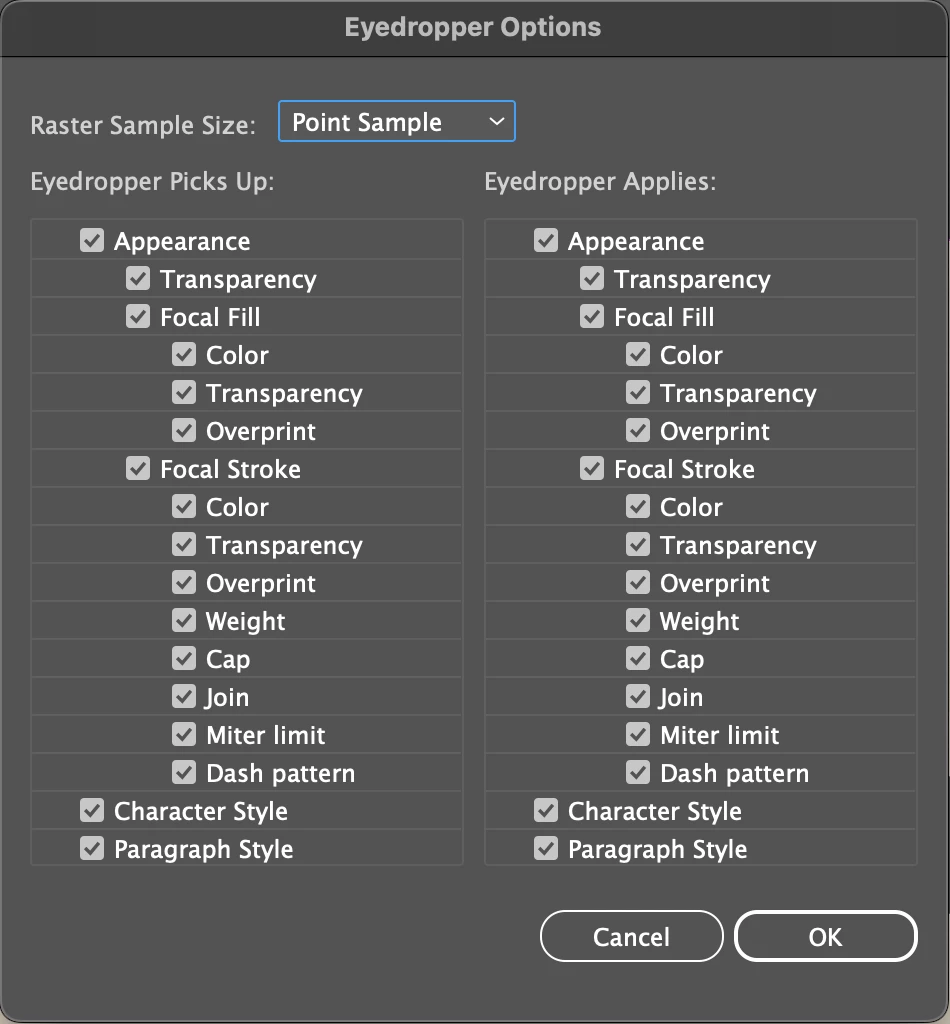


I'm trying to select only a portion of my text to change as a highlight color, not the entire text box. I can only select the entire text box in order to change the color. Something similar is also happenning with objects. I can't change the color unless I convert it into a compound object.


This is what happens when I try selecting individual text in my live text box tool.


This topic has been closed for replies.
Correct answer Ton Frederiks

Can you try it with the Appearance checkboxes unchecked?

2 replies

Ton Frederiks
Community Expert
Ton FrederiksCommunity ExpertCorrect answer
Community Expert
October 6, 2024

Can you try it with the Appearance checkboxes unchecked?

watermelon5
Inspiring
October 6, 2024

🎈🎊🎉 You solved it. 🎉🎊🎈


However, I don't understand. I thought it must be checked. It would seem I DO want my eyedropper to pick up color and everything mentioned.

Ton Frederiks
Community Expert
Community Expert
October 6, 2024

Good to hear that helped, but to be honest, I find it confusing too. I'll leave it to someone smarter to explain it.

Monika Gause
Community Expert
Community Expert
October 6, 2024

Do you hold down the Shift key when clicking on the circle?


Also: check the Appearance panel. You have probably applied a couple additional fills to the text object.

watermelon5
Inspiring
October 6, 2024

No. I don't hold the shift key.

There are no fills in my appearance panel.