
Steve 40
Participant
September 1, 2021
Answered

File does not exist

  • September 1, 2021
  • 2 replies
  • 9065 views

I am trying to open a recent logo file where it shows but when I click on it I get the error message "File does not Exist" I did not move it and I created it. Anyone have an answer for this and where I can retrieve my logo? Thanks
 

This topic has been closed for replies.
Correct answer Ton Frederiks

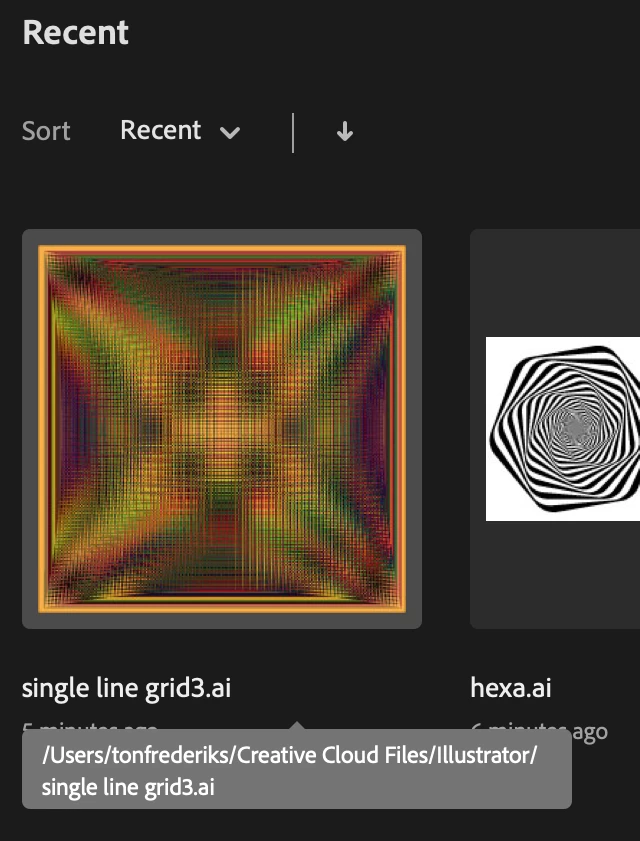
In the Illustrator Home screen, if you hover over a file name, the location will be displayed.

2 replies

Ton Frederiks
Community Expert
Ton FrederiksCommunity ExpertCorrect answer
Community Expert
September 1, 2021

In the Illustrator Home screen, if you hover over a file name, the location will be displayed.

Steve 40
Steve 40Author
Participant
September 1, 2021

Thanks Ton, I was able to find my logo, thanks!


Ton Frederiks
Community Expert
Community Expert
September 1, 2021

Good to hear that helped.

Myra Ferguson
Community Expert
Community Expert
September 1, 2021

Was it saved to a network or removable drive (it's recommended to save to your local hard drive)? There are some suggestions in the following Knowledge Base article if that's the case:

Illustrator support for networks and removable media - Suggestions for troubleshooting

Steve 40
Steve 40Author
Participant
September 1, 2021

Thanks Myra, I bet I save them to my desktop and now they are lost. Is there a way to retrieve them?