
Participating Frequently
December 6, 2020
Answered

File Location Information

  • December 6, 2020
  • 2 replies
  • 793 views

Is there a way to lookup a file's location from within Illustrator? Something equivalent to File>Info>Location in Word, where it shows the location of the file on your computer?

I keep expecting to find it somewhere under File> File Info but the information there is far more technical and can't seem to see this under any of the tabs. I would really appreciate being able to access this info as sometimes my PC doesn't find things on search, and quite often I will leave a file open for so long I forget (still developing a filing system as I learn this program). Thank you for any insights on this... 
 

This topic has been closed for replies.
Correct answer Srishti Bali

Hi there,


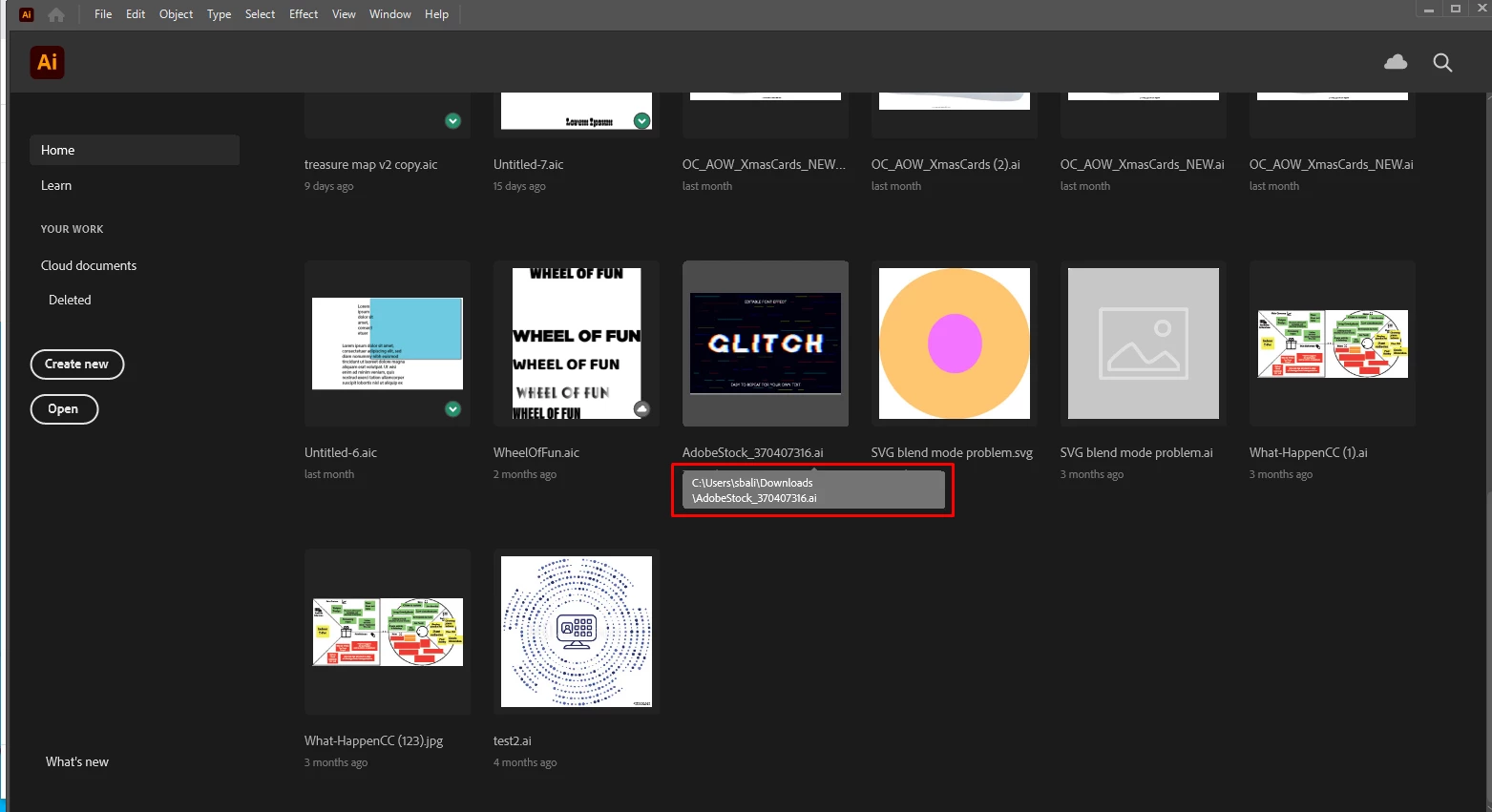
Sorry about the delay. I am hopeful that your query was resolved. If not, hover over the file on Home page and it will show you the file location. 


Feel free to let us know if you still need assistance. We'd be happy to help.


Regards,

Srishti

2 replies

Srishti Bali
Community Manager
Srishti BaliCommunity ManagerCorrect answer
Community Manager
January 18, 2021

Hi there,


Sorry about the delay. I am hopeful that your query was resolved. If not, hover over the file on Home page and it will show you the file location. 


Feel free to let us know if you still need assistance. We'd be happy to help.


Regards,

Srishti

Participating Frequently
January 19, 2021

Thank you so much! I had a feeling it was right under my nose, haha. 

Monika Gause
Community Expert
Community Expert
December 6, 2020

If that is on a Mac, you can make the document window a floating window and then press Cmd and click the document title.

Participating Frequently
December 7, 2020

Unfortunately it is a PC. I tried the equivalent CTRL instead of Cmd but no luck. Thanks anyway! Hopefully something turns up, I keep feeling like I'm missing something obvious.